29
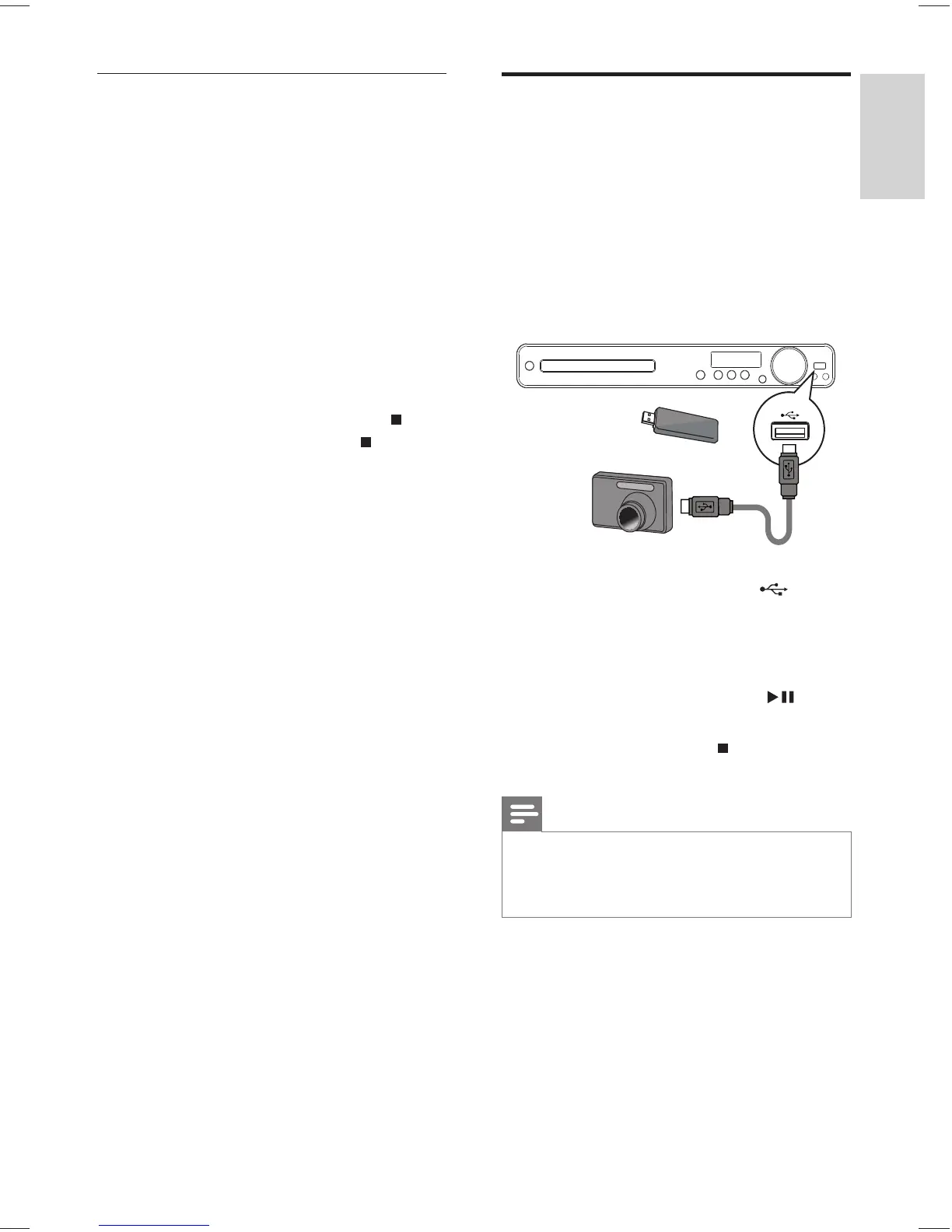
Play from USB device
This Home Theater System plays/views MP3,
WMA, DivX (Ultra) or JPEG fi les on the
following USB devices:
digital camera that complies with the PTP •
standard
fl ash drive•
memory card reader•
HDD (external power source needed)•
1 Connect a USB device to the (USB)
jack.
2 Press USB .
A contents menu is displayed. »
3 Select a fi le to play, then press .
Play starts. »
To stop play, press •
or remove the
USB device.
Note
If the device does not fi t into the USB jack, connect it •
through a USB extension cable.
If you connect a multiple USB card/device reader, •
only one card/device can be accessed.
/
Play musical slideshow
Play MP3/WMA music fi les and JPEG
photo fi les simultaneously to create musical
slideshow. The MP3/WMA and JPEG fi les
must be stored on the same disc or USB
device.
1 Play MP3/WMA music.
2 Navigate to the photo folder/album and
press OK to start slideshow play.
Slideshow begins and continues till the »
end of the photo folder or album.
Audio continues to play till the end of »
the disc.
To stop slideshow play, press •
.
To stop music play, press •
again.
English
EN
Play
1_hts3375_55_en.indd 291_hts3375_55_en.indd 29 12/29/2008 4:10:37 PM12/29/2008 4:10:37 PM



 To Next Page