13
English
Set up audio for connected devices
When you connect a device to your home
theater, check the audio settings.
1 On your TV and other devices, turn on
HDMI-CEC. For details, see the user
manual of the TV and the other device.
2 Select ‘Amplier’ from the TV speakers
menu. For details, see the TV user manual.
3 On your home theater, turn on System
Audio Control, and then map the audio
of the connected device to the correct
connectors on your home theater (see ‘Play
audio from home theater’ on page 25).
If the connected device is not HDMI-CEC
compliant, press SOURCE repeatedly on your
home theater to select the correct audio input.
Internet
Connect your home theater to the internet and enjoy:
• YouTube videos:Browse, search, and watch
YouTube videos through the Internet (see
‘YouTube videos’ on page 23).
• Picasa web albums: Access, search, and view
photos stored in your Picasa web albums
through the Internet (see ‘Picasa Web
Albums’ on page 23).
• BD-Live applications: Access exclusive
services from the BD-Live enabled Blu-ray
discs (see ‘BD-Live on Blu-ray’ on page 18).
• Software update: update the home theater
software through the network (see ‘Update
software through the Internet’ on page 30).
Caution
•
Familiarize yourself with the network router and
networking principles before you try to connect
the home theater to a network. If necessary,
read documentation that accompanies the
network components. Philips is not responsible
for lost, damaged, or corrupt data.
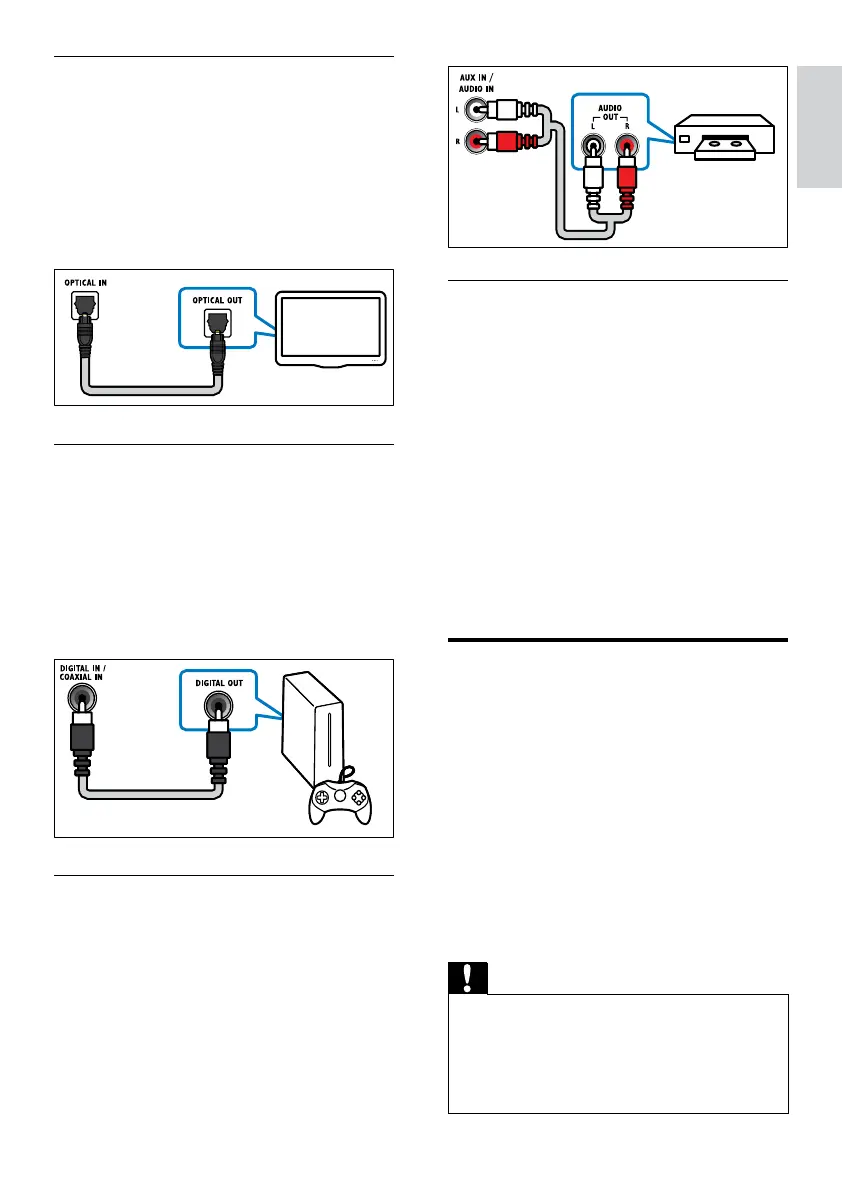
Option 1: Connect audio through a digital
optical cable
Best quality audio
Using an optical cable, connect the OPTICAL
connector on your home theater to the
OPTICAL OUT connector on the TV or other
device.
The digital optical connector might be labeled
SPDIF, SPDIF OUT, or OPTICAL.
Option 2: Connect audio through a digital
coaxial cable
Good quality audio
Using a coaxial cable, connect the COAXIAL
connector on your home theater to the
COAXIAL/DIGITAL OUT connector on the TV
or other device.
The digital coaxial connector might be labeled
DIGITAL AUDIO OUT.
Option 3: Connect audio through analog
audio cables
Basic quality audio
Using an analog cable, connect the AUX
connectors on your home theater to the
AUDIO OUT connectors on the TV or other
device.
EN



 To Next Page