5User manual
ENGLISH
3 Get started
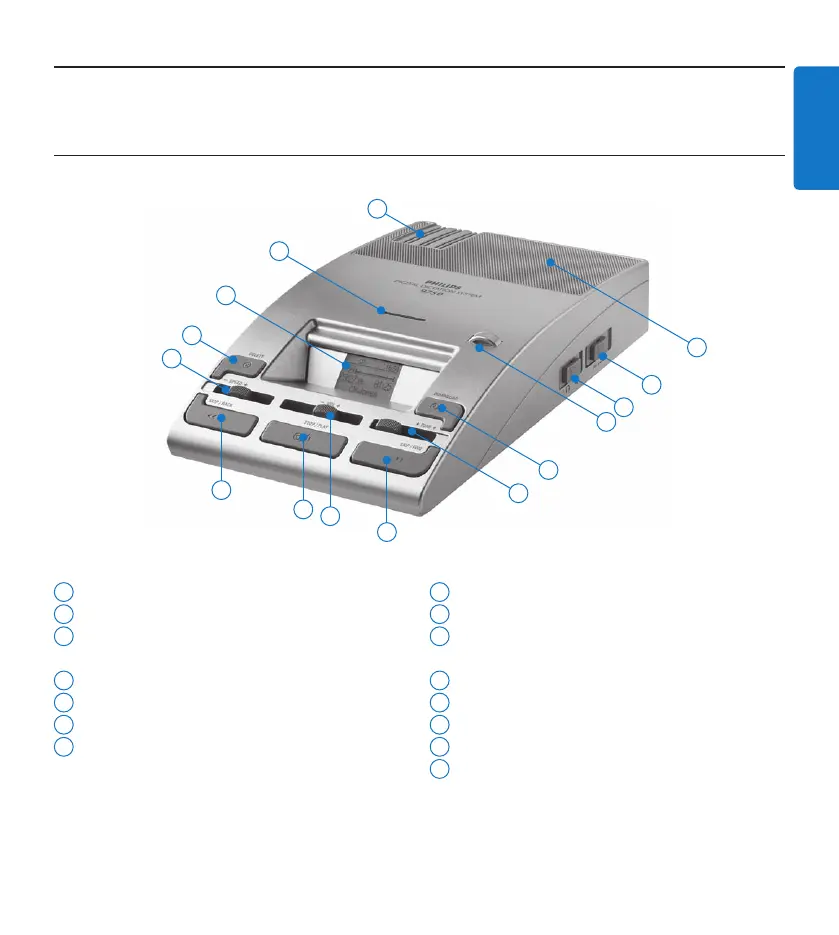
3.1 Overview – controls and connections
1
Built-in speaker
2
Automatic backspace (ABS)
3
Speaker selection (headphones/built-in
speaker/microphone speaker)
4
Jog dial (file selection and menu navigation)
5
DOWNLOAD button (for PC download)
6
TONE slider (adjusts the playback tone)
7
SKIP/FWD button (fast forwarding and
skipping to the end of the file)
8
VOL sllider (playback volume)
9
STOP/PLAY button
10
SKIP/BACK button (fast rewinding and
skipping to the start of the file)
11
SPEED slider (playback speed)
12
DELETE button
13
Display
14
Memory card slot
15
Storage spaces for additional memory cards
12
3
9
2
10
7
14
11
8
15
1
4
5
6
13


 To Next Page