8 User manual
1
Press and hold the pedal for fast rewind.
When rewinding reaches the desired
position, release the pedal.
2
Press and hold the pedal to fast forward.
When forwarding reaches the desired
position, release the pedal.
3
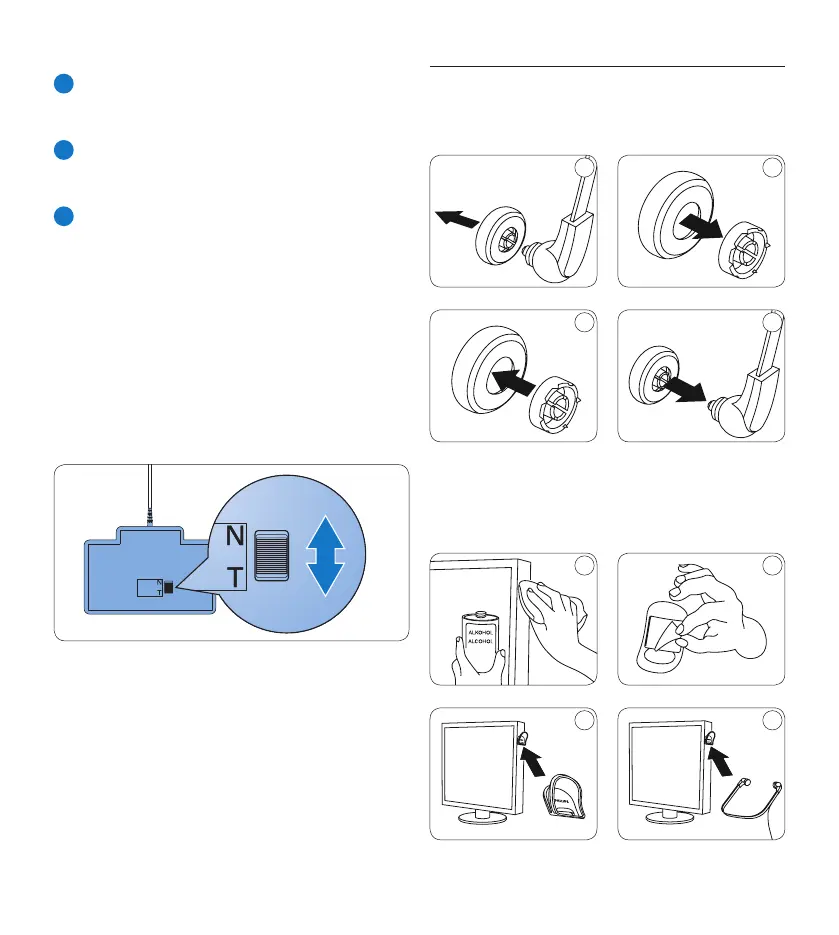
The pedal starts playback. The behavior for
starting and stopping playback depends on
the setting of the playback switch on the
underside of the foot control:
• N (Neutral) position: Press and hold the
right pedal for playback. When the pedal
is released, playback is stopped.
• T (Toggle) position: Press and release the
right pedal to start continuous playback.
Press the right pedal again to stop
playback.
4.4 Use the Philips headphones
The headphones are equipped with soft ear
cushions for wearing comfort and a hanging
bracket that attaches the headphone to a
monitor.
B Warning
Listen at a moderate volume to avoid hearing
damage.
4.4.1 Change the ear cushions
Follow the illustration below to change the ear
cushions:
1 2
3 4
4.4.2 Install the hanging bracket
Follow the illustration below to install the
hanging bracket:
1 2
3 4


 To Next Page