7User manual
ENGLISH
4 Use the Digital Desktop
4.1 Activation and power-save mode
The Digital Desktop is operated with a
power supply (Philips LFH0155); the Digital
Desktop is switched on and o by connecting
or disconnecting the device from the power
network.
If the device remains inactive for longer than
15 minutes, it automatically switches to the
power save mode and the display is switched o.
Reactivate the device by pressing any button.
4.2 Transcription
1 Move the
JOG DIAL
4
or press the SKIP/
BACK
10
or SKIP/FWD button
7
while
stopped to select the file to play and locate
the beginning of the recording.
2 Press the
STOP/PLAY button
9
to start
playback.
3 Adjust the volume (
VOL
8
), tone (TONE
6
) and speed (SPEED
11
) during playback
using the corresponding sliders.
4 To fast rewind, press and hold the
SKIP/ BACK button
10
while playing. Release
the
SKIP/BACK button to start playback.
5 To fast forward, press and hold the
SKIP/ FWD button
7
while playing. Release
the
SKIP/FWD button to start playback.
6 Press the
STOP/PLAY button
9
to stop
playback.
D Note
You can set the value for the automatic
backspace during playback of a recording with
the
ABS slider
2
:
• Playback does not begin where the recording
was stopped, rather a few seconds earlier.
• To turn o the automatic backspace, set the
slider to 0.
4.3 Use the foot control
The Philips foot control is designed to oer an
ergonomic, hands-free tool for playback and
recording of files for transcription.
4.3.1 Installation
1 Connect the plug of the foot control to
the foot control socket
19
of the Digital
Desktop.
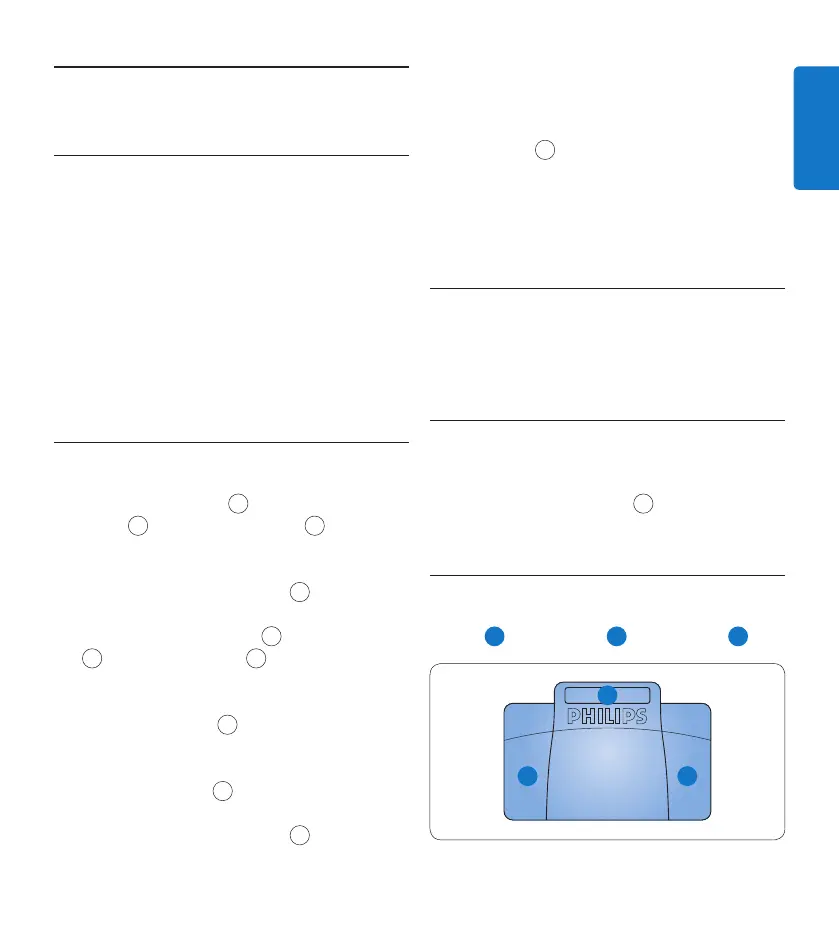
4.3.2 Transcribe using the foot control
The foot control 2210 has three pedals: fast
rewind
1
, fast forward
2
and playback
3
.
2
1 3


 To Next Page