10
English
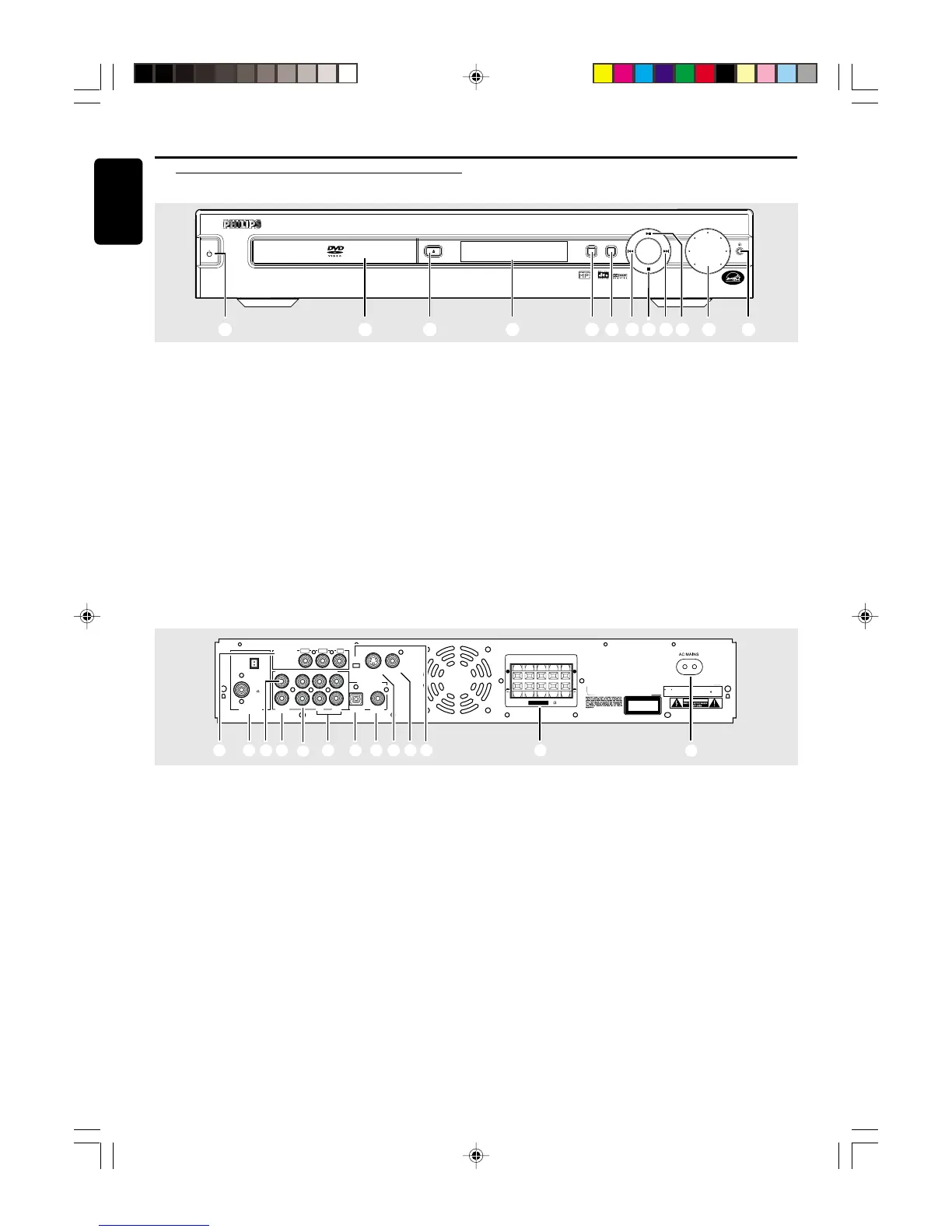
1 STANDBY ON y
– to switch between power on and standby modes.
2 Disc Tray
3 OPEN/CLOSE 0 (in Disc mode only)
– to open or close the disc tray.
4 Display screen
– to display details for user’s information.
5 SOURCE
– to select the desired source or external input source
(TV/AV, DISC, TUNER or AUX).
6 PROGRAM
– in Disc mode, to programme disc tracks.
– in Tuner mode, to programme preset radio stations.
Functional Overview
Front and Rear panels
VOLUME
P
R
E
V
P
L
A
Y
/
P
A
U
S
E
N
E
X
T
S
T
O
P
STANDBY
ON
DVD VIDEO DIGITAL SURROUND SYSTEM
PROGRESSIVE SCAN
OPEN/CLOSE
SOURCE PROGRAM
1 2 3 4 5 6 78 79 0 !
FUNCTIONAL OVERVIEW
7 PREV S / NEXT T
– in Disc mode, press to skip to the previous/next
chapter/track.
– in Disc mode, hold down to fast reverse/forward the
disc.
– in Tuner mode, to tune to a lower or higher radio
frequency.
8 STOP Ç (in Disc mode only)
– to stop playing the disc.
9 PLAY/PAUSEÉÅ (in Disc mode only)
– to start or interrupt disc playback.
0 VOLUME
– to adjust the master volume.
! n
– to connect headphones.
1 Pr/Cr Pb/Cb Y (COMPONENT VIDEO OUT)
– connect to TV with Pr/Cr Pb/Cb Y inputs.
2 MW/FM ANTENNA
– connect to the MW loop antenna or FM antenna.
3 CENTER LINE OUT
– connect to an additional centre speaker.
4 WOOFER LINE OUT
– connect to an active subwoofer.
5 AUDIO OUT
– connect to the analogue audio inputs of an external
recording device or amplifier.
6 AUDIO IN (TV / AUX)
– connect to the analogue audio outputs of a TV or
VCR.
7 DIGITAL OUT-OPTICAL
– connect to audio equipment with digital-optical audio
input.
8 DIGITAL OUT-COAXIAL
– connect to audio equipment with digital-coaxial audio
input.
9 S-VIDEO OUT
– connect to a TV with S-video input.
0 VIDEO OUT
– connect to a TV with video input.
! P-SCAN ON/OFF (for model LX3500D only)
– switch on or off progressive scan feature.
@ SPEAKERS
– connect to the front, centre and surround speakers.
# AC Power Cord
– connect to a standard AC outlet.
VIDEO
OUT



 To Next Page