11
English
Notes for remote control:
– First, select the source you wish to control by
pressing one of the source select keys on the remote
control (DISC or TUNER, for example).
– Then select the desired function (
É
,
S
,
T
for example).
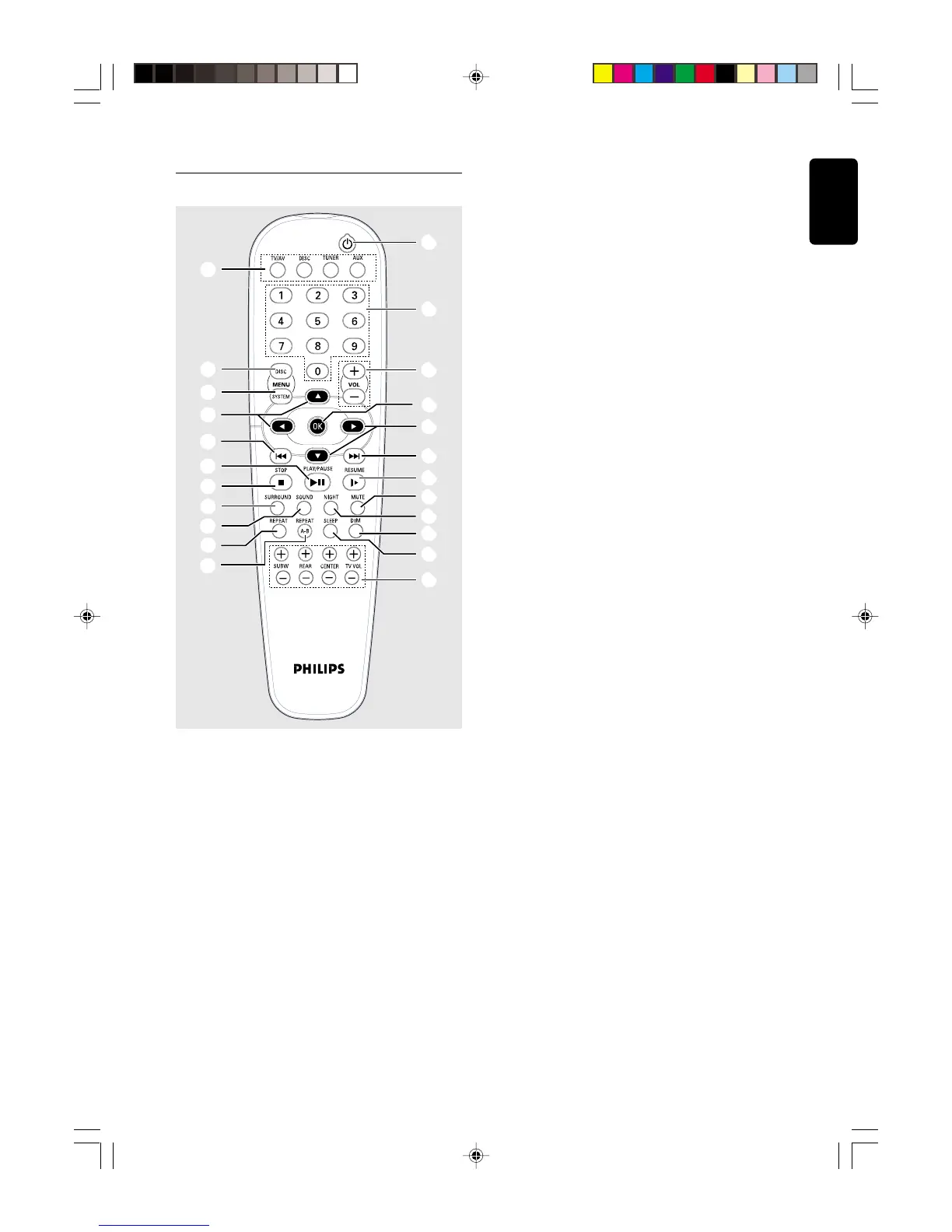
1 SOURCE
– to select the desired source (TV/AV, DISC, TUNER or
AUX).
2 DISC MENU (disc mode only)
– to enter or exit the disc contents menu.
3 SYSTEM MENU (disc mode only)
– to enter or exit the system menu bar.
4 3 4 1 2
– in Tuner mode, to select a preset radio station
number (1 or 2).
– to select movement direction in disc contents menu /
system menu bar.
FUNCTIONAL OVERVIEW
1
2
3
4
7
5
6
8
9
0
!
4
($
@
#
(%
(^
(&
(5
((
()
(¡
*
Remote Control
5 S / T
– in disc mode, press to skip to the previous/next
chapter/track.
– in disc mode, hold down to fast reverse/forward the
disc.
– in Tuner mode, to tune to a lower or higher radio
frequency.
6 ÉÅ
– to start or interrupt disc playback.
7 Ç
– to stop playing the disc.
8 SURROUND
– to select multichannel surround (Dolby Digital, DTS
or Dolby ProLogic) or stereo sound effect.
9 SOUND
– to select the various sound effects : CONCERT,
DRAMA, ACTION, SCI-FI, CLASSIC, JAZZ, ROCK or
DIGITAL.
0 REPEAT
– to repeat chapter, track or disc.
! REPEAT A-B
– to repeat a specific section on a disc.
@ SUBW +/-
– to adjust the subwoofer’s level.
REAR +/-
– to adjust the rear (surround) speakers’ level.
CENTER +/-
– to adjust the centre speaker’s level.
TV VOL +/-
– to adjust Philips television’s volume level.
# SLEEP
– to set the sleep (auto-off) timer function.
$ DIM
– to select different brightness for the display screen.
% NIGHT (DVD mode only)
– to optimise the dynamics of the sound output.
^ MUTE
– to interrupt or resume sound reproduction.
& RESUME
– to continue disc playback after an interruption.
* OK
– to exit or confirm the selection.
( VOL +/-
– to adjust the volume level.
) Numeric Keypad (0-9)
– to enter a track/title number of the disc.
– to enter a number of preset radio stations.
¡ y
– to switch to standby mode.
pg 01-26/LX3xxx/21-Eng 4/16/02, 11:20 AM11



 To Next Page