21
English
OPERATIONS
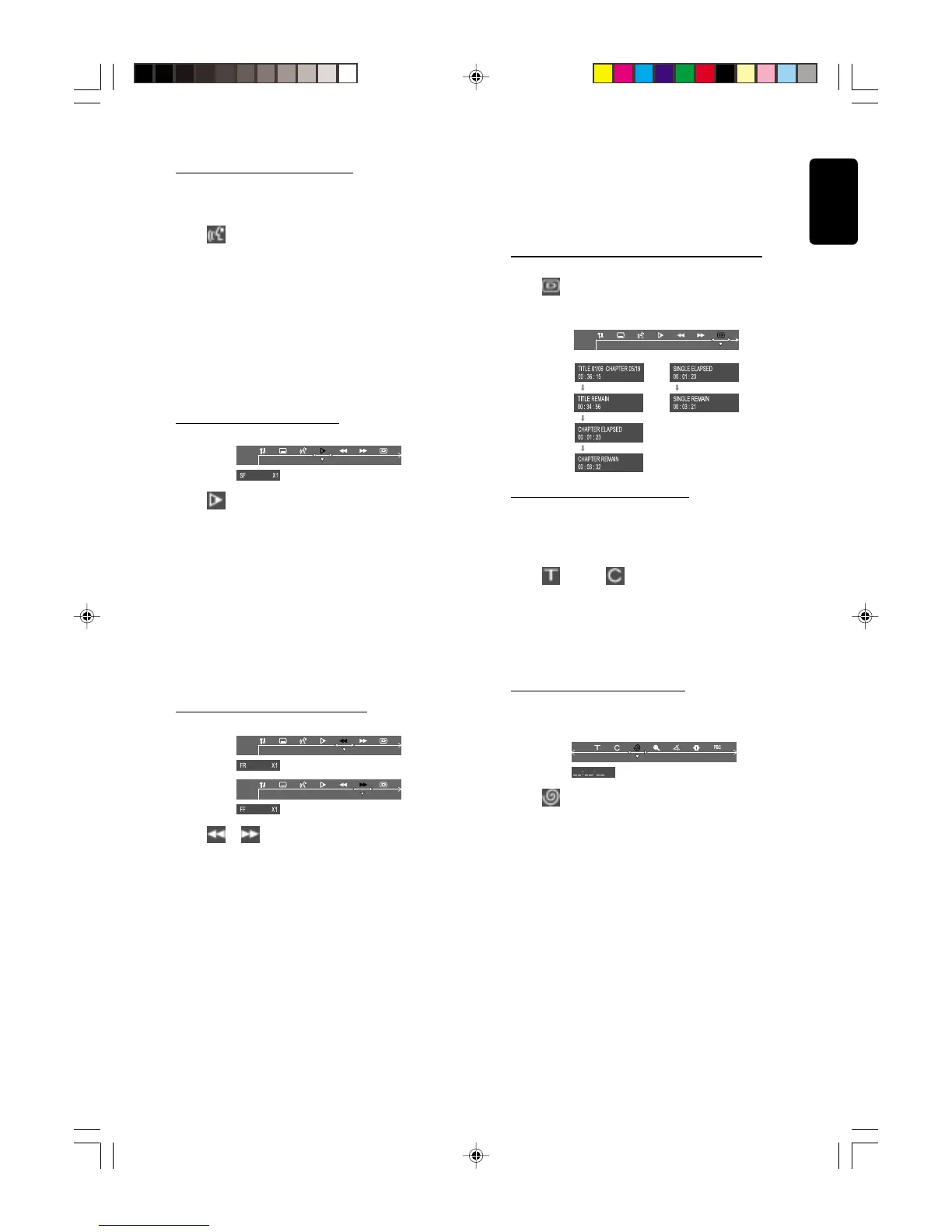
Changing sound track language
This operation works only on DVDs with multiple
soundtrack language.
● Select
from the menu bar and press 4 key to select
the desired language.
For VCD :
● Press 4 to select the desired audio channels for sound :
LEFT VOCAL ™ RIGHT VOCAL ™ MONO LEFT
™ MONO RIGHT ™ STEREO ™ LEFT VOCAL
Note:
– When the desired language is not selected even after
pressing the button several times, it means the language is not
available on the disc.
Playing in slow motion mode
1 Select from the menu bar and press 4 key to select
the required slow motion speed :
SF x2 ™ SF x4 ™ SF x8 ™ SR x2 ™ SR x4 ™ SR x8 ™
SLOW OFF
(SF) = slow forward
(SR) = slow reverse
For VCD :
1 Press 4 key to select the required slow motion speed :
(forward) : SF x1 ™ SF x2 ™ SF x3 ™ OFF
2 To resume normal play, pressÉÅ.
Note:
– The sound will be muted during slow-motion play.
Searching for a particular passage
1 Select or from the menu bar to select fast reverse
search or fast foward search respectively.
2 Press 4 key to select the required search speed :
(reverse) : FR x2 ™ FR x4 ™ FR x6 ™ FR x8 ™ OFF
(forward) : FF x2 ™ FF x4 ™ FF x6 ™ FF x8 ™ OFF
For VCD :
2 Press 4 key to select the required search speed :
(reverse) : FR x1 ™ FR x2 ™ FR x3 ™ FR x4 ™ OFF
(forward) : FF x1 ™ FF x2 ™ FF x3 ™ FF x4 ™ OFF
3 To resume normal play, pressÉÅ.
Note:
– The sound will be muted during fast reverse or forward
search.
Display the disc information during playback
● Select
from the menu bar and press 4 key to select
the following display informations :
Moving to another title/chapter
Some discs may contain more than one title or chapter. If
the disc has a title or chapter menu recorded on it, you can
start playback from the selected item.
1 Select (title) or (chapter) from the menu bar.
2 Use numeric keypad (0-9) to select a desired title/
chapter number and press OK to start playback.
Note:
– Selecting a title or chapter might not be possible on certain
discs.
Playback from a selected point
This function allows you to start playing at any chosen time
on the disc.
1 Select from the menu bar.
2 Enter hours, minutes and seconds from left to right in the
time edit box using the numeric keypad (0-9).
➜ Each time an item has been entered, the next item will
be highlighted.
3 PressÉÅ to start playback.
pg 01-26/LX3xxx/21-Eng 4/16/02, 11:21 AM21



 To Next Page