Direction of Use
7-4
Analogstereosystem
FM antenna
USB flash drive
Wired/Wireless network
Note
Refertothetypeplateatthebackorbottom
of the product for identification and supply
ratings.
Before you make or change any connections,
ensure that all the devices are disconnected
from the power outlet.
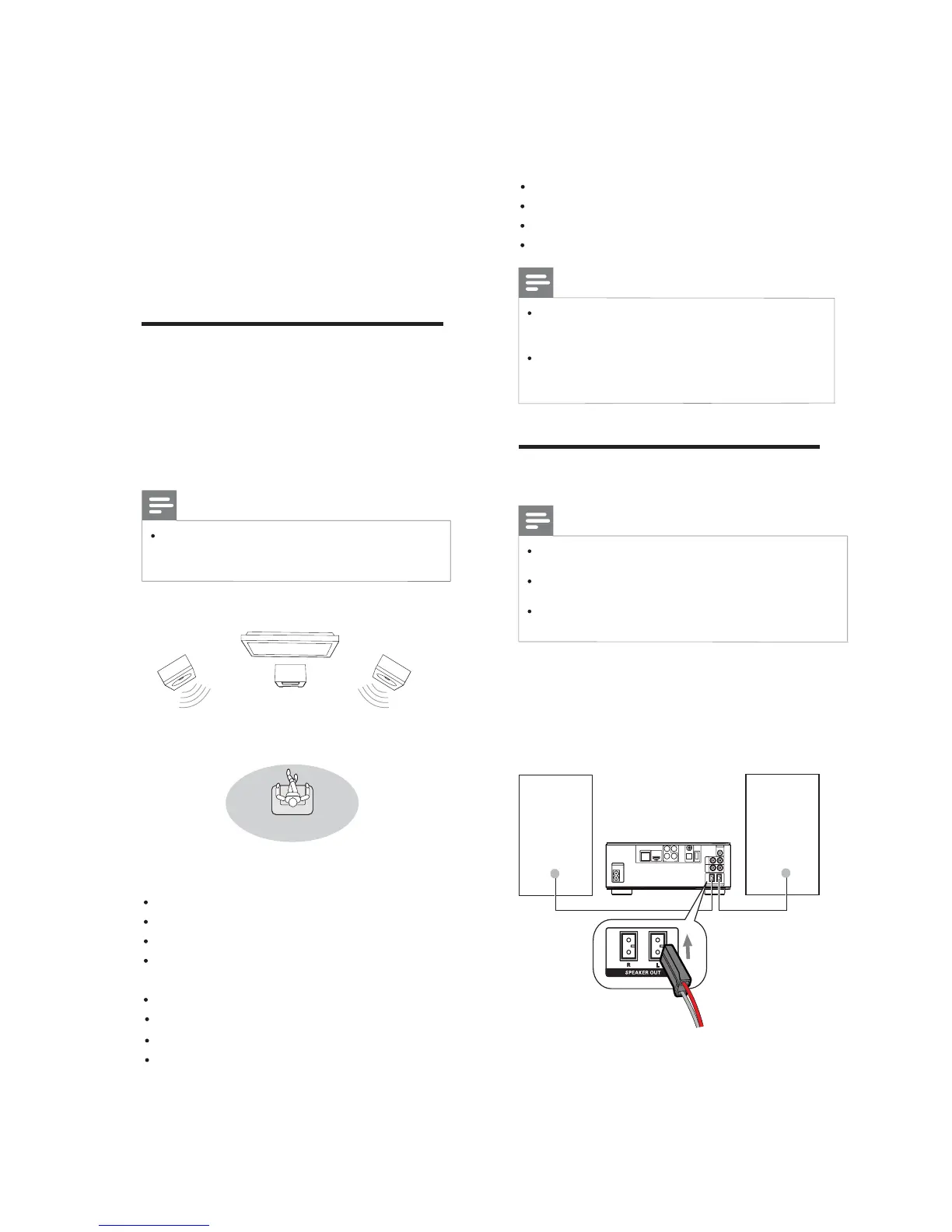
Connect speakers
Note
Insert the stripped portion of each speaker
wire into the socket completely.
Foroptimalsound,usethesuppliedspeakers
only.
Connect only speakers with impedance that is
thesameorhigherthanthesuppliedspeakers.
For the main unit side:
1 Match the type and colors of the speaker
cable connectors to the speaker input
sockets on the back of the main unit.
2 Connect the speaker cables.
COAXIAL
Pr/Cr
Pb/Cb
COMPONENT
Wi-Fi
Y
OPTICAL
DIGITALAUDIOOUT
O
E
D
I
V
T
U
O
DIGITALAV OUT
LAN
AC
~
AUX
IN
LINE
OUT
LR
LR
ANTENNA
FM
SPEAKER OUT
R
L
3 Connect
Make the following connections to use this
product.
Preparations
1
PlacetheapparatusneartotheTV.
2 Placethefrontleftandrightspeakers
atequaldistancefromtheTVandatan
angle of approximately 45 degrees from
the listening position.
Note
Toavoidmagneticinterferenceorunwanted
noise, never place this apparatus and
speakers too close to any radiation devices.
Basic connections:
Speakers
Video
Audio
Power
Optional connections:
Routeaudiotootherdevices
HDMI-compliant AV receiver/amplifier
Multi-channel AV amplifier/receiver
Digital AV amplifier/receiver


 To Next Page