Direction of Use
7-6
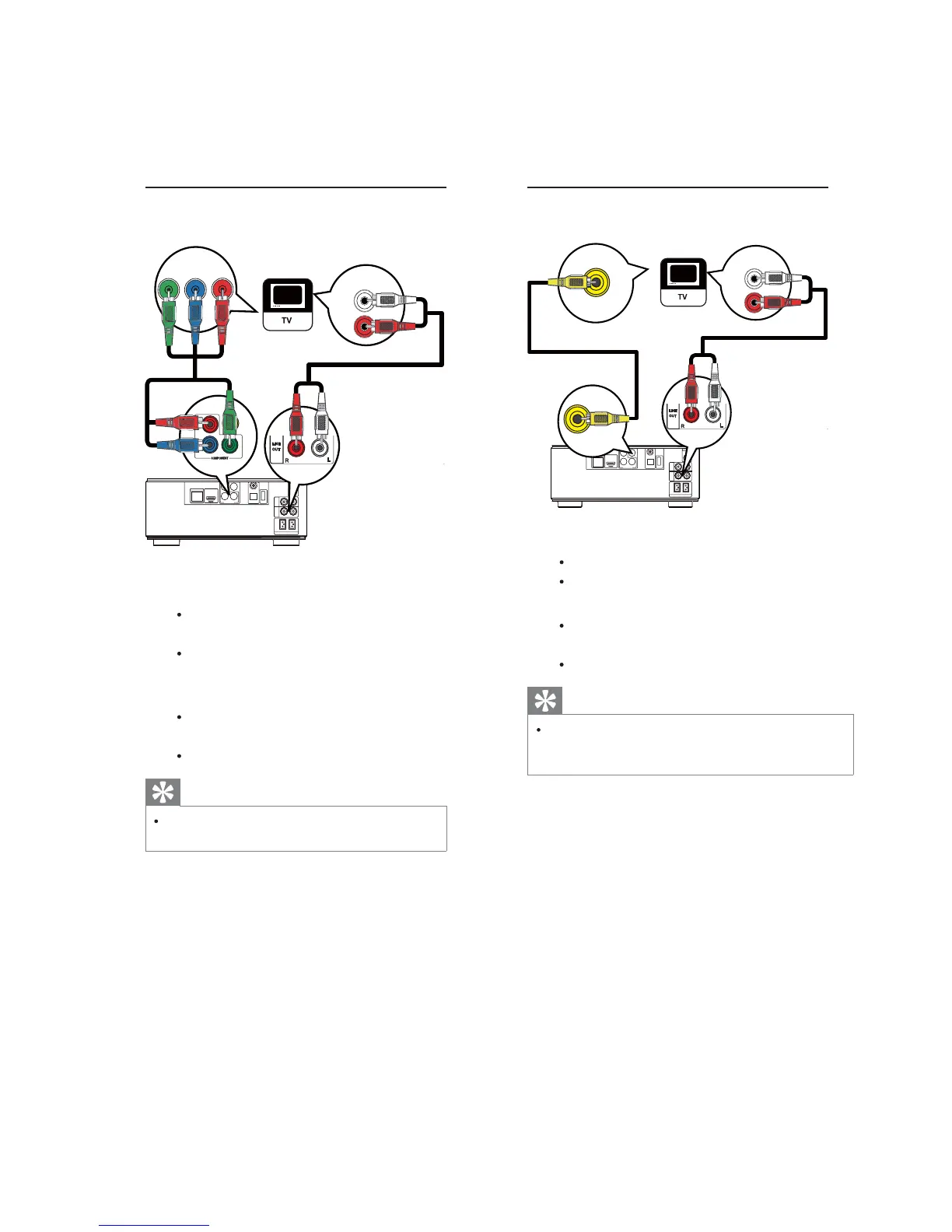
Option 3: Connect to the composite
video jack
COAXIAL
Pr/Cr
Pb/Cb
COMPONENT
Wi-Fi
Y
OPTICAL
DIGITAL AUDIOOUT
O
E
D
I
V
T
U
O
DIGITALAV OUT
LAN
AUX
IN
LINE
OUT
LR
LR
ANTENNA
FM
SPEAKER OUT
R
L
VIDEO
OUT
LINE OUT
AUDIO IN
VIDEO IN
1 Connect a composite video cable to:
the
VIDEOjack on this product.
theVIDEOinputjackontheTV.
2 Connect the audio cables to:
the
LINE OUT/AUDIO -L/Rjacks
on this product.
the AUDIO input jacks on the TV.
Tip
ThevideoinputjackontheTVmightbe
labeledasA/VIN,VIDEOIN, COMPOSITEor
BASEBAND.
Option 2: Connect to the component
video jacks
COAXIAL
Pr/Cr
Pb/Cb
COMPONENT
Wi-Fi
Y
OPTICAL
DIGITALAUDIO OUT
O
E
D
I
V
T
U
O
DIGITALAV OUT
LAN
AUX
IN
LINE
OUT
LR
LR
ANTENNA
FM
SPEAKER OUT
R
L
PbY
Pr
AUDIO IN
COMPONENT
Pb/Cb
Y
Pr/Cr
1 Connect the component video cables
(not supplied) to:
the
Y Pb/Cb Pr/Crjacks on this
product.
the COMPONENT VIDEO input
jacksontheTV.
2 Connect the audio cables to:
the
LINE OUT/AUDIO -L/Rjacks
on this product.
the AUDIO input jacks on the TV.
Tip
The componentvideoinputjackontheTV
mightbelabeledas Y PbProrYUV.


 To Next Page