English
13
Connections
Step 3: Connecting FM
antenna
● Connect the supplied FM antenna to the FM (75
Ω) jack. Extend the FM antenna and fix its end to
the wall.
For better FM stereo reception, connect an
external FM antenna (not supplied).
Note:
– Adjust the position of the antennas for optimal
reception.
–Position the antennas as far as possible from
your TV, VCR or other radiation source to prevent
unwanted interference.
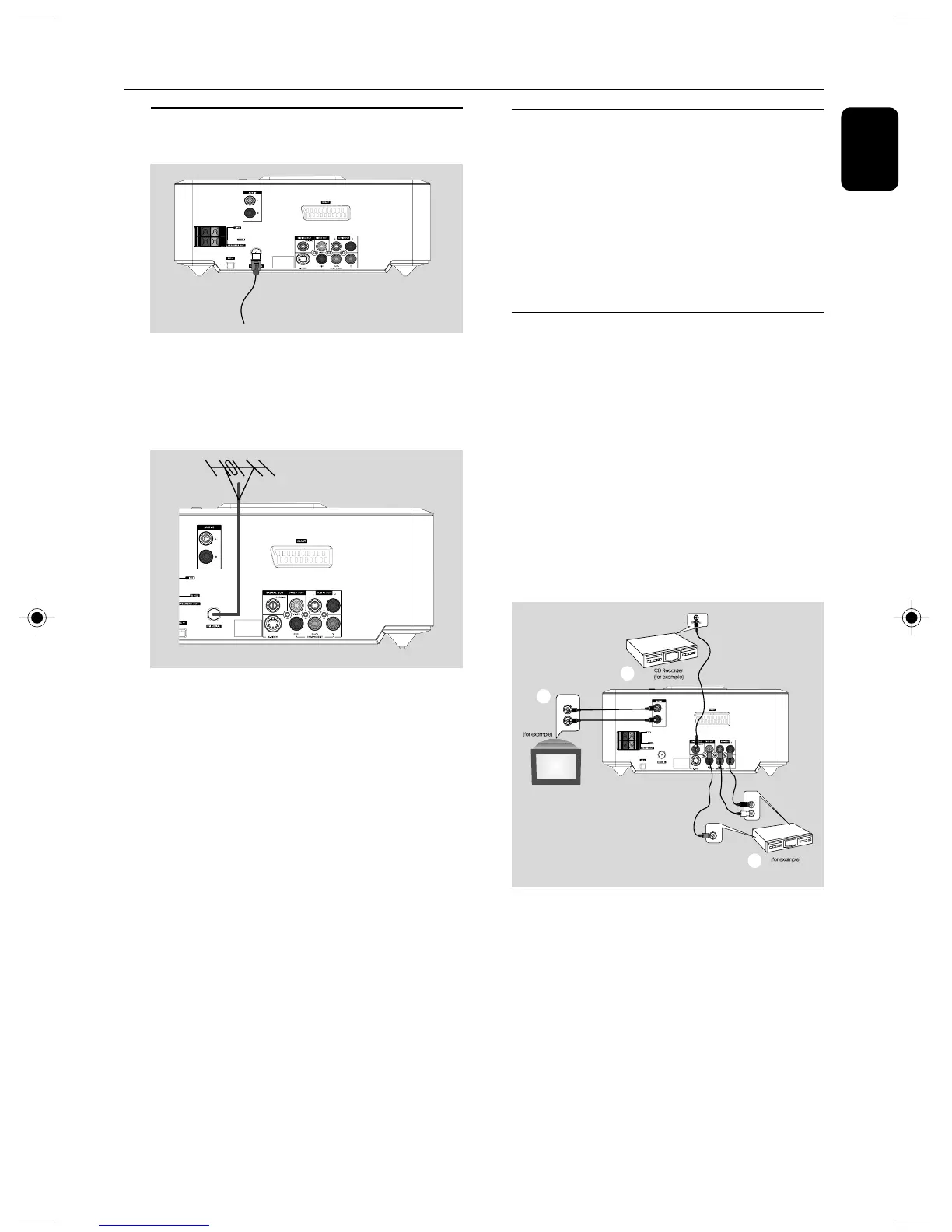
Step 4: Connecting the power
cord
After everything is connected properly,
plug in the AC power cord to the power
outlet.
Never make or change any connection with the
power switched on.
Additional: Connecting
additional equipment
IMPORTANT!
– Some discs are copy-protected. You
cannot record the disc through a VCR or
digital recording device.
– When making connections, make sure
the colour of cables matches the colour
of jacks.
–Always refer to the owner’s manual of
the other equipment for complete
connection and usage details.
AUDIO OUT
L
R
Television
A
C
VCR
B
VIDEO IN
AUDIO IN
L
R
pg 001-022_MCD710_12_Eng 2007.11.29, 14:2613













 To Next Page