English
16
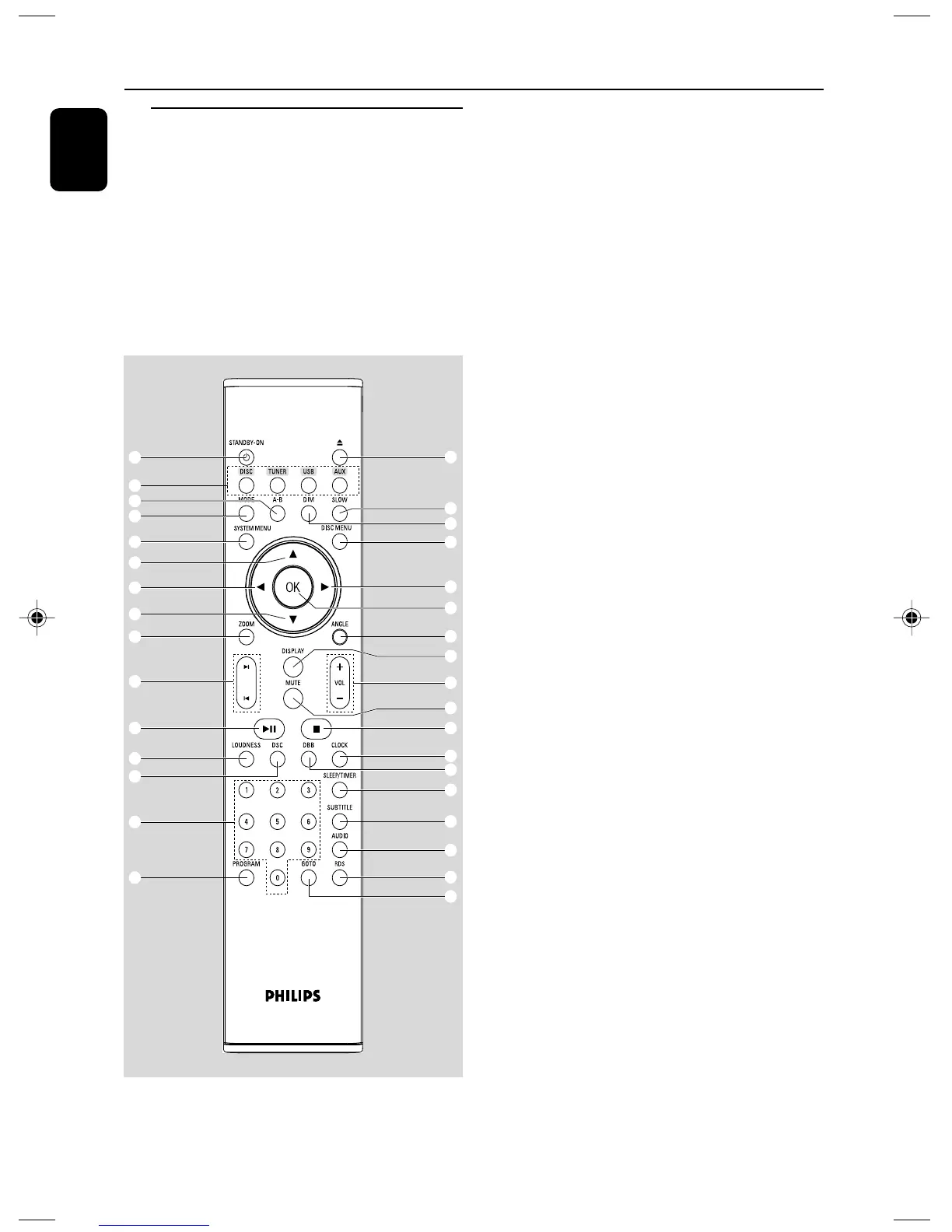
Remote control
1 ECO POWER/STANDBY-ON y
– switches on the system or puts it on to Eco
power/normal standby mode.
2 Numeric Keypad (0-9)
– inputs a track/title/chapter number of the disc.
3 PROGRAM
–DVD/VCD/CD/MP3-CD/USB: enters the
program menu.
Functional Overview
– Picture CD: during playback, to select a slide
show mode.
–Tuner: programs preset radio stations.
4 SOURCE
– to select the respective sound source : TUNER,
DISC, USB or AUX.
5 SYSTEM MENU (disc mode only)
– to enter or exit the system menu bar.
6 DISC MENU (disc mode only)
–DVD/VCD: enters or exits the disc contents
menu.
– VCD2.0: switches the playback control mode on
or off .
7 2 / 3
Tuner
– press to tune to a lower/higher radio frequency
gradually.
– press and hold, then release the key to start
automatic search for a radio frequency
downward/upward.
Disc/USB
– searches fast backward/forward.
– In DISC mode, to select a movement direction in
the disc menu or system menu bar.
8 3 / 4
– In DISC mode, to select a movement direction in
the disc menu or system menu bar.
9 OK
– to exit or confirm the selection.
0 í / ë
– Disc: skips to the previous/next chapter/title/
track.
–Tuner: selects a preset radio station.
! 9
– In DISC/USB mode, to stop playback or clear a
program.
@ 2;
– In DISC/USB mode, to start or interrupt
playback.
# VOL +/-
– adjusts the volume upward/downward.
– adjusts the hours and minutes in clock/timer
setting mode.
– selects a source in timer setting mode.
ª
¡
6
7
9
!
•
(
§
≤
%
^
º
#
)
⁄
1
™
4
$
5
7
∞
0
@
2
3
&
≥
£
*
8
8
pg 001-022_MCD710_12_Eng 2007.11.29, 14:2616













 To Next Page