15
Note
Some TVs do not support HDMI audio •
transmission.
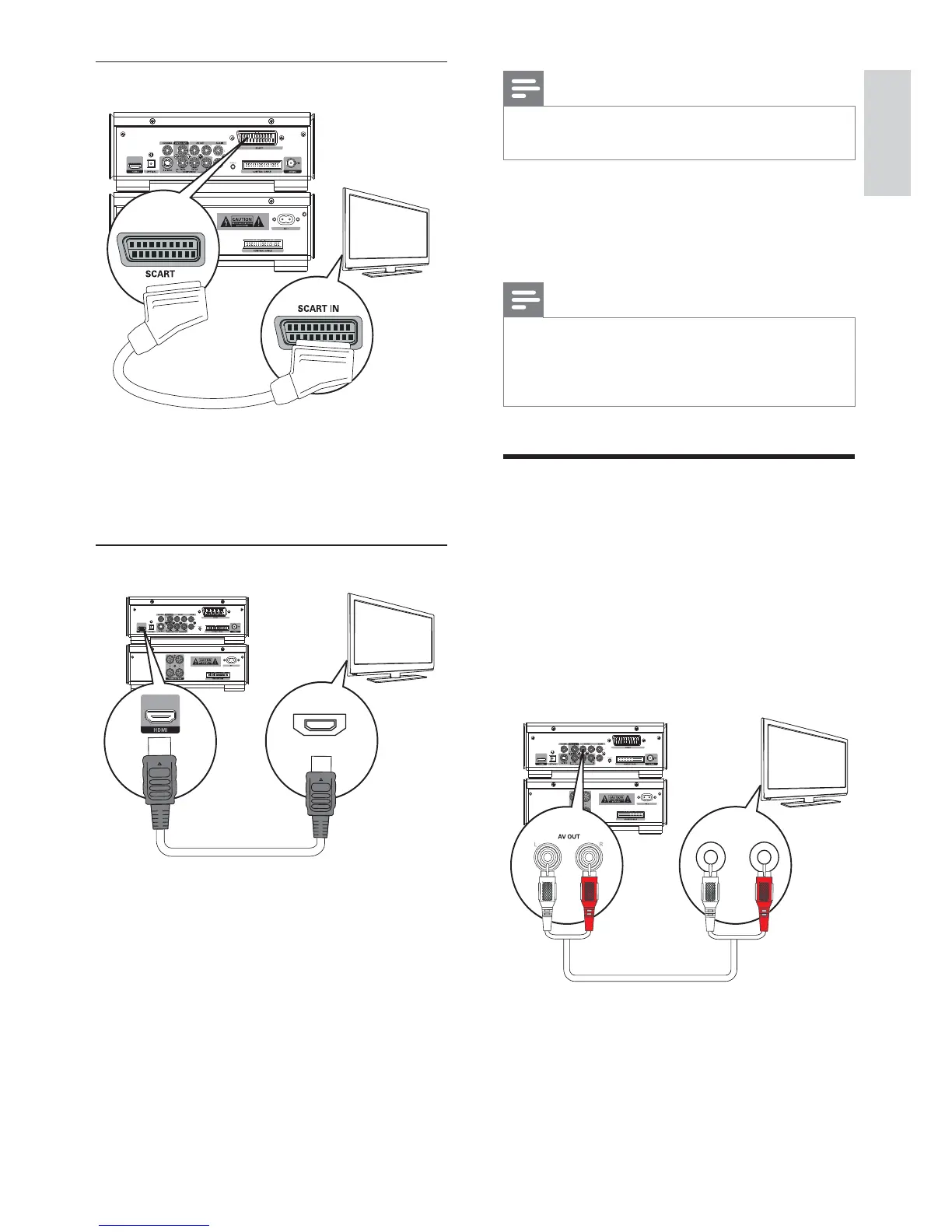
1 Connect an HDMI cable (not supplied)
to:
the • HDMI socket on this unit.
the • HDMI socket on the TV.
Note
If your TV has only a DVI connection, connect •
through a HDMI/DVI adaptor. An extra
audio connection is needed to complete this
connection.
Connect an external audio
device (optional)
You can also listen to an external audio device
through this unit.
1 Connect audio cables (red/white) to:
the • AUX IN sockets on this unit.
the audio output sockets on the •
external audio device.
TV
L LINE IN R
Option 4: connect SCART cable
1 Connect a scart cable to:
the • SCART socket on this unit.
the • SCART socket on the TV.
Option 5: connect HDMI cable
Connect HDMI (High Definition Muiltimedia
Interface), DVI (Digital Visual Interface), or
HDCP (High-bandwidth Digital Contents
Protection)-compliant TVs through HDMI
for the best picture quality. This connection
transmits both video and audio signals.
Through this connection, you can watch DVDs
that contain HD (High-Definition) content.
TV
TV
HDMI IN
English
EN



 To Next Page