26
[HDMI Video] – Select the HDMI video
output resolution that is compatible with your
TV display capability.
Option Description
[Auto] Detect and select the best
supported video resolution
automatically.
[480p],
[576p],
[720p],
[1080i],
[1080p]
Select a video resolution that
is best supported by your
TV. See your TV manual for
details.
[Closed Caption]
Turn off or on display captions.
• [On] – show the sound effects in
subtitles. Applicable only to discs
with Closed Caption information
included and the TV that supports
this feature.
• [Off] – turn off closed caption.
Preferences
1
Press SYSTEM.
2 Press to select [Preference Setup], and
then press
.
3 Select an option and then press OK.
4 Select a setting and then press OK.
To return to the previous menu, •
press
.
To exit the menu, press • SYSTEM.
Note
See the explanations of the above options in •
the following pages.
[Audio]
Select the preferred audio language for disc
play.
[Subtitle]
Select the preferred subtitle language for disc
play.
[TV Type]
Change this setting if the video does not
appear correctly. By default, this setting
matches the most common setting for TVs in
your country.
• [PAL] – For TV with PAL color
system.
• [NTSC] – For TV with NTSC color
system.
• [Multi] – For TV that is compatible
with both PAL and NTSC.
[TV Display]
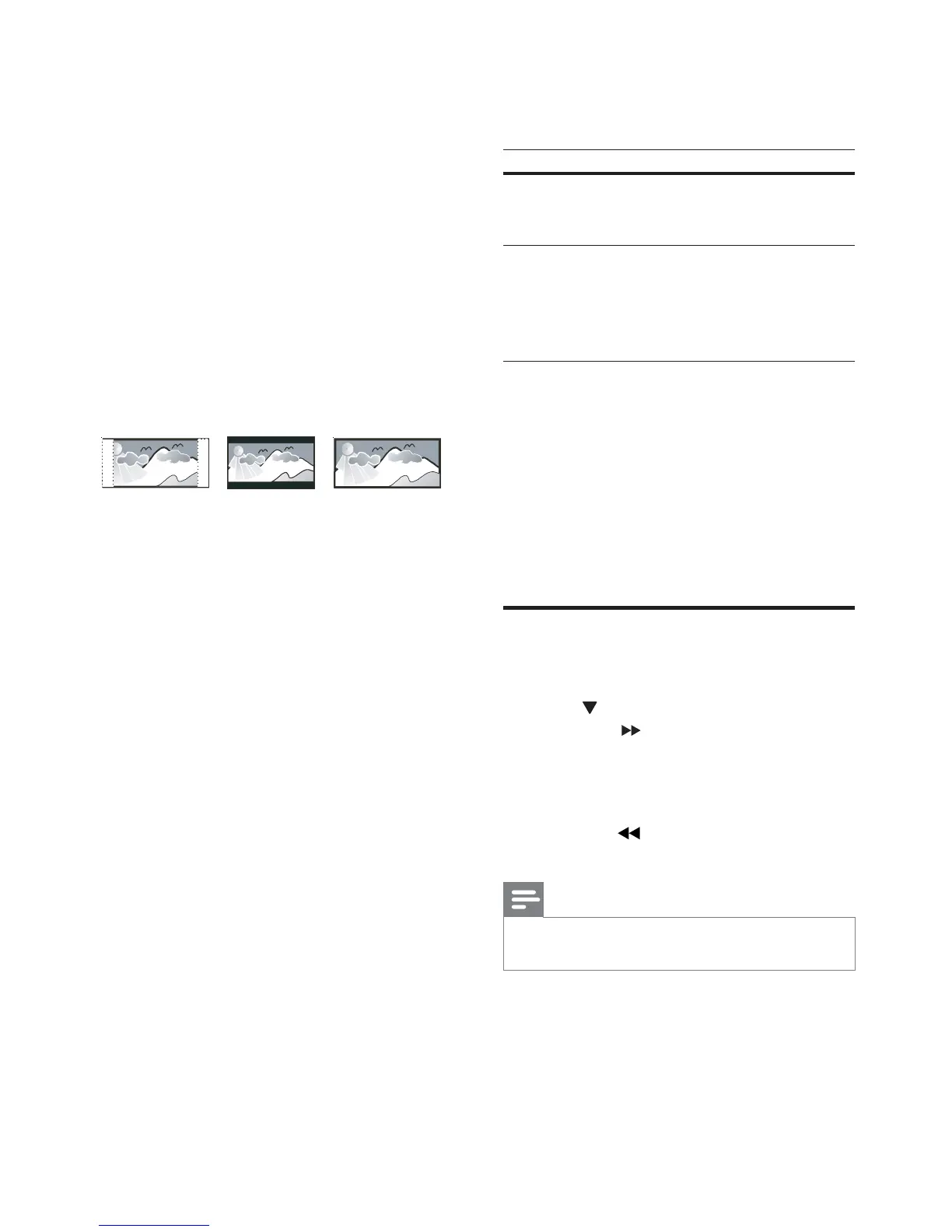
The TV format determines the aspect ratio of
display according to the type of TV you have
connected.
• [4:3 Pan Scan] – For 4:3 screen TV:
full-height display with the trimmed
sides.
• [4:3 Letter Box] – For 4:3 screen TV:
wide-screen display with black bars
on the top and bottom of the screen.
• [16:9 Wide Screen] – For wide-
screen TV: display ratio 16:9.
[Progressive]
Turn on or off progressive scan mode.
[Picture Settings]
Select a predefined set of picture color
settings or customize your personal setting.
• [Standard] – original color setting.
• [Bright] – vibrant color setting.
• [Soft] – warm color setting.
• [Personal] – customize the color
setting. Adjust the level of brightness,
contrast, sharpness/tint and color
saturation.
4:3 Letter Box (LB)
4:3 Pan Scan (PS)
16:9 (Wide Screen)
EN



 To Next Page