9
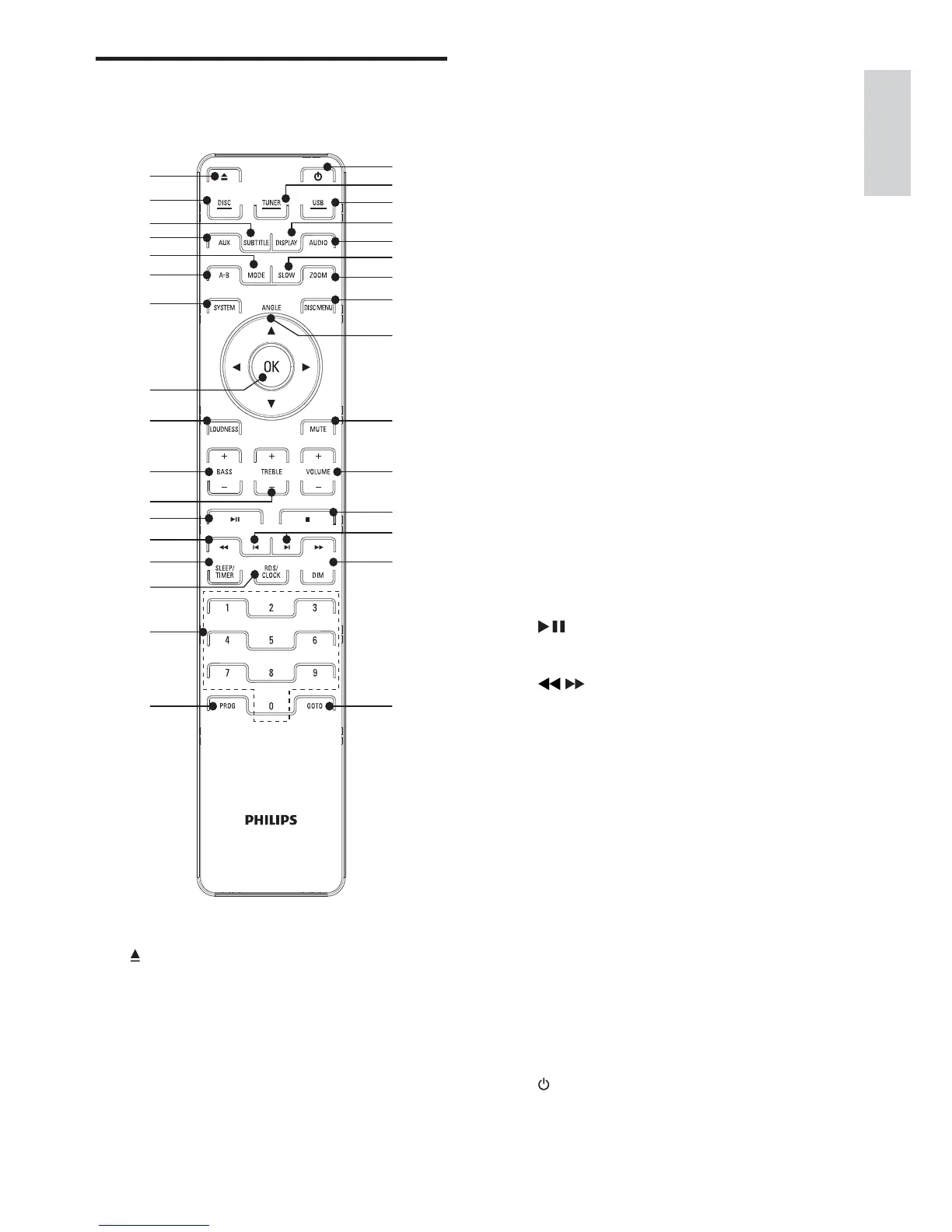
d AUX
Select external audio device source.•
e MODE
Select repeat play modes.•
Select shuffle play modes.•
f A-B
Repeat a specific section within a •
track/disc.
g SYSTEM
Access or exit the system setup •
menu.
h OK
Confirm a selection.•
i LOUDNESS
Turn on or off automatic loudness •
adjustment.
j BASS +/-
Adjust bass level.•
k TREBLE +/-
Adjust treble level.•
l
Start or pause play.•
m
/
Search within a track.•
Tune to a radio station.•
n SLEEP/TIMER
Set the sleep timer.•
Set the alarm timer.•
o RDS/CLOCK
For selected FM radio stations: •
display RDS information.
Set the clock.•
View the clock.•
p Numeric keypad
Select a title/chapter/track directly.•
q PROG
Program radio stations.•
r
Turn on the apparatus or switch to •
the Eco Power standby mode.
Overview of the remote
control
a
Open or close the disc •
compartment.
b DISC
Select disc source.•
c SUBTITLE
Select a subtitle language.•
English
EN



 To Next Page