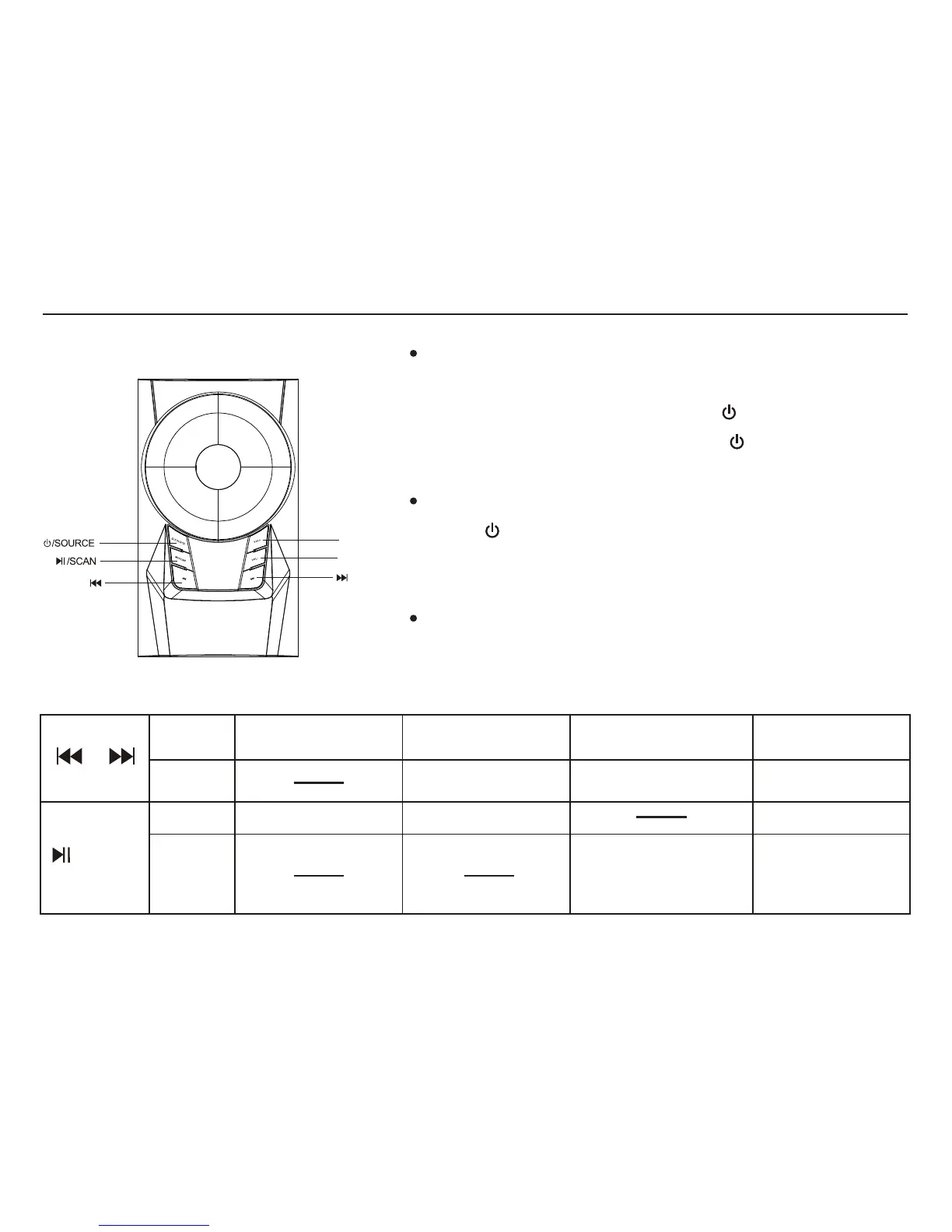
The Speaker system is in “ ST-BY ” (stand by) mode
when the power supply is switched on, with the orange
LED Flashing. Please press the “ /SOURCE ” to select
appropriate source. Long press “ /SOURCE ” to
put it back in “ ST-BY ” (stand by) mode.
Front panel operation
You can toggle through the input modes by pressing
the “ /SOURCE ” key. “ AU ” for Audio in mode,
“Ud” for USB* mode, “Sd” for SD* mode, “ 87.5 ” for
FM mode, “bt” for Bluetooth Mode.
Volume+/- Manual control for volume.
VOL-
VOL+
4
* AVAILABLE IF CONNECTED
BT INPUT
AUDIO IN INPUT
FM TUNNER
Play/Pause Play/Pause
Disconnect/reconnect
Bluetooth
Track Selection
Previous/Next
Auto Search
Previous/Next
Channel Selection
short press
short press
long press
/SCAN
Play/Pause
USB/SD INPUT
Track Selection
Previous/Next


 To Next Page