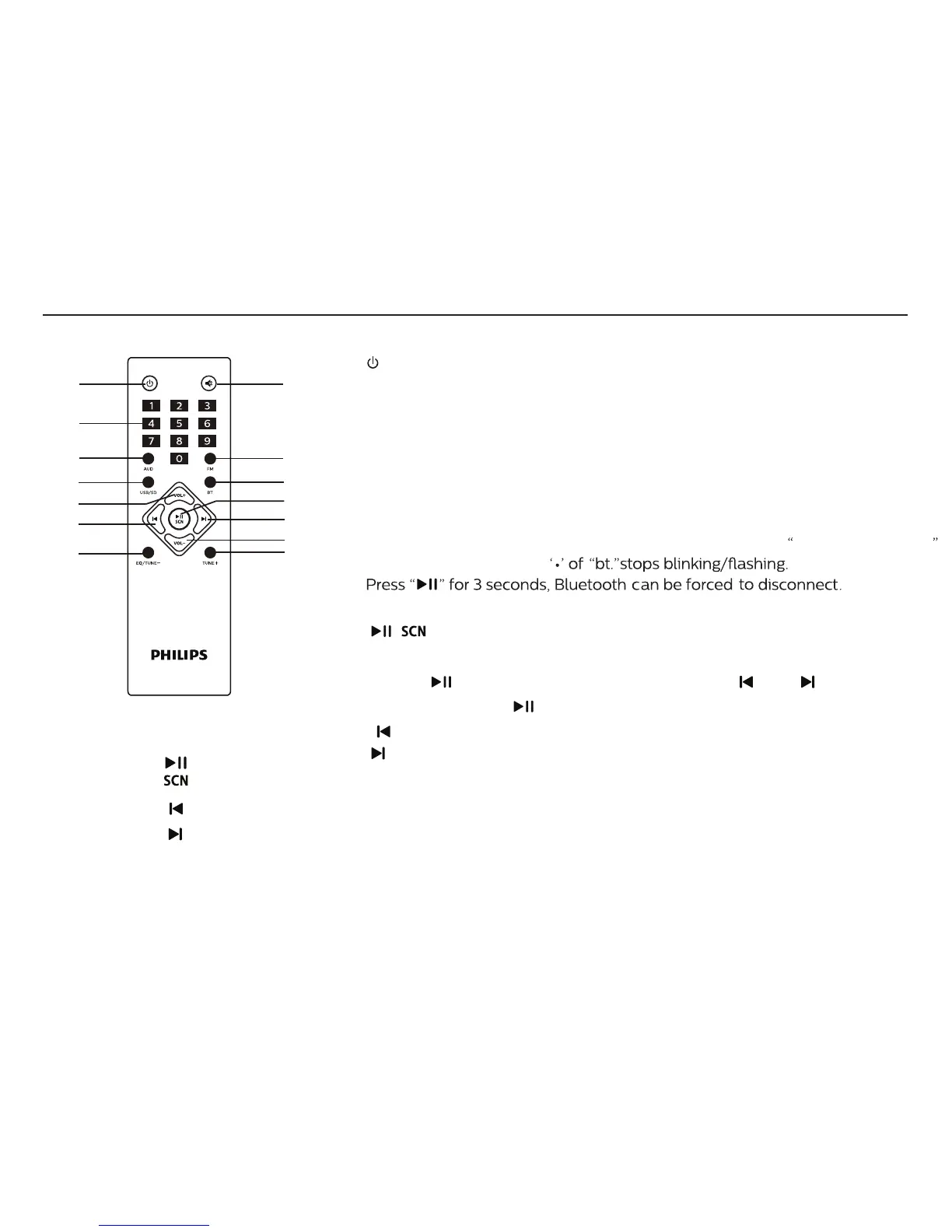
Remote controls
5
* AVAILABLE IF CONNECTED
(1)
(3)
(4)
(6)
(8)
(10)
(13)
(2)
(5)
(7)
(9)
(11)
(12)
(14)
1. ST-BY
2. MUTE
3. 0 ~ 9
4. AUD
5. FM
6. USB/SD
7. BT
8. VOL+
10.
11.
12. VOL-
13. EQ/TUNE-
14. TUNE+
9.
1. : Turn on/Stand-by the speaker.
3. 0-9: Numeric keys, with the help of these keys you can select
2. MUTE: To activate or deactivate the sound.
song or track in USB*. In FM, you can key in frequency, i.e. 927 for 92.7.
4. AUD: To choose Audio in mode.
5. FM: To choose FM mode.
6. USB*/SD*: To choose USB*/SD* mode. Press the number “ 0-9 ” on the
remote control, your can choose corresponding song.
8. VOL+: Volume increase.
9. / : Short press to plays/pause, long press for FM auto search.
For manual storage, user can press frequency (eg. 106.4) and
press “ ”, station number will ash, press “ ” or “ ” to choose
the serial, press “ ” again to store the station.
7.
BT: To choose Bluetooth mode Search the device named
Philips MMS2160B ,
It is successfully paired if
10. : Previous song/station.
11. : Next song/station.
12. VOL-: Volume decrease.
13. EQ/TUNE-: Short press to search channel step by step (each
step(-) 0.1 MHz), long press “EQ/TUNE-” to search previous channel.
The channel will start to play once sucessfully searched.
EQ: Normal, Pop, Rock, Jazz, Classic, Country
(works in USB*/SD*/BT mode)
14. TUNE+: Short press to search channel step by step (each
step(+) 0.1 MHz), long press to search next channel.
The channel will start to play once sucessfully searched.


 To Next Page