8
English
IMPORTANT!
– You only need to make one video
connection from the following options,
depending on the capabilities of your TV.
– Connect the DVD system directly to
the TV.
– Scart (RGB) Video provides better
picture quality than S-Video. These
options must be available on your TV.
– If S-Video is used for DVD playback, the
system’s VIDEO OUT setting will need to
be changed accordingly. Details are on
page 23.
Helpful Hint:
– To hear the TV channels through this DVD
system, use the audio cables (white/red - not
supplied) to connect AUX IN jacks to the
corresponding AUDIO OUT jacks on the TV (not
required if you are using Scart connection).
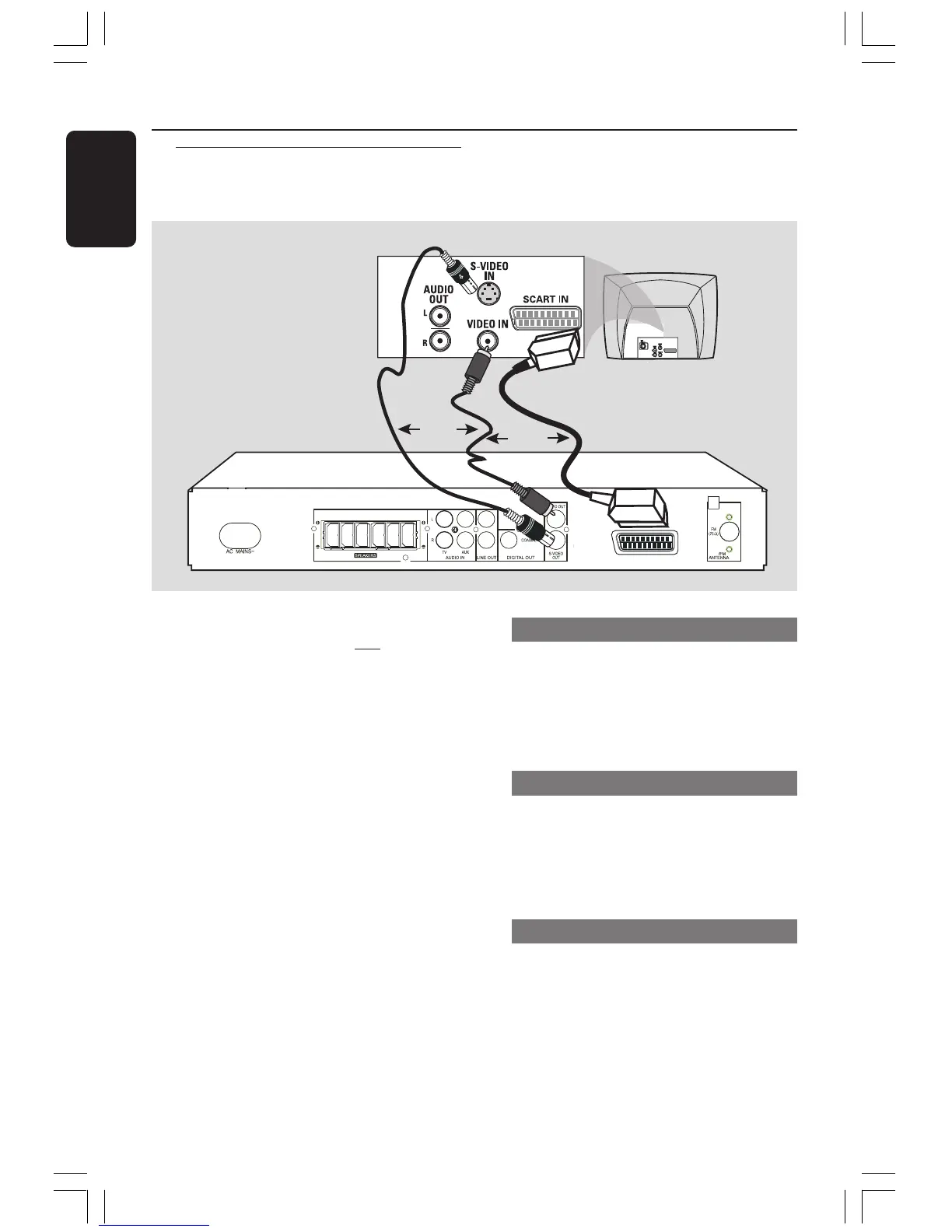
Using Scart jack
● Use the supplied scart video cable (black) to
connect the DVD system’s SCART OUT jack
to the corresponding Scart input jacks on the
TV.
OR
Using S-Video jack
● Use an S-video cable (not supplied) to connect
the DVD system’s S-VIDEO OUT jack to the
S-Video input jack (or labelled as Y/C or
S-VHS) on the TV.
OR
Using Composite Video jack (CVBS)
● Use a composite video cable (yellow - not
supplied) to connect the DVD system’s CVBS
jack to the video input jack (or labelled as A/V
In, Video In, Composite or Baseband) on the
TV.
Connections
Step 3: Connecting TV
FRONT
RIGHT
FRONT
LEFT
REAR
RIGHT
REAR
LEFT
SUBWOOFER
FRONT
CENTER
MW
MW
SCART OUT
SCART IN
OR
OR
001-035-MX2500-00-Eng 9/16/04, 10:458


 To Next Page