EasyManua.ls Logo

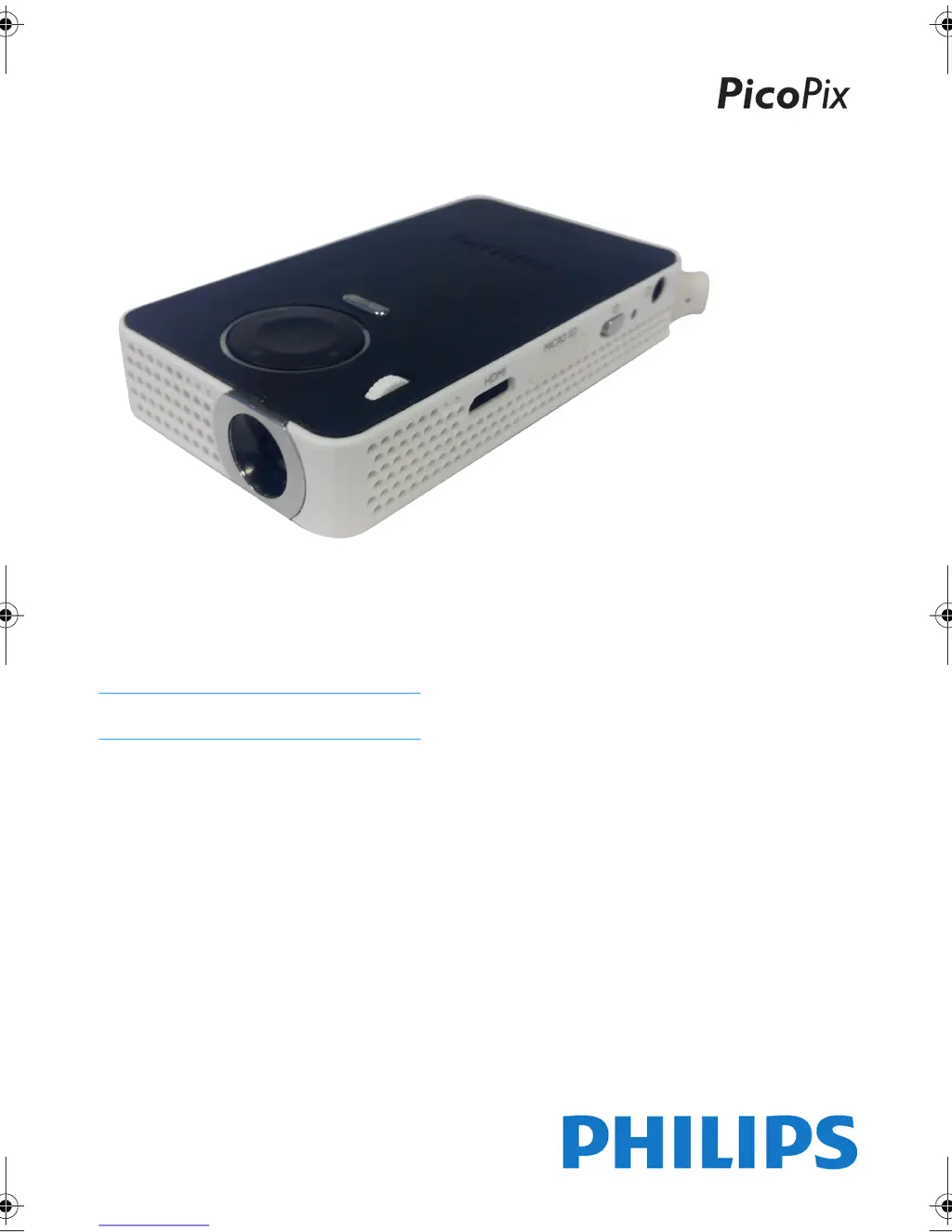
Philips PicoPix PPX 4350 - User Manual

Philips PicoPix PPX 4350
26 pages
Print Icon
To Next Page IconTo Next Page
Loading...
PPX 4350
EN User Manual
Register your product and get support at
www.philips.com/welcome
PPX4350_UM_EN_253624544.book Page 1 Jeudi, 29. janvier 2015 11:35 11

Questions and Answers

Summary

PicoPix PPX 4350: Getting Started

About This User Manual

Provides guidance on using the user manual and safety instructions.

Whats in the Box

Lists the included accessories for the PicoPix projector.

Product Highlights

Highlights key features like HDMI connectivity and WiFi Display.

WiFi Display (Miracast Compatible)

Explains how to use WiFi display for screen mirroring from compatible devices.

General Safety Information and Precautions

Device Setup and Safe Operation

Instructions for safe placement, ventilation, handling, and avoiding hazards.

Power Supply and Battery Safety

Guidelines for using the power adapter, battery care, and electrical safety warnings.

Critical Safety Warnings

Important DANGER notices regarding LED, battery, and hearing risks.

General Safety Information and Precautions

Repairs and Service Guidance

Advises against self-repair and directs users to authorized service centers.

Device Overview and Components

Top and Side Views of the Projector

Identifies all physical ports and controls on the device.

Bottom View and Status Indicators

Identifies the tripod socket and battery status monitor.

Device Overview and Components

Menu Functions and Status Bar Icons

Explains how to navigate menus and interpret status bar icons.

Initial Operation and Setup

Device Setup and Power Connection

Guides through initial setup, connecting power, and charging the battery.

Initial Installation and Language Selection

Covers the first-time setup process, including language selection.

Connecting to Playback Devices

Headphone Connection and Audio Settings

Steps for connecting headphones and adjusting volume, including hearing safety.

HDMI Connection for External Devices

Instructions for connecting to computers/laptops via HDMI.

Memory and Storage Media

Inserting and Using Memory Cards

Steps for inserting a Micro SD card and precautions against data loss.

Connecting USB Storage Devices

Instructions for connecting USB storage devices.

Wireless Connectivity: Miracast

Miracast Setup and Requirements

Guides on using Miracast for screen mirroring, including network requirements.

Bluetooth Connectivity Management

Activating, Deactivating, and Pairing Bluetooth

Instructions to activate, deactivate, and delete Bluetooth pairings.

Media Playback Guide

Video and Photo Playback Operations

How to play video files and view photos, including slide shows.

Supported Video File Formats

Lists supported video file formats and codecs.

Playback Settings and Controls

Adjusting volume, smart settings, contrast, and brightness during playback.

Media Playback Guide

Music Playback and Slide Shows

Instructions for playing music and creating photo slide shows with background sound.

Storage Location and Playback Limits

Specifies that photos can only be played from Memory Card/USB.

File Management Operations

Copying and Deleting Files

Detailed steps for managing files on internal memory and storage media.

File Operation Error Handling

Troubleshooting tips for file operations and storage media handling.

Device Settings and Customization

Menu Navigation and Image Settings

Settings for wallpaper, projection modes, and screen fit.

Audio, Video, and Picture Settings

Options for sound, video display, music playback, and photo viewing.

Power Management and System Preferences

Settings for power saving, Bluetooth, language, and maintenance.

Additional Projector Functions

Flashlight and SOS Light Modes

Instructions on using the projector as a flashlight and SOS signal.

Warning Light Feature Activation

How to activate and use the warning light feature.

Service and Battery Management

Battery Care, Charging, and Deep Discharge

Tips for prolonging battery life, charging, and handling deep discharge.

Battery Replacement Safety Warning

Warning against self-battery replacement due to injury risk.

Service and Maintenance Procedures

Cleaning the Device and Lens

Instructions for cleaning the device and lens, and managing overheating.

Firmware Update via SD Card

Guides on updating firmware using an SD card, with data loss warnings.

Service and Maintenance Procedures

Firmware Update via USB Stick

Guides on updating firmware using a USB stick, with data loss warnings.

Troubleshooting Common Issues

Power Cycling and Basic Problem Solving

Basic troubleshooting step of power cycling and common issue resolutions.

Audio and Video Connectivity Problems

Solutions for sound issues and problems connecting to external devices.

Troubleshooting Common Issues

Brightness, Image Quality, and USB Playback Issues

Lists problems related to brightness, image quality, and USB video playback.

Appendix: Technical Details and Accessories

Projector Technical Specifications

Provides detailed specifications of the projector, including dimensions, weight, and performance metrics.

List of Available Accessories

Lists available accessories for the PicoPix projector and their part numbers.

Regulatory Compliance and Certifications

EU, FCC, and Canadian Compliance Statements

Details on CE, FCC, and Canadian regulatory compliance statements.

RF Exposure and Regional Safety Information

Information on RF exposure limits and safe operating distances for various regions.

Regulatory Compliance and Certifications

Product Disposal and Trademark Acknowledgements

Information on proper electronic waste disposal and trademark acknowledgments.

Manufacturer Liability Disclaimers

Legal disclaimers regarding product use, modifications, and third-party issues.

Summary

PicoPix PPX 4350: Getting Started

About This User Manual

Provides guidance on using the user manual and safety instructions.

Whats in the Box

Lists the included accessories for the PicoPix projector.

Product Highlights

Highlights key features like HDMI connectivity and WiFi Display.

WiFi Display (Miracast Compatible)

Explains how to use WiFi display for screen mirroring from compatible devices.

General Safety Information and Precautions

Device Setup and Safe Operation

Instructions for safe placement, ventilation, handling, and avoiding hazards.

Power Supply and Battery Safety

Guidelines for using the power adapter, battery care, and electrical safety warnings.

Critical Safety Warnings

Important DANGER notices regarding LED, battery, and hearing risks.

General Safety Information and Precautions

Repairs and Service Guidance

Advises against self-repair and directs users to authorized service centers.

Device Overview and Components

Top and Side Views of the Projector

Identifies all physical ports and controls on the device.

Bottom View and Status Indicators

Identifies the tripod socket and battery status monitor.

Device Overview and Components

Menu Functions and Status Bar Icons

Explains how to navigate menus and interpret status bar icons.

Initial Operation and Setup

Device Setup and Power Connection

Guides through initial setup, connecting power, and charging the battery.

Initial Installation and Language Selection

Covers the first-time setup process, including language selection.

Connecting to Playback Devices

Headphone Connection and Audio Settings

Steps for connecting headphones and adjusting volume, including hearing safety.

HDMI Connection for External Devices

Instructions for connecting to computers/laptops via HDMI.

Memory and Storage Media

Inserting and Using Memory Cards

Steps for inserting a Micro SD card and precautions against data loss.

Connecting USB Storage Devices

Instructions for connecting USB storage devices.

Wireless Connectivity: Miracast

Miracast Setup and Requirements

Guides on using Miracast for screen mirroring, including network requirements.

Bluetooth Connectivity Management

Activating, Deactivating, and Pairing Bluetooth

Instructions to activate, deactivate, and delete Bluetooth pairings.

Media Playback Guide

Video and Photo Playback Operations

How to play video files and view photos, including slide shows.

Supported Video File Formats

Lists supported video file formats and codecs.

Playback Settings and Controls

Adjusting volume, smart settings, contrast, and brightness during playback.

Media Playback Guide

Music Playback and Slide Shows

Instructions for playing music and creating photo slide shows with background sound.

Storage Location and Playback Limits

Specifies that photos can only be played from Memory Card/USB.

File Management Operations

Copying and Deleting Files

Detailed steps for managing files on internal memory and storage media.

File Operation Error Handling

Troubleshooting tips for file operations and storage media handling.

Device Settings and Customization

Menu Navigation and Image Settings

Settings for wallpaper, projection modes, and screen fit.

Audio, Video, and Picture Settings

Options for sound, video display, music playback, and photo viewing.

Power Management and System Preferences

Settings for power saving, Bluetooth, language, and maintenance.

Additional Projector Functions

Flashlight and SOS Light Modes

Instructions on using the projector as a flashlight and SOS signal.

Warning Light Feature Activation

How to activate and use the warning light feature.

Service and Battery Management

Battery Care, Charging, and Deep Discharge

Tips for prolonging battery life, charging, and handling deep discharge.

Battery Replacement Safety Warning

Warning against self-battery replacement due to injury risk.

Service and Maintenance Procedures

Cleaning the Device and Lens

Instructions for cleaning the device and lens, and managing overheating.

Firmware Update via SD Card

Guides on updating firmware using an SD card, with data loss warnings.

Service and Maintenance Procedures

Firmware Update via USB Stick

Guides on updating firmware using a USB stick, with data loss warnings.

Troubleshooting Common Issues

Power Cycling and Basic Problem Solving

Basic troubleshooting step of power cycling and common issue resolutions.

Audio and Video Connectivity Problems

Solutions for sound issues and problems connecting to external devices.

Troubleshooting Common Issues

Brightness, Image Quality, and USB Playback Issues

Lists problems related to brightness, image quality, and USB video playback.

Appendix: Technical Details and Accessories

Projector Technical Specifications

Provides detailed specifications of the projector, including dimensions, weight, and performance metrics.

List of Available Accessories

Lists available accessories for the PicoPix projector and their part numbers.

Regulatory Compliance and Certifications

EU, FCC, and Canadian Compliance Statements

Details on CE, FCC, and Canadian regulatory compliance statements.

RF Exposure and Regional Safety Information

Information on RF exposure limits and safe operating distances for various regions.

Regulatory Compliance and Certifications

Product Disposal and Trademark Acknowledgements

Information on proper electronic waste disposal and trademark acknowledgments.

Manufacturer Liability Disclaimers

Legal disclaimers regarding product use, modifications, and third-party issues.

Philips PicoPix PPX 4350 Specifications

General IconGeneral
TechnologyDLP
Light sourceLED
Contrast ratio1000:1
Aspect Ratio16:9
Internal memory8 GB
Integrated Media PlayerYes
Supported audio formatsMP3, WAV
Supported photo formatsJPEG, BMP, PNG, GIF
Wi-FiYes
BluetoothYes
Operating systemAndroid
Internal batteryYes
Battery life2 hours
Weight0.5 kg
LED lifetime30000 hours
Native resolution854 x 480 (WVGA)
Supported video formatsAVI, MP4, MKV, MOV
ConnectionsHDMI, USB, MicroSD

Related product manuals