EasyManua.ls Logo

Philips Plena - Advanced Functionality Setup; Emergency, Insertion, Cascade Modes

Philips Plena
30 pages
Print Icon
To Next Page IconTo Next Page
To Previous Page IconTo Previous Page
Loading...
8
PLENA UNIVERSAL PRE-AMPLIFIER
Eng
Setting emergency, insertion or cascade
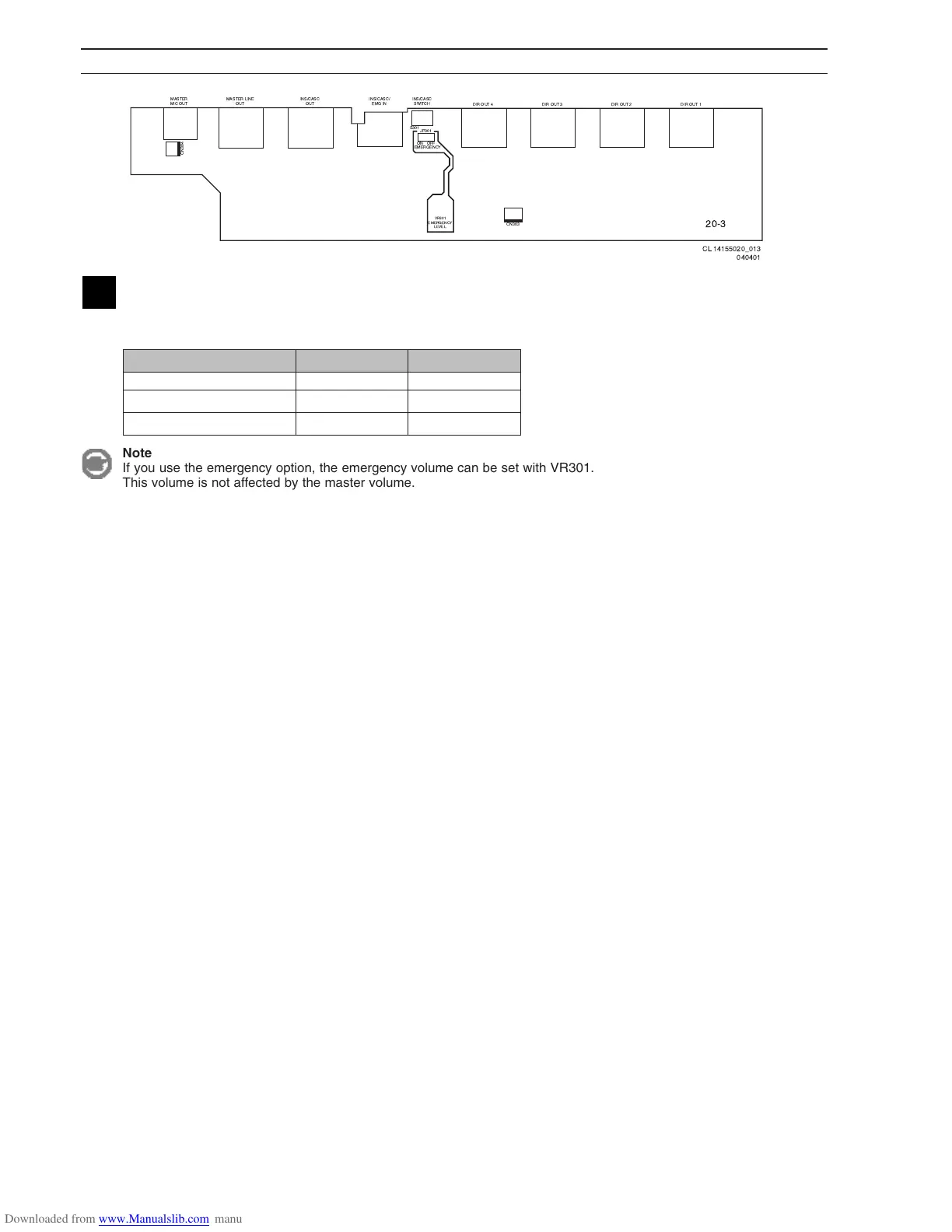
The functionality of the insertion/cascade/emergency input is determined with jumper JP301 and the 'Ins/Casc' switch at
the back of the unit.
Input/output used for Jumper JP301 Switch
Insertion OFF INS
Cascade OFF CASC
Emergency ON CASC
CN304
S301
MASTER
MIC OUT
MASTER LINE
OUT
INS/CASC
OUT
DIR OUT 4 DIR OUT 3 DIR OUT 2 DIR OUT 1
INS/CASC/
EMG IN
INS/CASC
SWITCH
JP301
OFFON
EMERGENCY
VR301
EMERGENCY
LEVEL
CN303
20-3
CL 14155020_013
040401
Note
If you use the emergency option, the emergency volume can be set with VR301.
This volume is not affected by the master volume.

Related product manuals