EasyManua.ls Logo

Philips Plena - Input Source Connections; Microphone and Line Source Connectivity

Philips Plena
30 pages
Print Icon
To Next Page IconTo Next Page
To Previous Page IconTo Previous Page
Loading...
PLENA UNIVERSAL PRE-AMPLIFIER
11
3
5
4
1
2
2
1
+
-
GND
3
1
2
+
-
GND
3
1-
4
3
5
1-
4
3
5
1-
4
3
5
Dir.Out1
Dir.Out2
Dir.Out3
Dir.Out4
In
s
/C
a
s
c
/E
m
g
l
In
s
/C
a
s
c
1
/
L
in
e
2
/L
in
e
0
R
a
t
e
d
i
n
p
u
t
P
o
w
e
r
:
2
5
V
A
T
0
.
5
A
L
2
5
0
V
T
hi
s a
pp
ar
at
us
mu
s
t b
e e
a
rt
he
d
W
a
r
n
i
n
g
1
1
5
V
-
+
2
4
V
-
+
2
4
V
-
2
3
0
V
-
A
p
p
a
r
a
t
u
s
d
e
l
i
v
i
r
e
d
c
o
n
n
e
c
t
e
d
f
o
r
2
3
0
V
-
2
1
+
-
G
ND
3
1
2
+
-
G
ND
3
L
R
1
-
4
3
5
1
-
4
3
5
1
-
4
3
5
D
ir
.O
u
t
1
D
ir.
O
u
t
2
D
ir
.O
u
t
3
D
i
r
.
O
u
t
4
Ins/Casc/Emgln
Ins/Casc
Ins/CascOut
Master Line Out
Master Mic. Ou
t
1
-
4
3
5
1
-
4
3
5
L
B
B
1
9
2
0
/
0
0
8
9
0
0
1
9
2
0
0
0
0
1
1
1
5
/
2
3
0
V
~
,
5
0
/
6
0
H
z
N
o
.
D
E
S
IGN
&
Q
U
A
LIT
Y
P
H
IL
I
PS
H
O
L
L
A
ND
1
/Lin
e
2
/L
in
e
3
/Lin
e
4
/L
in
e
E
M
G
O
u
t
D
C
I
n
D
C
O
u
t
3
5
4
1
2
Cinch 180 5-pole DIN 180 3-pole XLR
GND
GND
GND
CL 14155020_005
050401
Eng
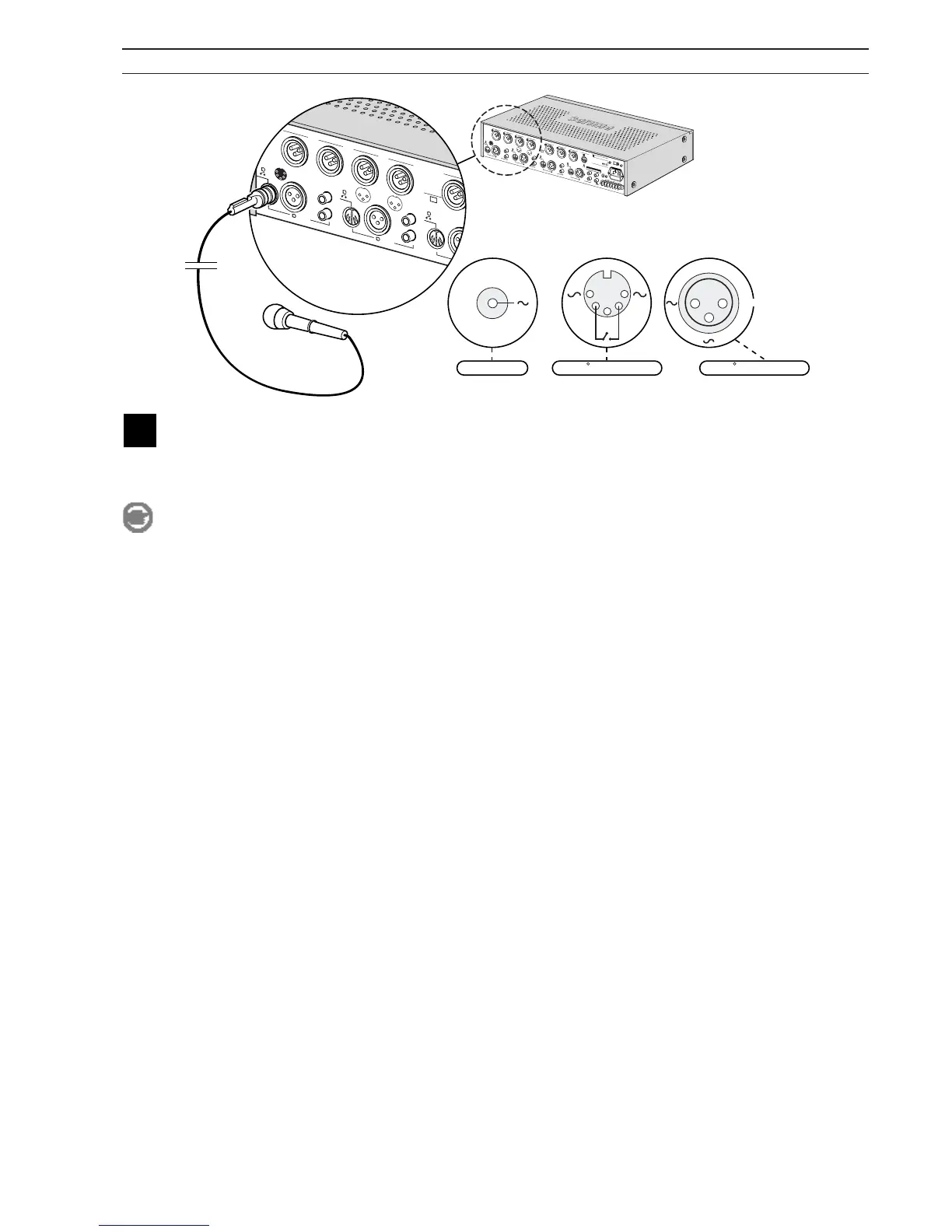
Connect a microphone or line-level source
All channels have 3 possible inputs, use one of these inputs to connect a microphone or a line-level source. The XLR
and DIN input are balanced, the stereo Cinch input is unbalanced and converted to mono. If you use an input make
sure that the internal switch settings are correct (refer to settings).
Note
If you want to use the priority feature, you must use a microphone or line-level source with a priority
contact on pin 4 and 5 of the 5-pole DIN plug.

Related product manuals