Connect to the playback device 11
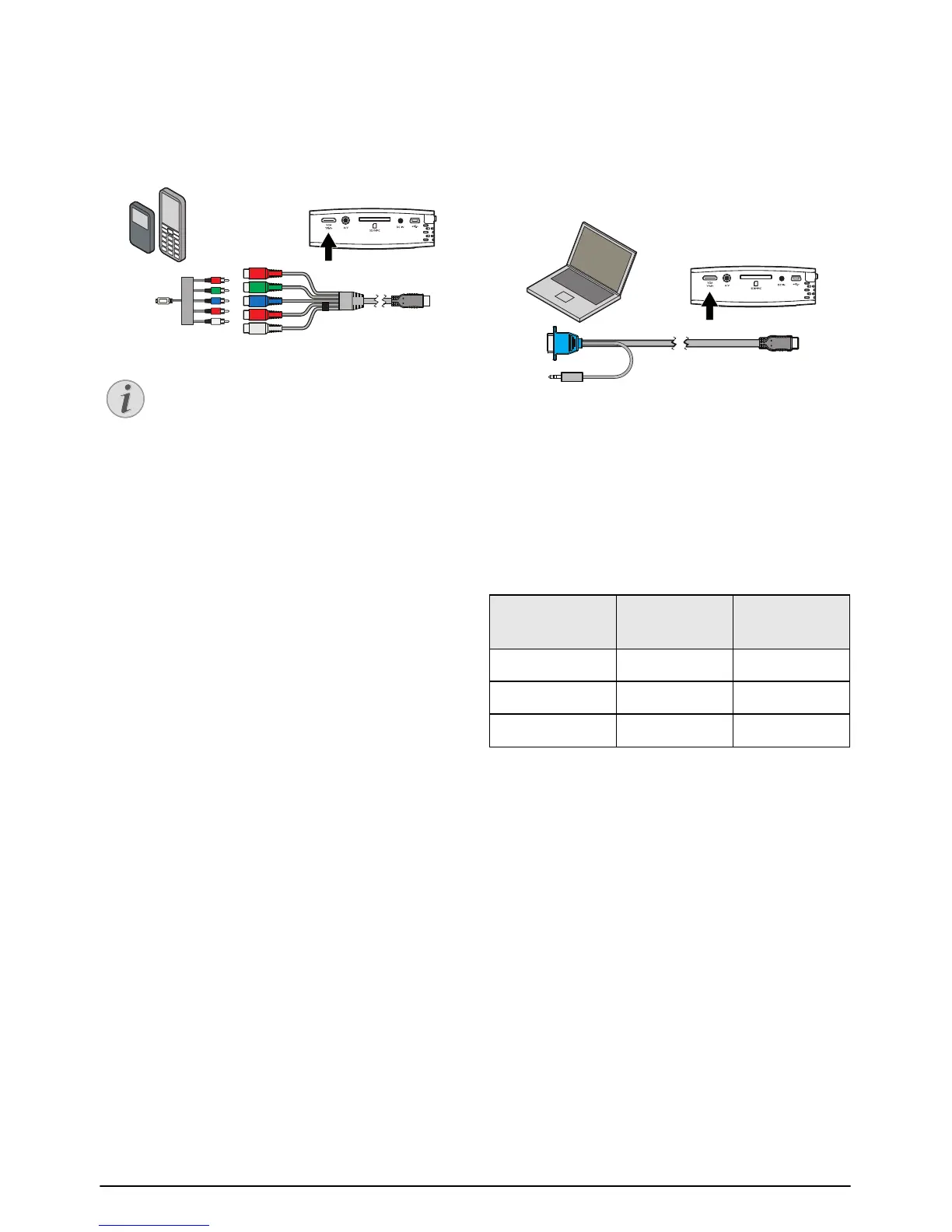
Connecting to mobile multimedia devices
Connecting to mobile multimedia devices
Some video devices (e.g.: pocket multimedia players, ...)
require specific connection cables. There are either
supplied with the device or acquired from the manufac-
turer of the multimedia device. Please note that only the
original cables from the device manufacturer may func-
tion.
Componet Mobile Device
Signal output, multimedia devices
Connecting to a Computer
(VGA)
Use the VGA audio cable (accessory) to connect the
projector to a computer, laptop or some PDAs. The
projector supports the following resolutions: VGA/
SVGA/XGA . For best results, set the computer's reso-
lution to SVGA (800x600).
Laptop VGA
1 Connect the VGA audio cable to the VGA / YPbPr
socket of the projector.
2 Connect the VGA plug to the computer's VGA
socket and the audio plug to the computer's audio
output.
3 Adjust the computer's resolution to the correct set-
ting and switch the VGA signal to an external moni-
tor.
4 The following resolutions are supported:
Switching to the multimedia device sig-
nal output
See the multimedia device instruction manual
to find out how to switch the signal output to
this jack.
Resolution Image
refresh rate
VGA 640 x 480 60 Hz
SVGA 800 x 600 60 Hz
XGA 1024 x 768 60 Hz












 To Next Page