34 EN
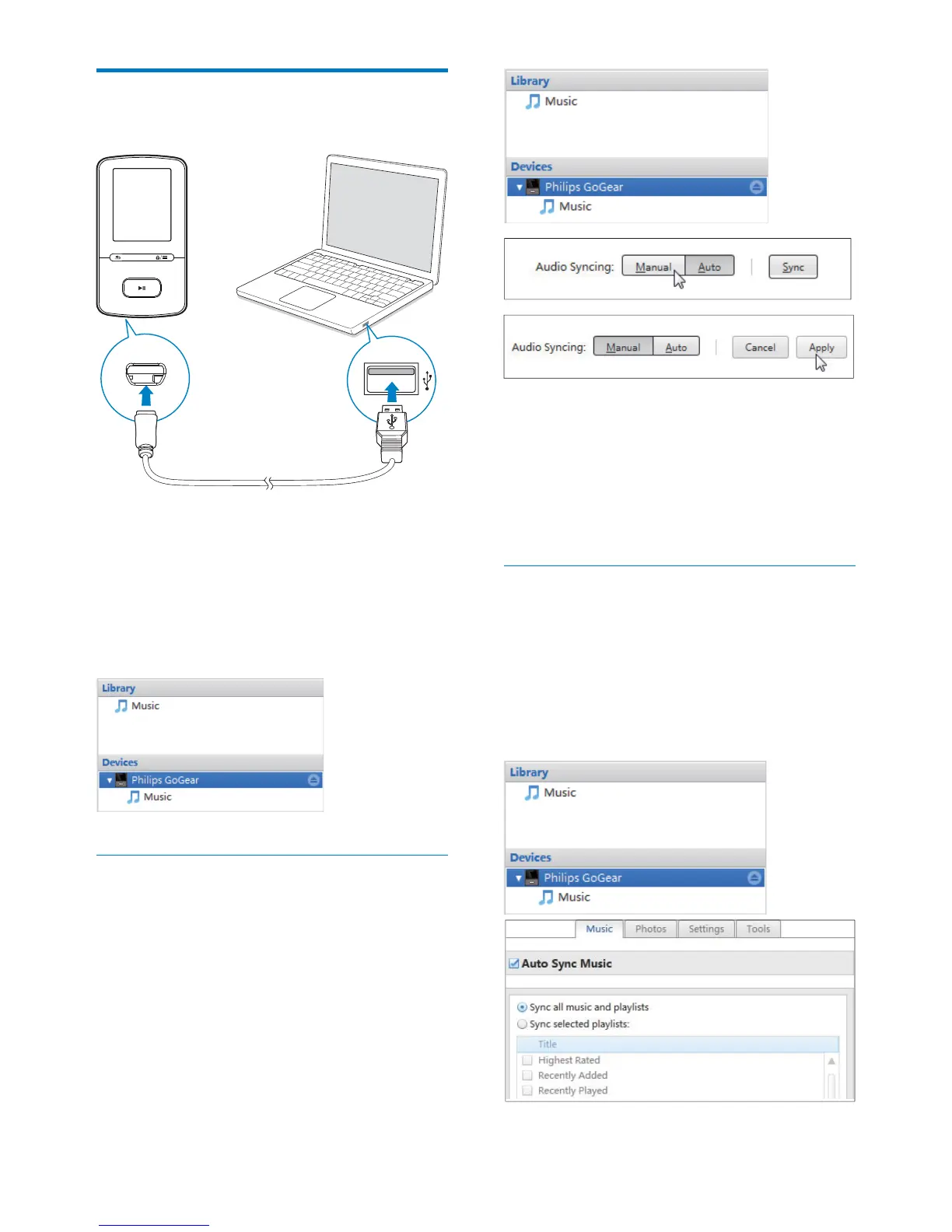
Sync the player with Philips
Songbird
1 On the PC, launch Philips Songbird.
2 Connect the player to the PC by using the
USB cable.
» On Philips Songbird, the player is
displayed when it is recognized by the
PC.
Select auto or manual sync
7KHÀUVWWLPH\RXFRQQHFWWKHSOD\HUWRPhilips
Songbird, select auto sync as prompted. The
player sync with Philips Songbird automatically.
If you do not select auto sync, you switch on
the manual sync.
To select auto or manual sync,
1 Select the player under Devices.
» A pop-up screen is displayed.
2 On the pop-up screen, select Manual or
Auto.
3 7RFRQÀUPWKHRSWLRQFOLFNApply.
Auto sync
If you have selected auto sync, auto
sync starts automatically when you
connect the player to a PC;
Alternatively, select the player under
Devices, and click Sync.
To select auto sync settings,



 To Next Page