8EN
Play from an external device
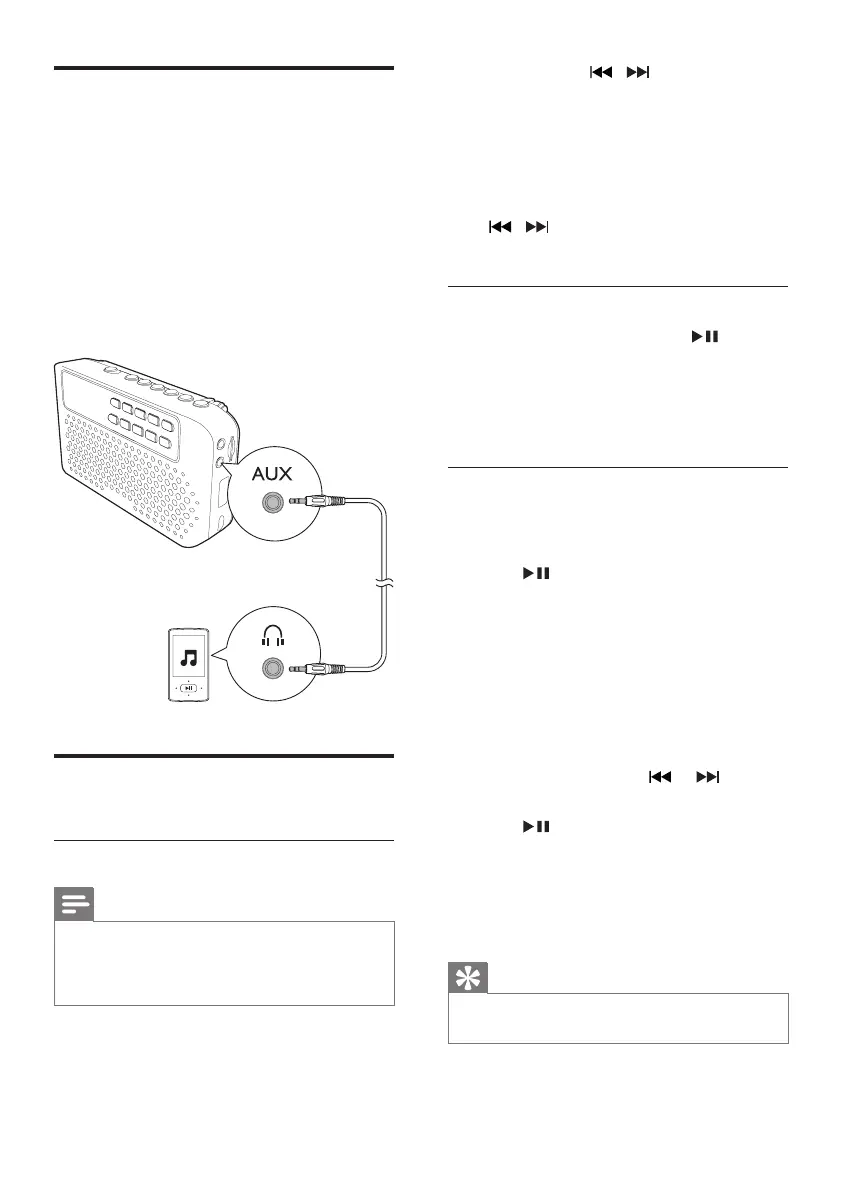
With this speaker, you can also enjoy audio
from an external device such as an MP3 player.
1 Press S repeatedly to select Aux-in source.
2 Connect the supplied Aux-in cable to:
• the AUX socket on the speaker.
• the headphone socket on an external
device.
3 Play audio on the device (see the device's
usermanual).
Listen to FM radio
Tune to FM radio stations
Note
•
Keep the portable speaker away from other electronic
devices to avoid radio interference.
• For better reception, fully extend and adjust the
position of the FM antenna.
1 Press S repeatedly to select FM tuner
source.
2 Press and hold / for two seconds.
» The speaker tunes to a station with
strong reception automatically.
3 Repeat step 2 to tune to more radio
stations.
To tune to a station manually:
Press
/ repeatedlyuntilyoundbetter
reception.
Store FM radio stations automatically
In FM tuner mode, press and hold for two
seconds.
» The speaker stores all the FM radio stations
automaticallyandthenbroadcaststherst
preset radio station.
Store FM radio stations manually
You can store up to 30 FM radio stations.
1 Tune to an FM radio station.
2 Press to activate storing.
3 Select a preset number.
• Tostorethestationintherst9
positions, press the numeric buttons
1- 9 directly;
• To store the station in other positions,
press the two corresponding numeric
buttons (e.g., press 1 and 5 to store
thestationinthe15thchannel);
• You may also press
or to select
a number.
4 Press toconrm.
» The station is stored in the selected
channel.
5 Repeat steps 1 - 4 to store more FM
stations.
Tip
•
To overwrite a preset station, store another station in
its place.



 To Next Page