12
4 Use your
Soundbar
This section helps you use the Soundbar to play
audio from connected devices.
Before you start
• Make the necessary connections described
in the user manual.
• Switch the Soundbar to the correct source
for other devices.
Turn ON and OFF
• When you first connect the unit to the
main socket, the unit will be in STANDBY
mode. The Standby indicator will light up.
• Press the button on the remote control
to switch the main unit ON or OFF.
• Disconnect the main plug from the main
socket if you want to switch the unit o
completely.
Auto wake up
• If a TV or an external device (only for AUX
socket) is connected, the unit will switch on
automatically when the TV or the external
device is switched on.
Auto Standby
The unit automatically turns to Standby mode
after about 15 minutes if the TV or the external
unit is disconnected, switched o.
• To switch the unit o completely, remove
the mains plug from the mains socket.
• Please turn the unit o completely to save
energy when not in use.
Select Modes
1 Press the button repeatedly on the unit
or press the AUX, OPTICAL, HDMI
ARC, BT/Pair, USB buttons on the remote
control to select the desired mode.
The indicator light on the Soundbar will
show which mode is currently in use.
Status
LED State
AUX [AUX/USB] white light is constant on
USB [AUX/USB] white light is blink
BT (Bluetooth)
• Connected
• Connection
[BT] white light is constant on
[BT] white light is blink
OPTICAL [OPTICAL] white light is constant on
HDMI ARC [HDMI ARC] white light is constant on
Select Equalizer (EQ)
Eect
Select predefined sound modes to suit your
video or music.
1 Press the EQ button on the remote
control to select your desired preset
equalizer eects.
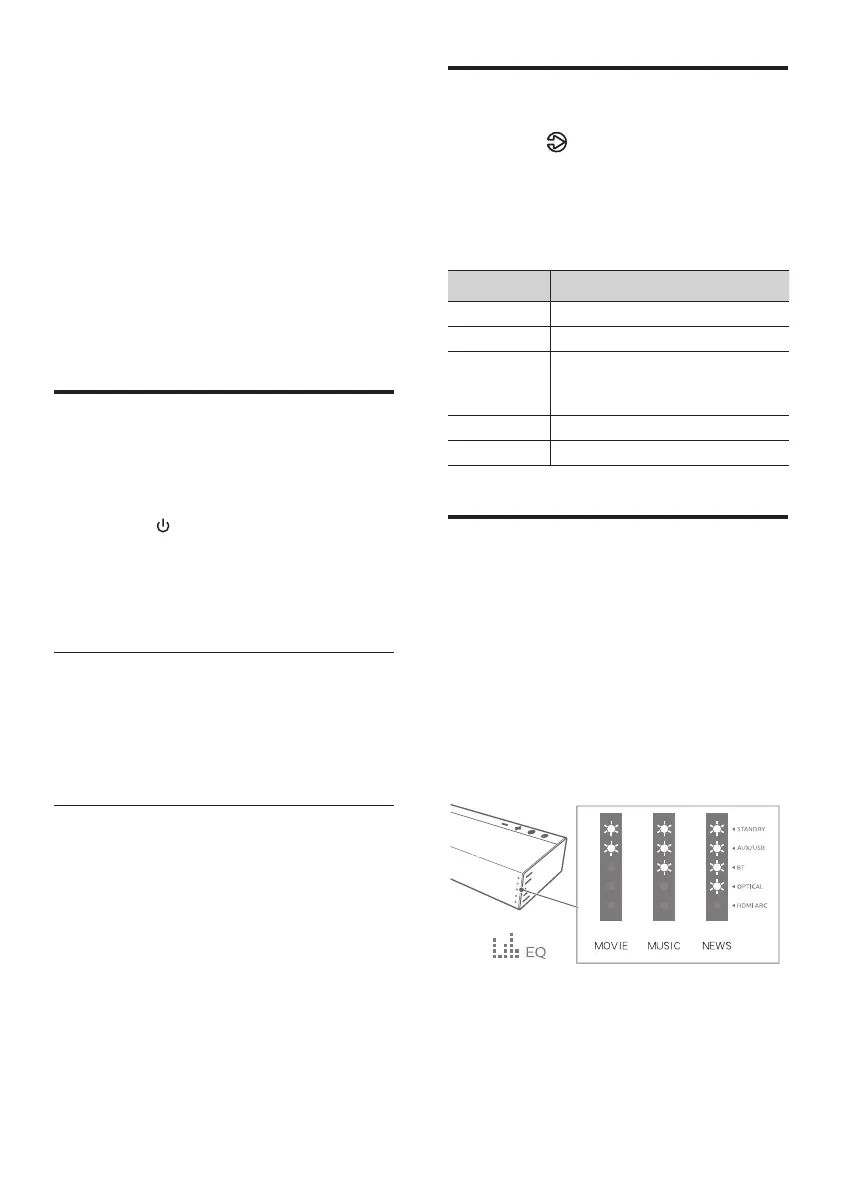
LEDs blink for 3 sec to show current
EQ mode according to the EQ mode
definition (Fig).
Movie: recommended for viewing Movies
Music: recommended for listening to Music
News: recommended for listening to News



 To Next Page