14
Note
• The music streaming may be interrupted by obstacles
between the device and Soundbar, such as wall, metallic
casing that covers the device, or other devices nearby
that operate in the same frequency.
• If you want to connect your Soundbar with another
Bluetooth device, press and hold BT/Pair on the
remote control to disconnect the currently connected
Bluetooth device.
AUX / OPTICAL / HDMI
ARC Operation
Ensure that the unit is connected to the TV or
audio device.
1 Press the button repeatedly on the unit
or press the AUX, OPTICAL, HDMI
ARC buttons on the remote to select the
desired mode.
The indicator light on the Soundbar will
show which mode is currently in use.
Status
LED State
AUX [AUX/USB] Solid white
OPTICAL [OPTICAL] Solid white
HDMI ARC [HDMI ARC] Solid white
2 Operate your audio device directly for
playback features.
3 Press the +/- (Volume) buttons to adjust
the volume to your desired level.
Tip
• While in OPTICAL/HDMI ARC mode, if there’s no
sound output from the unit and the status Indicator
flashes, you may need to activate PCM or Dolby Digital
Signal output on your source device (e.g. TV, DVD or
Blu-ray player).
USB Operation
Enjoy audio on a USB storage device, such as an
MP3 player and USB flash memory, etc.
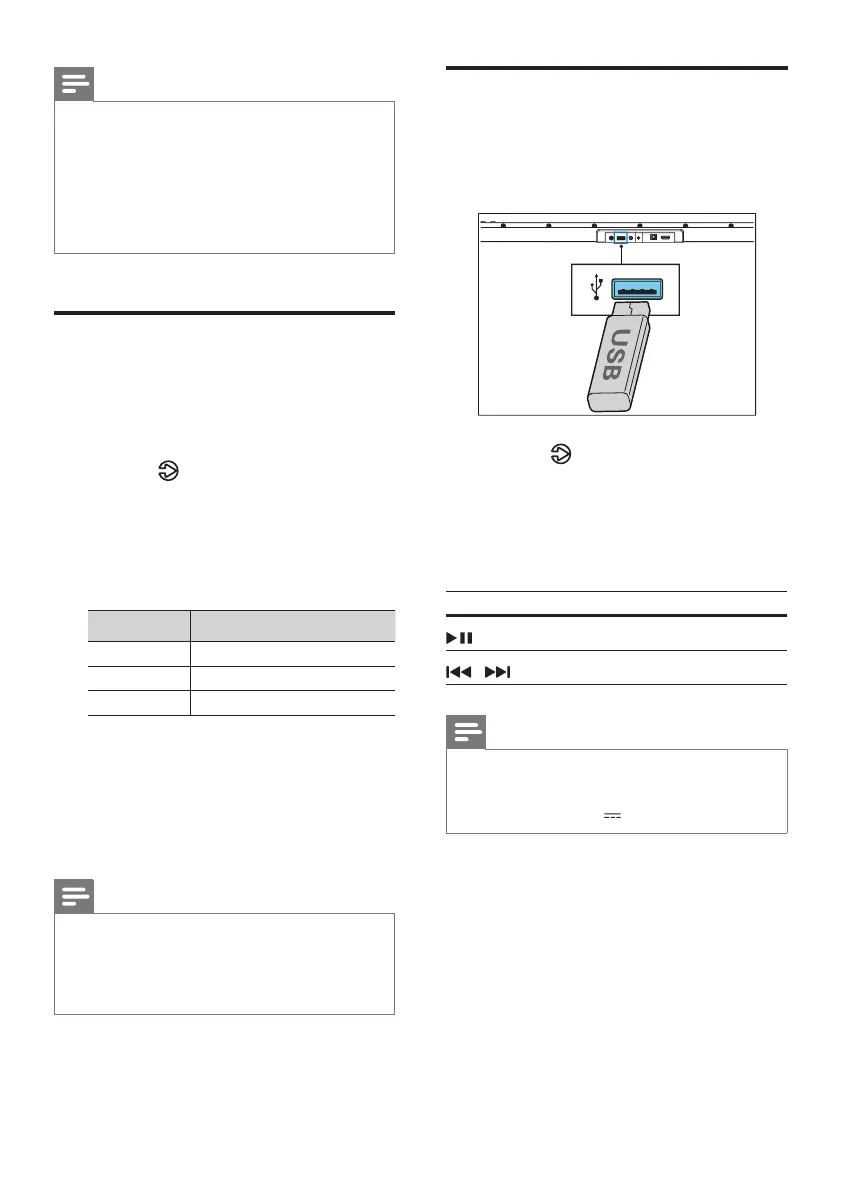
1 Insert the USB device.
2 Press the button repeatedly on the unit
or press the USB button on the remote
control to select USB mode.
[AUX/USB] LED indicator blinks white.
3 During playback:
Button Action
Start, pause or resume play.
/
Skip to the previous or next track.
Tips
• The unit can support USB devices with up to 32 GB of
memory.
• This unit can play MP3 / WAV / FLAC.
• Support a USB port: 5V , 500mA.



 To Next Page