4 EN
Caution
•
Risk of product damage! Make sure that the power
voltage corresponds to the voltage printed on the
back or underside of the clock radio.
• Risk of electrical shock! When you unplug the power
cord, always pull the plug from the socket. Never pull
the cord.
Note
•
3
Get started
Always follow the instructions in this chapter in
The batteries can only back up clock and alarm
settings.
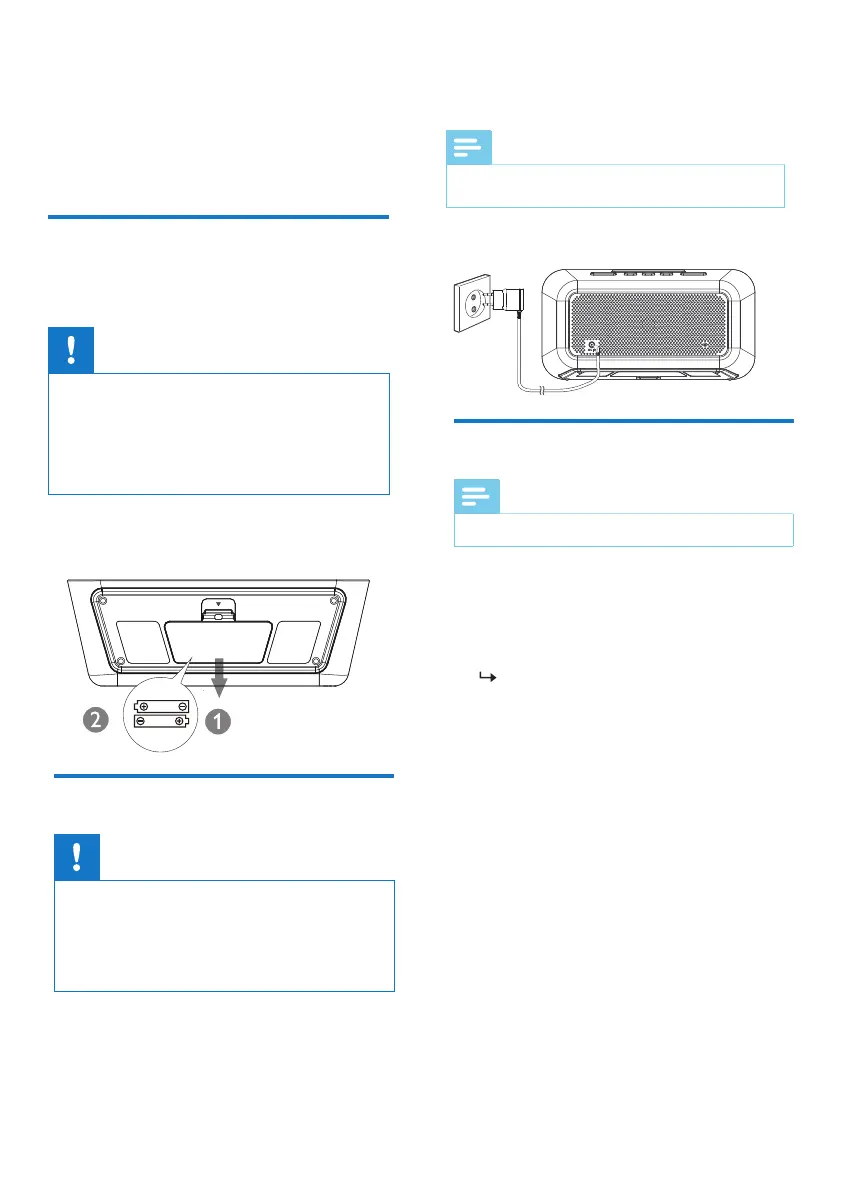
Connect the power adaptor to the wall outlet.
sequence.
Install batteries
Connect power
Caution
• Risk of explosion! Keep the batteries away from heat,
sunshine or re. Never discard batteries in re.
• Batteries contain chemical substances, so they should
be disposed of properly.
• Do not mix battery types: e.g. alkaline with carbon
zinc. Only use batteries of the same type for the set.
The type plate is located at the bottom of the clock
radio.
Insert 2 AAA batteries (not provided) with
correct polarity (+/-) as illustrated.
Set time
Note
• You can only set time in standby mode.
1
In standby mode, press and hold SET TIME
for 2 seconds.
2
Press
HR
to set hour and
MIN
to set
minute, then press to conrm.
SET TIME
The time is set.



 To Next Page