Circuit Description and Abbreviation List
EN 31TE3.1E CA 9.
9.2 FUNCTIONAL DESCRIPTION
This chapter describes the functions of 21” RF TV. The
ST92195C/D MCU in TV part, handle the overall control of the
system.
ST92195 C/D:
• Decodes the serial data from the remote control unit
• Scans the local keyboard
• Controls the OSD
• Exchanges information via the serial I2C bus
• Selects the proper tuner band
• Selects the proper IF and the sound demodulator
• Analog picture controls
• Switches between internal and external audio and video
signals
9.2.1 Tuning
• Frequency Synthesis Tuning system with 62.5kHz
resolution based on PLL technology
• Silent Automatic search tuning based on AFC and IDENT
• Auto Store function to find and store all transmitters (from
44 MHz to 860 MHz )
• ATS Algorithm capability (See country List on 4.2.2
Installation Menu)
• Fine Tuning capability (-4 MHz Û +4 MHz)
• Automatic PAL/SECAM/NTSC recognition both RF and AV
• Automatic sound recognition on program switching
• Suitable for positive and negative modulation
• Selection of 100 programmes (0 ... 99)
• Dark programme switching
• TV channel installation menu
• 5-character program name
• Manual Search and Store capability
• Manual Sort capability
• Plug and Play function
9.2.2 AFC
Controller tries to keep locked to the transmitter by means of
following the AFC signal, which may be effected by the
changes in frequency due to deviations in component ratings.
When a station is detected and stored thereupon is equipped
with the auto-following feature by default. However, the
memorisation after fine-tuning disables auto-following for that
station. In order to enable auto-following, the station must be
tuned again by automatic search.
AFC bit in NVM
0: Auto-following Disabled (Store after fine tune)
1: Auto-following Enabled (Store after auto search)
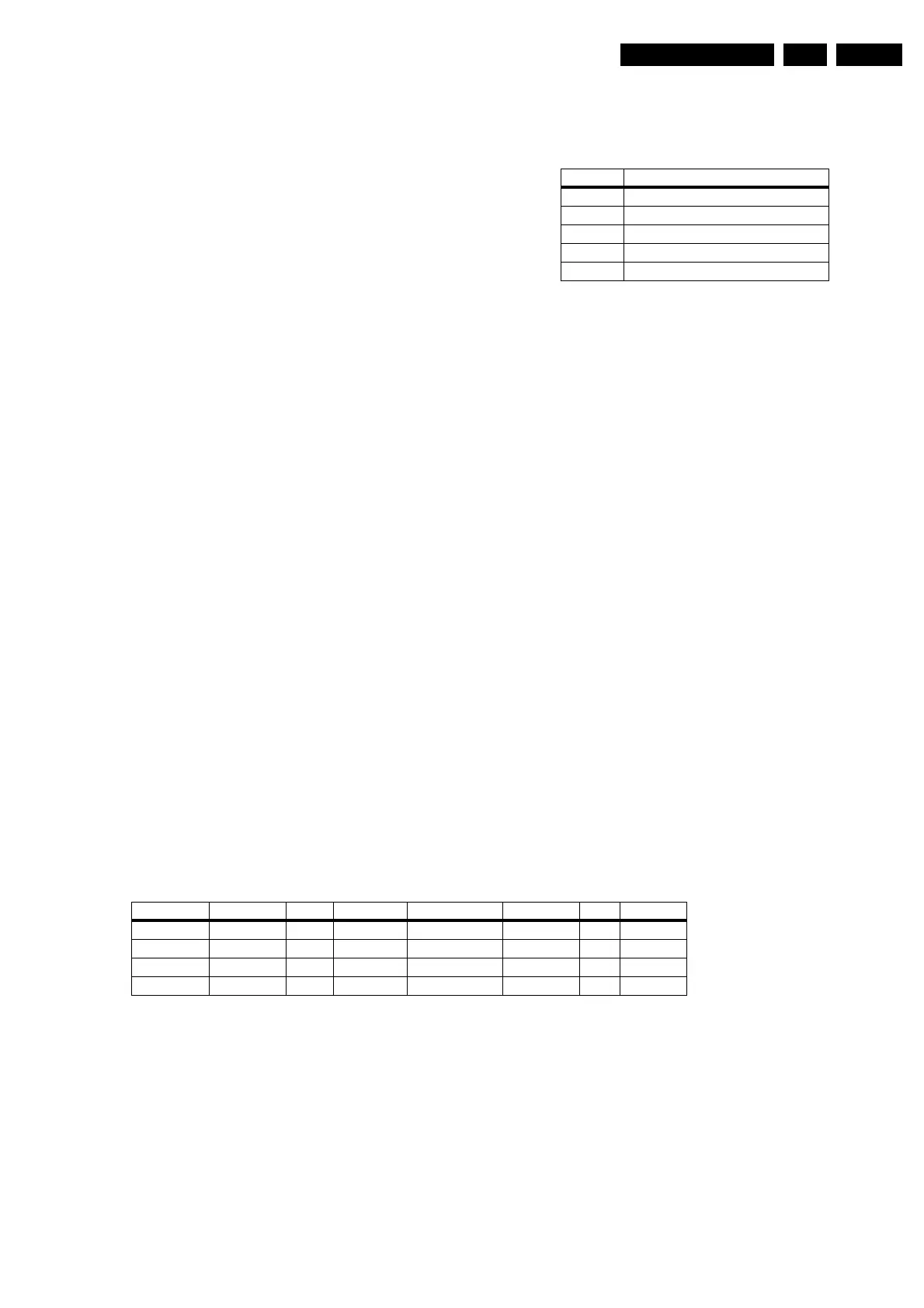
Table 9-1 AFC Reference Values
9.2.3 Picture
Screen Format Selection
2 different formats are available; 4:3, 4:3 Expand. When Clear/
Format key is pressed for the first time an OSD stating the
current screen format is displayed on the screen. In order to
select another screen format this key must be pressed before
the OSD disappears (within 5 seconds).
Picture Control
• Brightness 64 Steps (00 ... 63)
• Colour 64 Steps (00 ... 63)
• Contrast 64 Steps (00 ... 63)
• Sharpness 16 Steps (00 ... 15)
• Colour Temperature
Normal Red (offset), Green (offset
Warm Red (offset + 9), Green (offset + 7)
Cool Red (offset - 10), Green (offset - 7)
• Hue 64 Steps (-32 ... +31)
(Hue control setting is available only for NTSC settings.)
• Noise Reduction On/Off
• Contrast+ On/Off
Smart Picture Modes
5 different Smart Picture Modes (Rich, Natural, Soft,
Multimedia and Personal) are available in RF, AV Modes. User
can select any of these modes or return to the personal
selections. Using the Smart Picture key on the RC unit can
perform selection of different modes or returning to personal
selections. When Smart Picture key is pressed for the first time,
an OSD stating the current mode will be displayed. In order to
select another mode this key must be pressed before the OSD
disappears (within 5 seconds). The last selected mode is
always stored to NVM.
Table 9-2 Smart Picture Mode Settings
AFC Out Frequency
0 -60 kHz < FPLL - F0 < +60 kHz
2 -300 kHz < FPLL - F0 < -60 kHz
3 FPLL - F0 < -300 kHz
4 +60 kHz < FPLL - F0 < +300 kHz
5 +300 kHz < FPLL - F0
Brightness Colour Contrast Sharpness Color Temp NR Contrast+
Rich 32 33 55 14 Cool OFF ON
Natural 26 26 44 8 Normal OFF ON
Soft 24 24 27 7 Normal ON OFF
Multimedia 26 26 50 12 Normal OFF ON


 To Next Page