Instructions for Use | Device Setup
Adding Oxygen 35
4. Connect the flow sensor to the Flow Sensor Cable Connector (4).
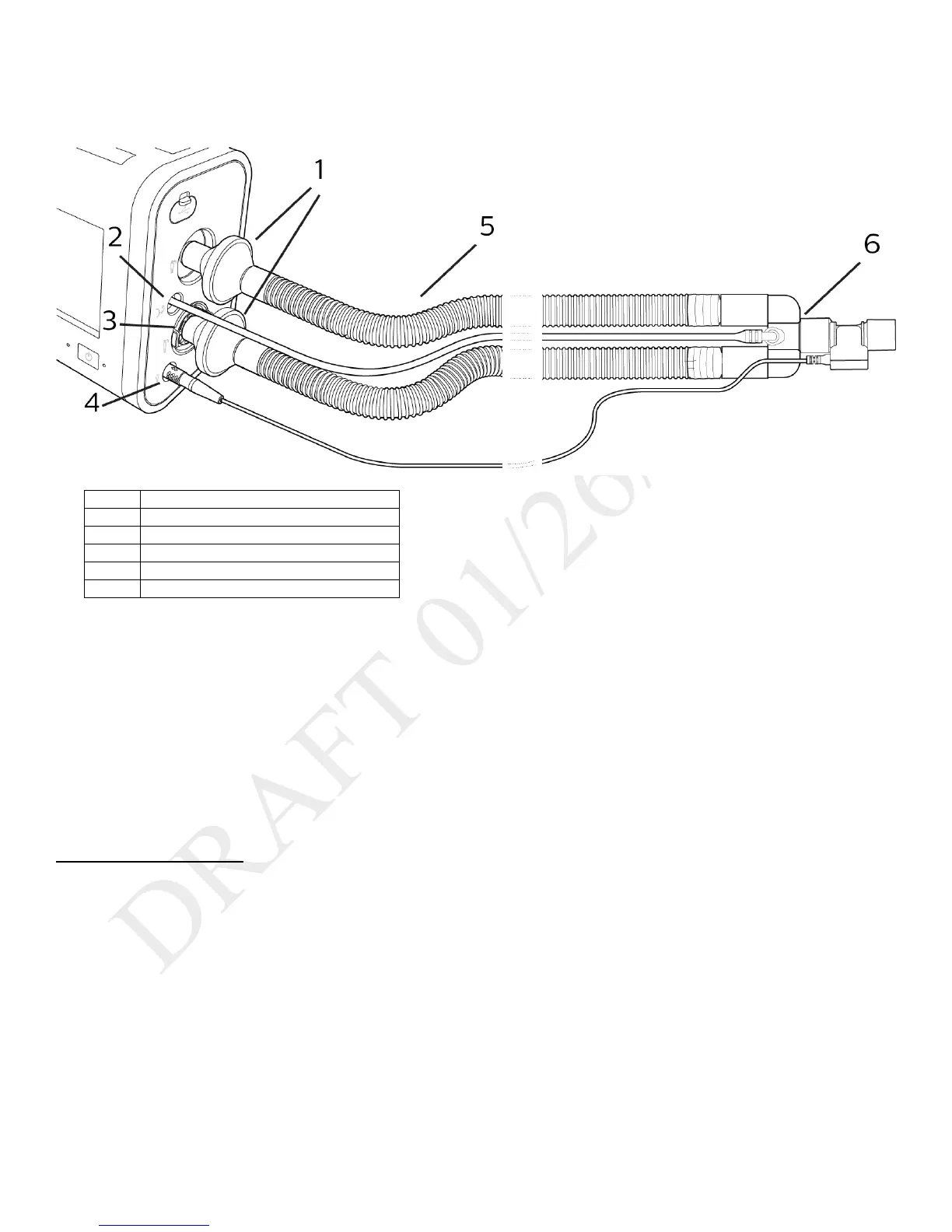
Dual Limb Circuits
Active exhalation valve connection
Flow sensor cable connector
Flow sensor connected to circuit
1. Attach the bacteria filter (1) end of the colored inspiratory tube to the Inspiratory Port.
2. Attach the proximal pressure line (2) to the Proximal Pressure Port.
3. Install the external active exhalation valve (AEV) according to the instructions provided with it (3).
4. Attach the bacteria filter end of the clear expiratory tube to the AEV (3).
5. Attach the flow sensor cable to the flow Sensor Cable Connector (4).
6. Attach the flow sensor to the Y-shaped connector on the circuit (6).
Low Tidal Volume Ventilation
When using volumes between 35 and 50 ml, use the infant/pediatric external flow sensor with either the active flow or dual limb circuits. See the
operating instruction sheets included with those accessories.
Adding Oxygen
High Pressure Oxygen
To ensure accurate oxygen administration and to monitor for the presence of contamination, use an FiO
2
sensor or external oxygen monitor to
verify the oxygen concentration in the delivered gas.
To connect high-pressure oxygen: Connect an oxygen hose to the high-pressure oxygen connector on the back panel, and then connect the other
end of the hose to the source. After you have completed the connection, calibrate the O
2
sensor. See chapter 7, “Device Options, O
2
Sensor
Calibration.” To maintain accuracy, calibrate the oxygen sensor daily.



 To Next Page