Instructions for Use | About Trilogy Evo Universal
Monitoring Window 15
Main Window
The main window contents vary depending on the action you are performing. The main window can show the standby window, prescription
window, monitoring window, and others.
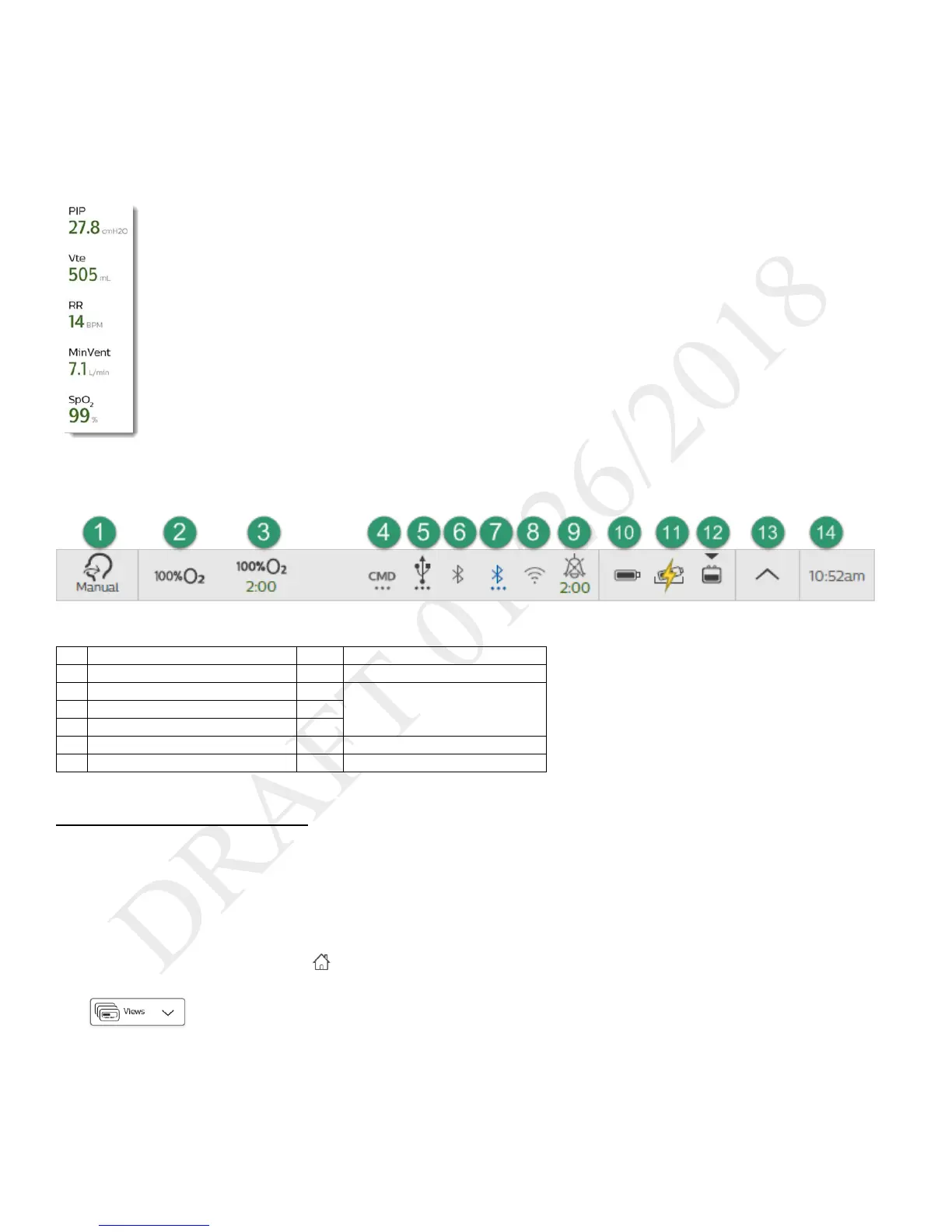
Monitored Parameters Pane
Use the monitored parameters pane to see measured and calculated
values while delivering therapy. These values vary based on the circuit,
therapy mode, and accessory type.
Depending on the accessories you use, values such as SpO
2
appear
during active ventilation and during standby.
Parameters that may appear are:
- PIP: peak inspiratory pressure
- Vte: exhaled tidal volume
- RR: respiratory rate
- MinVent: minute ventilation
- SpO
2
: saturation of peripheral oxygen
- Pulse Rate
- etCO
2
: end tidal carbon dioxide
Status Bar
Use the status bar to monitor device status and the availability of manual therapeutic actions.
Power sources and their status
Monitoring Window
During ventilation, a monitoring window, or home screen, contains information such as measured parameters and battery status. You can select
the type of information you want to see.
Selecting a Monitoring View
To select a monitoring view during ventilation:
1. In the Menu Bar, tap the Home button.
2. In the monitoring window, tap the Views button
3. In the Views menu, tap the type of view you want to use.



 To Next Page