Instructions for Use | Device Options
Data Transfer 69
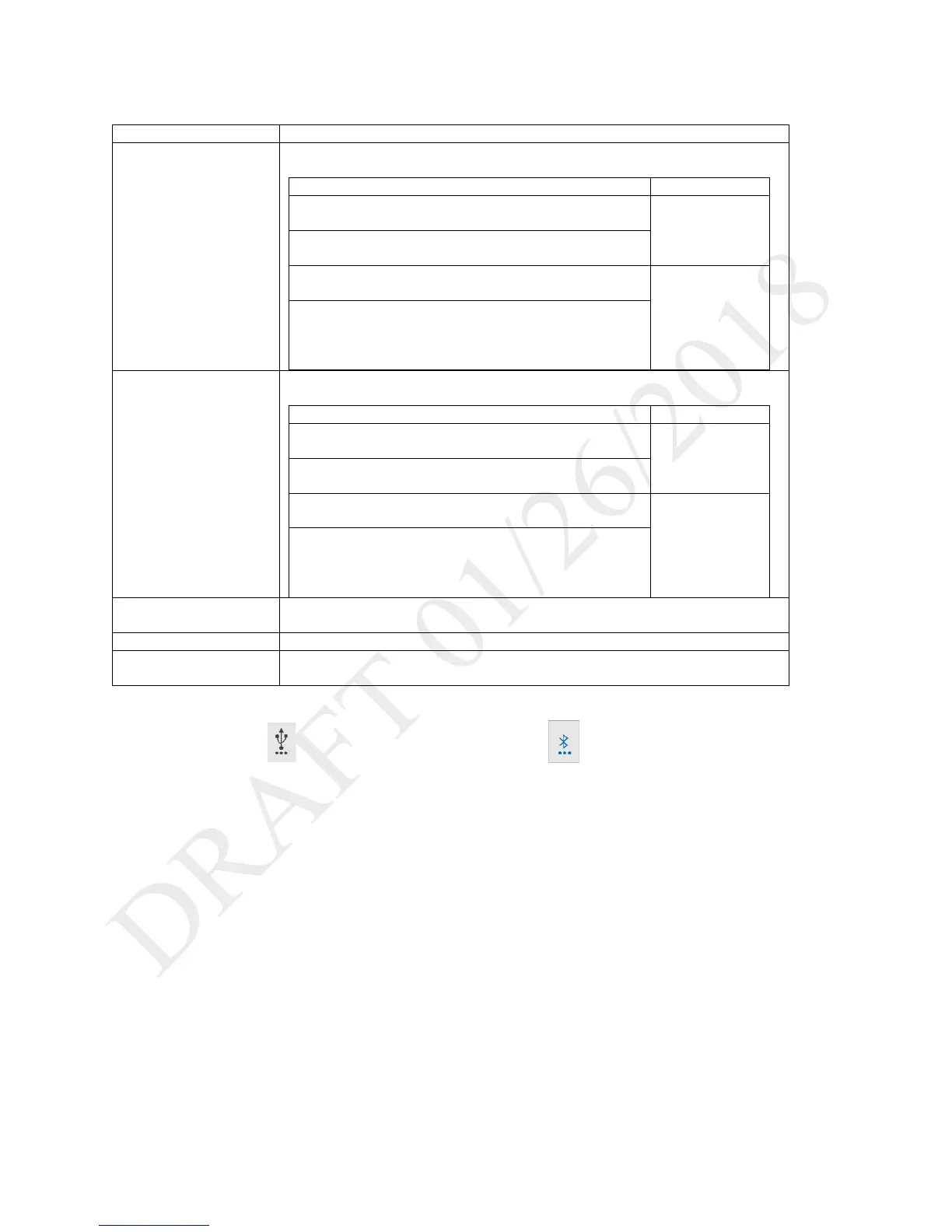
4. In the Data Transfer window, tap the procedure you would like to perform and then follow the prompts on the screen:
Export details about the patient’s therapy to a storage device connected to the USB
port. Data is identified by the device serial number.
Changes to the ventilator, alarms, prescriptions, accessories
and oxygen
6 months
30-second averages of each therapy parameter related to
the therapy provided to the patient
Waveform data including pressure, flow, volume, and total
leak
31 days
- CO
2
monitor data
- Oximeter data
Export details about the patient’s therapy to a storage device connected through
Bluetooth. Data is identified by the device serial number.
Changes to the ventilator, alarms, prescriptions, accessories
and oxygen
6 months
30-second averages of each therapy parameter related to
the therapy provided to the patient
Waveform data including pressure, flow, volume, and total
leak
31 days
- CO
2
monitor data
- Oximeter data
Export the alarm and event logs. If two storage devices are connected, the logs are
saved to the device that was connected first.
Installs prescriptions that were previously exported.
Ensure the version number that you are installing is higher than the current software
version. After installing the update, the system automatically restarts.
As data is transferred, a data transfer icon appears in the Status Bar.
USB Data Transfer Icon Bluetooth Data Transfer icon



 To Next Page