TROUBLESHOOTING AND MAINTENANCE
A
02.9690.0001 A 15 April 2010 67
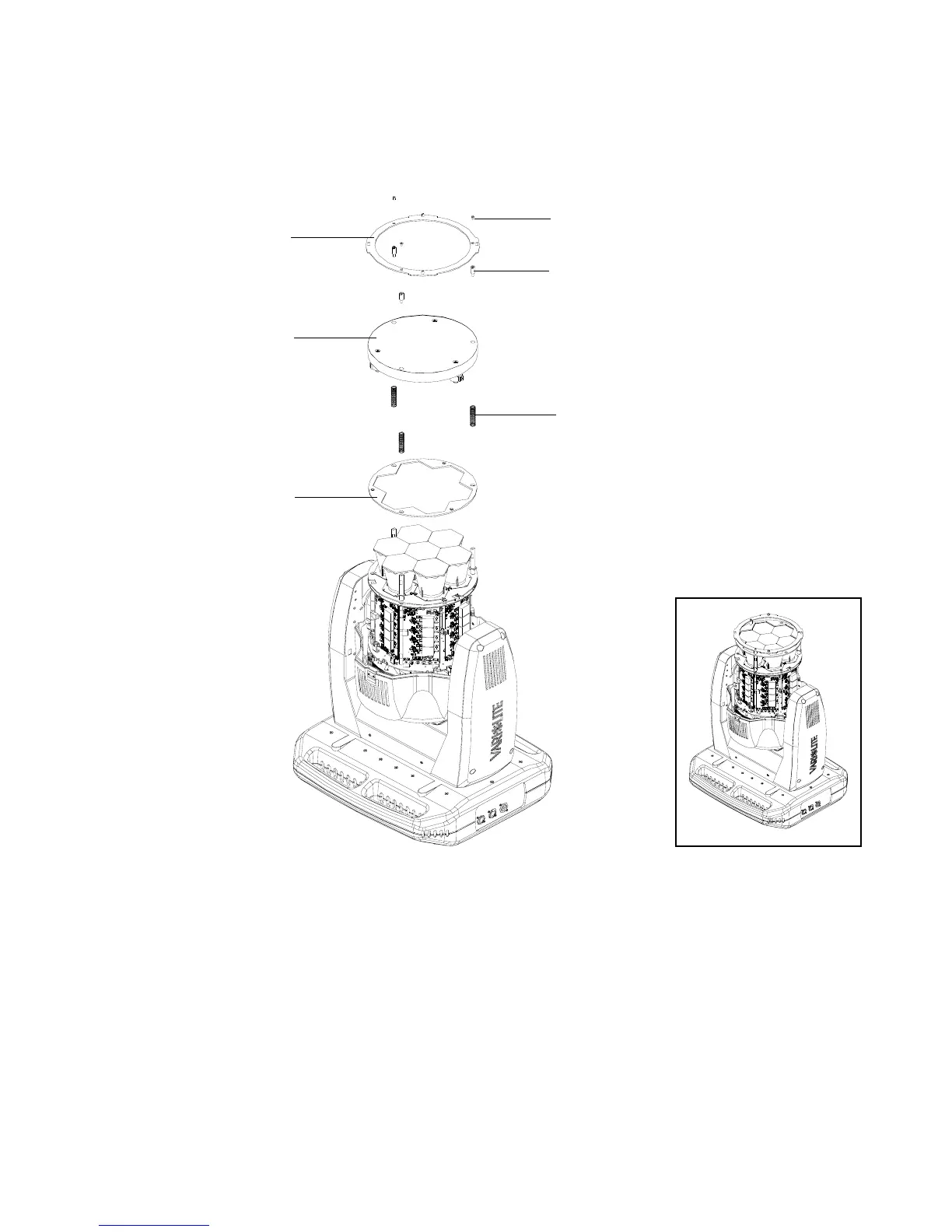
Step 6. At head assembly, as shown in Figure A-4, remove front lens assembly as follows:
Figure A-8: Front Lens Removal
a. Remove three screws securing array lens and lens ring. Set components aside.
b. Note zoom motor wiring and routing. Disconnect wiring from zoom motors.
c. At front lens, loosen and remove and remove three stand-offs. Remove lens and place
lens on a clean, lint free cloth as not to damage or scratch lens.
d. Remove three compression springs and optic ring plate. Set components aside.
Step 7. Reassemble luminaire for fixed beam applications as follows:
Front Lens Ring
6-32 x 1/4" PPB Screws (x3)
Zoom Slide Standoffs (x3)
Array Lens
Compression Springs (x3)
Optics Ring Plate









 To Next Page