VARI❋LITE® - VLX™ WASH LUMINAIRE USER’S MANUAL
44 15 April 2010 02.9690.0001 A
Menu Operation
What Is the Menu System?
The menu system is a programmable set of commands used to configure, address, operate, and test the
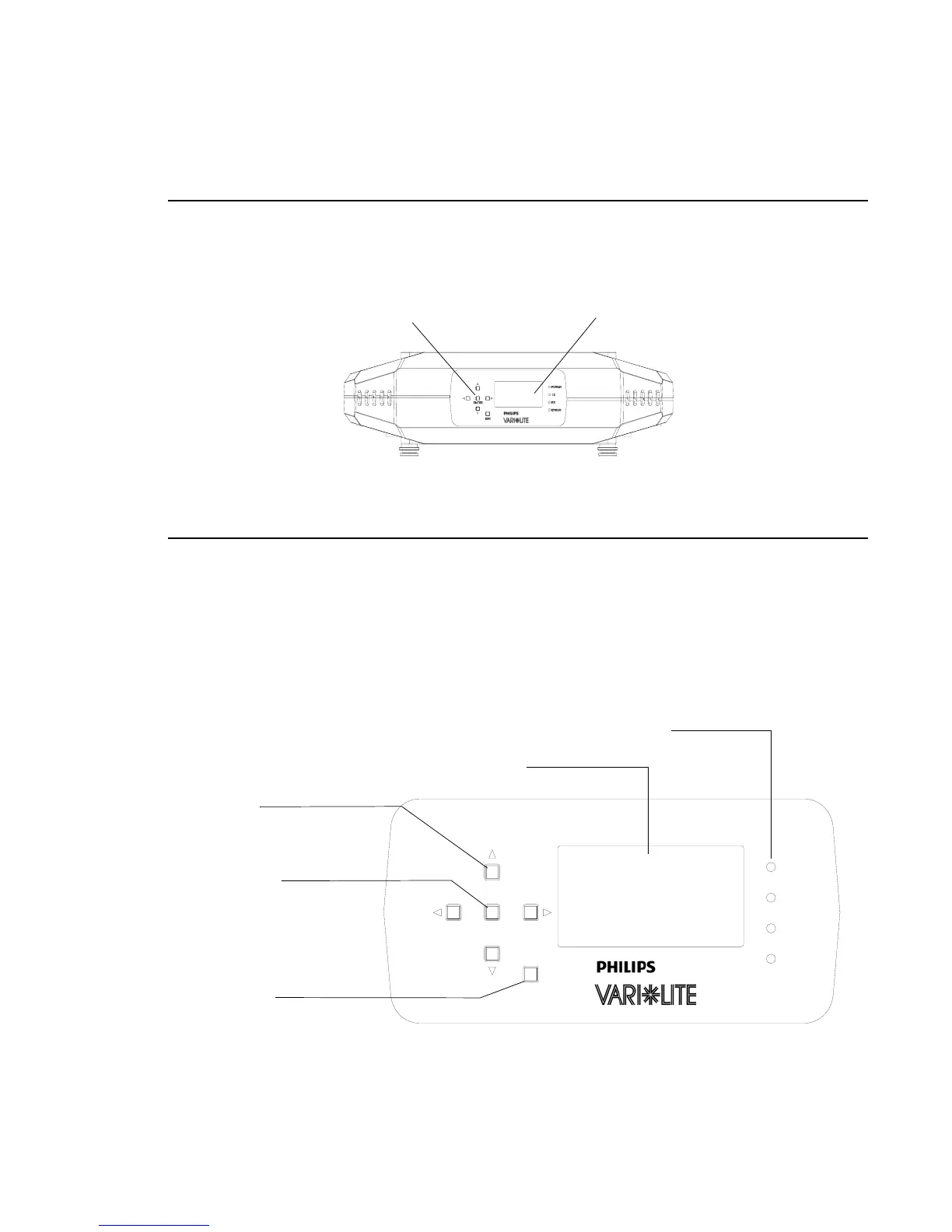
luminaire. The menu system is controlled at the Menu Display available at the enclosure input panel.
Figure 4-1: Menu Display Location
Controls Operation
The menu system is controlled by an ENTER, ESC (Escape), and four Arrow (YUVZ) buttons.
These buttons function as follows:
Figure 4-2: VLX Menu Control
Menu Display
Enclosure Input Panel
ENTER
ESC
POWER
RX
TX
ERROR
Enter Button
Arrow Keys
LCD Display - Displays all Data and Luminaire Settings
Escape (ESC)
(Left/Right/Up/Down)
Luminaire Status Indicators
(Power On, Transmitting DMX, Receiving DMX, Error in Luminaire Operation)










 To Next Page