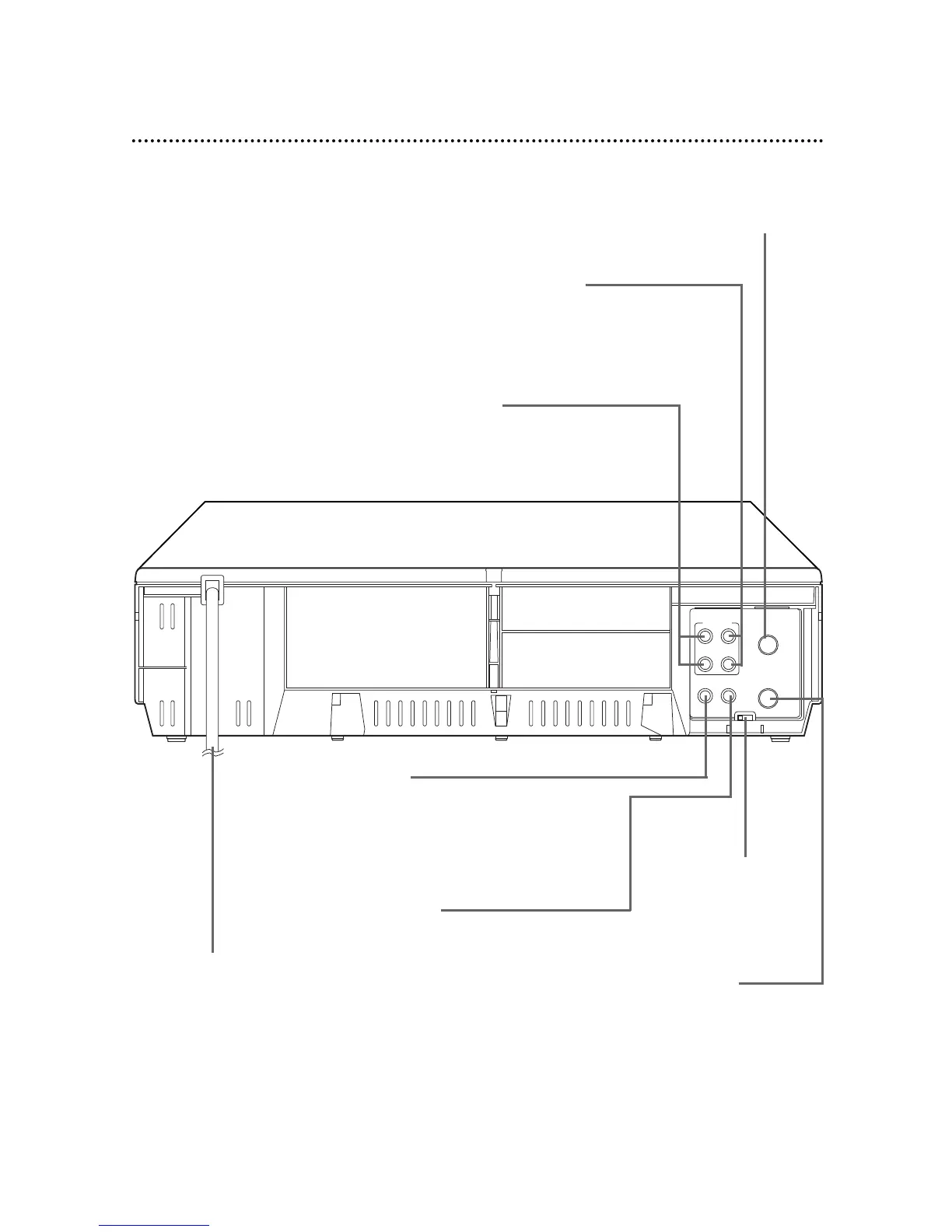
AUDIO IN Jacks
Connect the audio cables coming from
the AUDIO OUT Jacks of a camcorder,
another VCR, or an audio source here.
Details are on page 34.
VIDEO IN Jack
Connect a video cable coming
from the VIDEO OUT Jack of a
camcorder, another VCR, or an
audio-visual source (laser disc
player, digital video disc player,
etc.) here. Details are on page 34.
ANT(enna) IN Jack
Connect your antenna or cable
here. Details are on pages six-10.
CH3/CH4 Switch
Set to channel 3 or 4
to use your TV with
your VCR. Details are
on pages six-nine.
OUT Jack
Use the supplied RF coaxi-
al cable to connect this
jack to the ANTENNA IN
Jack on your TV, Cable
Box, or Direct Broadcast
System. Details are on
pages six-nine.
VIDEO OUT Jack
Connect a video cable going to the VIDEO
IN Jack of a camcorder, another VCR, or an
audio-visual system (monitor, laser disc
player, digital video disc player, etc.) here.
Details are on pages 34 and 40.
AC Power Cord
Connect to a stan-
dard AC outlet to
supply power to the
VCR.
AUDIO OUT Jacks
Connect the audio cables going to the AUDIO IN
Jacks of a camcorder, another VCR, or an audio
system here. Details are on pages 34 and 40.



 To Next Page