34 35
1. In the Stop Mode of recorded file, press STOP button to
select the folder you prefer.
2. Press “ ” or “ ” to select a file to play.
3. Press Play button to start playing, “Record/Play” indicator
blinking green.
4. Press “+” and “-” to adjust volume.
5. Press STOP to stop playing. When the playing is stopped,
press the MENU button for about 2 seconds to return to the
main interface.
6. When playing, press PLAY to pause, “Record/Play” indicator
green light is off, press PLAY again to continue playing.
7. When playing, press “ ” or “ ” for a few seconds to fast
forward or backward.
6 Voice Mode
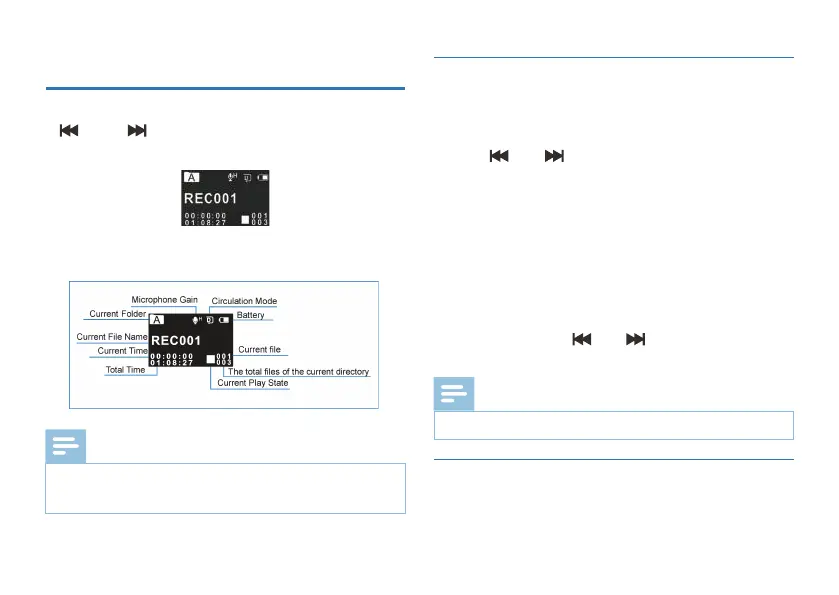
Voice Playback Interface Specification:
On the main interface you can select the voice mode with
“ ” or “ ” buttons, and then shortly press the menu
button to enter. Please refer to the Voice Stop interface below:
After the audio file is selected, press the PLAY button shortly to
When in Stop state, press STOP button to switch between
folders A, B, C, D and MUSIC.
If the earphone is plugged in, the speaker is disabled.
Note
Note
•
•
6.1 Voice Playback
6.2 Playing Modes














 To Next Page