40
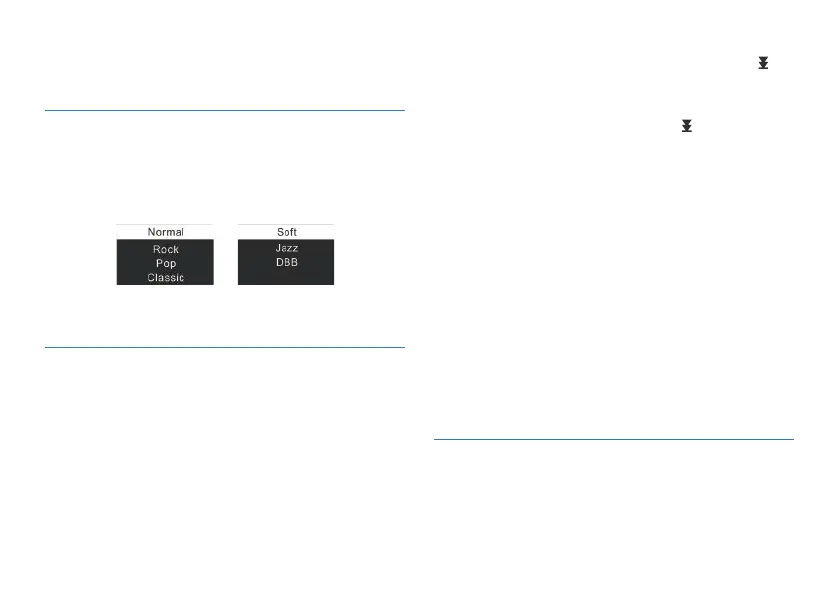
From the Playing Menu select “Equalizer”, press MENU button
to enter. The Equalizer includes: Normal, Rock, Pop, Classic,
Soft, Jazz, and DBB. Refer the below pictures:
From the Playing Menu select the “A-B Replay”, press MENU
button to enter.
From the Playing Menu select the “Replay times”, then press
MENU button to enter Replay times setting. Use “+” and “-” to
adjust times setting. See the below interface picture:
• Set A-B Repeat
• Set the start mark: When playing, shortly press MENU button
to enter Playing Menu, then shortly press “+” or “-” to select
“A-B Replay” mode, then press MENU button to return to
Playing Menu. The “A” in “A-B” on LCD display is blinking, if
7.1.2 Equalizer
7.1.3 A-B Replay
7.1.4 Replay times
Repeat one: repeat continuously the selected track.
Random: Play randomly tracks in selected folder.
In the Equalizer Mode, you can choose mode with “+” and “-”
buttons, press MENU button to confirm.
you need to confirm the start point A , shortly press “ ” to
make confirmation.
• Set the finish mark: After setting mark A, the “B” in “A-B”
on LCD display is blinking, shortly press “ ” to set the finish
mark. The “A-B” is displayed on the LCD. As the replay marks
are fixed on “A-B”, the section between mark A and B will
be replayed for specified times. After playing specified times,
the “A” in “A-B” is blinking to wait for setting mark A, and the
system resumes normal playing. If A-B Replay is not needed,
use any of the following methods to cancel the A-B Replay
mode.
Cancellation:
• Shortly press “PLAY” button to cancel the AB marks and
pause playing.
• Shortly press “STOP” button to cancel the AB marks and stop
playing.
• Shortly press “MENU” button to cancel the AB marks and
continue playing.















 To Next Page