38 39
7 Music mode
From the main interface, you can choose music mode with
“ ”or “ ” buttons, and then shortly press the MENU button
to enter; or in the voice mode, use the switch buttons to switch
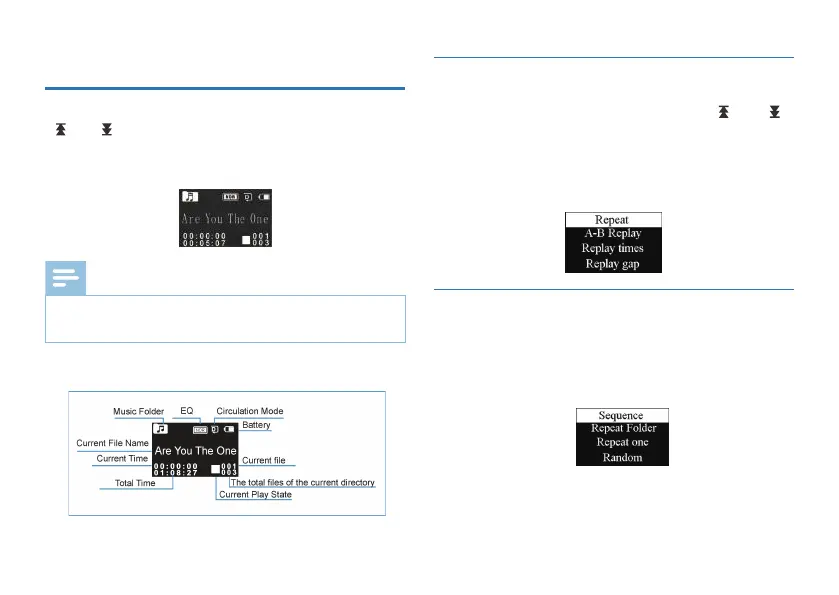
to the music folder. Music playback interface is as follows:
Music playback Interface illustration:
Music files can only be played when they are in “MUSIC”
folder.
Note
•
You can select the track you want by pressing “ ”or“ ”,
then press PLAY to play. When playing, shortly press the MENU
button, the below menu pops up with modes of: Repeat,
Equalizer, A-B Replay, Replay times, Replay gap and Play speed.
See the interface as follows:
7.1 Playing Mode
After selecting a menu, the selected area turns White. As
illustrated, “Repeat” is selected, then press MENU button to
enter the Repeat Selection Menu. You can choose the preferred
repeat as follows:
Sequence: Play sequentially tracks in selected folder. After playing
all the tracks in the current folder, the playing stops automatically.
Repeat folder: Repeat tracks on the selected playlist.
7.1.1 Repeat















 To Next Page