for WP4161/01 and WP4161/91 only
Notes:
Filter cartridge life undo steps:
In the setting status (see the chapter “Filter cartridge life
reset” for the entry method), the “Undo” icon will ash at
this time. Long press the “Undo” button for 3 seconds to
restore the life of all the reset lter cartridges to the status
before reset.
Filter cartridge life reset undo
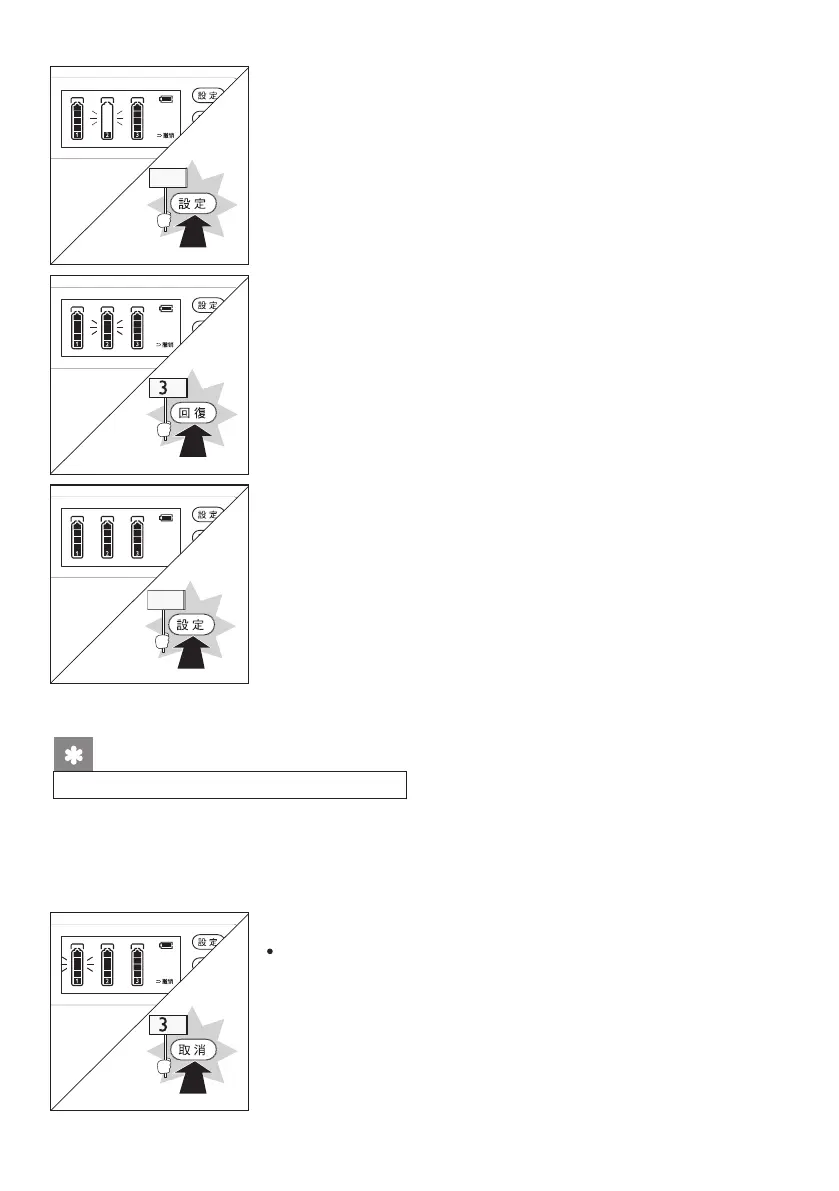
(2) Short press the “Settings” button to select the lter
cartridge which needs to be reset.
(3) After selecting the lter cartridge, the “Filter Element”
icon will ash. Then long press the “Reset” button for 3
seconds to restore the selected lter cartridge to the full
scale display.
(4) Short press the “Settings” button until no “Filter Element”
icon is ashing to exit the setting status.
When resetting the life of the lter cartridge, if wrongly rest a cartridge, the cartridge
life can be restored by undo operation. This operation is invalid under the following
conditions:
(1) Five minutes after resetting the life of the lter cartridge;
(2) Power outage after resetting the life of the lter cartridge.
22
s
s
Short
press
Short
press










 To Next Page