EasyManua.ls Logo

Phoenix 1200 - User Manual

Phoenix 1200
9 pages
Print Icon
To Next Page IconTo Next Page
Loading...
Owner’s Manual — Phoenix 1200
Desiccant Dehumidifier
Installation, Operation & Service Instructions
1
www.UsePhoenix.com • sales@UsePhoenix.comToll-Free 1-800-533-7533
Read and Save These Instructions
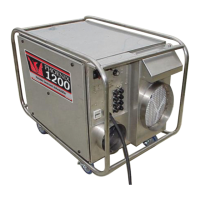
The Phoenix 1200 Desiccant Dehumidifier
•900CFMprocessairow
•300CFMreactivationairow
•12”Inlet
•8”ReactivationOutlet
•Dual8”ProcessOutlets
•230Voltsinglephase:
-Userselectable25or40ampdraw
-Allthestandard120voltoutletsavailablefor
Phoenixairmovers
•Fitseasilythroughdoors,uptruckrampsandinSUVs
•Quietoperation
-Constantrunmodeorhumidistatcontrolledmode
•Hi-Lohandlesforeasylifting
•Externalltersandfusesforsimplemaintenance
•Toughweatherresistantdesign
•OperatingRange-10ºFto120ºF
Specifications subject to change without notice.
TS-449b
02/12
4201LienRd.•Madison,WI53704
PN 4028000
ThePhoenix1200PortableDesiccantDehumidieroffersthe
nestinair-dryingequipment;however,thismachinecanonly
providemaximumserviceifproperlyinstalled,operated,and
maintained.
Thismanualisprovidedtoacquaintyouwiththedehumidier
sothatinstallation,operationandmaintenancecanproceed
successfully.Ultimatesatisfactiondependsonthequalityof
installationandathoroughunderstandingofthisequipment.
Thedehumidierisbuiltaroundtestedengineeringprinciples
andhaspassedathoroughinspectionforqualityof
workmanshipandfunction.

Questions and Answers

  • V
    Vanessa FosterJul 26, 2025
    Why is my Phoenix 1200 running but the humidity rising?
    • C
      Colleen PrinceJul 26, 2025
      If your Phoenix Dehumidifier is running but humidity is rising, it might be due to several reasons: * Excessive unconditioned make-up air: Reduce make-up air. * Leaking ducts and/or air handling equipment outside the controlled space: Seal any leaks. * Access openings to the space not sealed: Close and/or seal them. * The space isn't vapor tight: Seal it with paint and/or a vapor barrier. * Readjust or replace some parts.
  • E
    edwardmillsJul 30, 2025
    What to do if my Phoenix Dehumidifier stopped (fan off, no heater)?
    • V
      Virginia PerezJul 30, 2025
      If your Phoenix Dehumidifier has stopped (with the fan off and no heater), the possible causes and solutions are: * Main power off: Check the line and main power supply. * Control power off: Replace the fuse. If that doesn't work, replace the transformer or close/replace the switch. * Turn down to a lower setpoint. Check and repair or replace parts as required.
  • N
    nicholedrakeAug 3, 2025
    Why is there inadequate or no reactivation heat in my Phoenix 1200?
    • P
      Paul CooperAug 3, 2025
      If there's inadequate or no reactivation heat in your Phoenix Dehumidifier, the possible causes and solutions are: 1. Element burnout: Replace the element. 2. Low voltage: Correct the power supply. 3. Faulty control elements: Check, repair, or replace them.
  • T
    Trevor WoodAug 8, 2025
    What causes inadequate air flow in a Phoenix 1200?
    • A
      Andrew MitchellAug 8, 2025
      Inadequate airflow in your Phoenix Dehumidifier can be caused by: * Excessive static pressure loss: Clean or replace parts. * Obstructions: Remove any obstructions. * Media issues: Remove and replace the media.
  • W
    wmelendezAug 12, 2025
    What to do if the fan is off but the heater functions in my Phoenix Dehumidifier?
    • O
      Oscar GordonAug 12, 2025
      If the fan is off but the heater is still functioning in your Phoenix Dehumidifier, consider these potential issues: * Blown motor fuse: Replace the control circuit fuse. * Bad contactor: Repair or replace it. * Burned out motor: Repair or replace it. * Fan motor failures: Repair or replace as required.
  • P
    Philip AguirreAug 16, 2025
    What causes air leakage in Phoenix 1200 air seals and gaskets, and how to fix it?
    • S
      Shane CastroAug 16, 2025
      If you have air leakage into your Phoenix dehumidifier through the air seals and gaskets, or if air is bypassing media or leaking seals, here's what to do: * Air leakage into dehumidifier: Replace the panel gaskets and seals. * Air bypassing media or leaking seals: Check the media position and replace the seals.
  • C
    Christopher GainesAug 20, 2025
    What causes ineffective desiccant media in a Phoenix Dehumidifier?
    • D
      Daniel AyalaAug 20, 2025
      If the desiccant media in your Phoenix Dehumidifier is ineffective, it could be due to: * Media drive failure: Repair or replace parts. * Clean or replace rotor.

Summary

Phoenix 1200 Desiccant Dehumidifier Specifications

Power Specifications

Details the electrical power requirements and options for the unit.

Water Removal Capacity

Specifies the unit's water removal rate and conditions.

Blower Airflow Rates

Lists the process and reactivation airflow volumes.

Operating Temperature Range

Defines the environmental temperature limits for operation.

Ductwork Options

Outlines available configurations for inlet and outlet ducts.

Warranty Information

States the warranty period and terms for the dehumidifier.

Physical Dimensions

Provides the height, width, and depth of the machine.

Popular Accessories

Lists commonly used accessories and replacement parts.

Understanding Dehumidifier Operation

Principle of Operation

Explains how the desiccant process removes moisture from air.

Installation Instructions

Initial Inspection

Guides on checking the unit for shipping damage.

Machine Placement

Provides instructions for positioning the unit before operation.

Electrical Connections

Details necessary electrical hookups and safety precautions.

Duct Work Requirements

Emphasizes the need for air and vapor-tight duct connections.

Operating and Start-Up Procedures

Airflow Management

Explains the unit's two distinct process airflow streams.

Desiccant Wheel Rotation

Describes the mechanism for rotating the desiccant rotor.

Manual Operation

Guides on running the unit continuously.

Automatic Operation

Instructions for operating the unit via humidistat control.

Controls and Maintenance

Make-Up Air Vent

Instructions for utilizing the make-up air vent.

Unit Controls Overview

Details the control switch, humidistat, and run lights.

General Maintenance

Recommends periodic inspections of components.

Cabinet and Filter Care

Instructions for accessing panels and maintaining filters.

Fan and Motor Maintenance

Guidance on cleaning fan blades and checking motor.

Drive Motor and Seals

Drive Motor and Belt

Details maintenance for the drive motor and belt tension.

High-Temperature Seals

Instructions for inspecting and replacing seals.

Desiccant Media Care

Information on desiccant media life and cleaning.

Dehumidifier Service and Troubleshooting

Desiccant Rotor Removal

Step-by-step guide for removing the desiccant rotor.

Changing Seals

Procedure for replacing seals on the desiccant rotor.

Installing Seals

Instructions for fitting and installing new seals.

Troubleshooting Guide

Lists common problems, probable causes, and corrective actions.

Service Parts List

Wiring Diagram

Phoenix 1200 Desiccant Limited Warranty

Phoenix 1200 Specifications

General IconGeneral
BrandPhoenix
Model1200
CategoryDehumidifier
LanguageEnglish

Related product manuals