4
www.UsePhoenix.com • sales@UsePhoenix.comToll-Free 1-800-533-7533
3 Maintenance
3.1 Air Filter
The Phoenix 200 MAX is equipped with a pleated fabric air
lter that must be checked regularly. The standard lter
is a MERV-11 high efciency lter. Operating the unit with
a dirty lter will reduce the dehumidier’s capacity and
efciency and may cause the compressor to cycle off and on
unnecessarily on the defrost control.
The lter can generally be vacuumed clean several times
before needing replacement. Replacement lters can be
ordered from the factory or purchased locally if available. DO
NOT operate the unit without the lter or with a less effective
lter as the heat exchange coils inside the unit could become
clogged and require disassembly to clean.
3.2 Storage
There are two issues to consider when the Phoenix 200 MAX
is stored between uses and both pertain to the water trapped
in the unit: damage caused by freezing or biological growth.
The effect of the trapped water can be greatly reduced if
precautions are taken to remove as much as possible before
storage.
1. Use the pump purge switch (see Sec. 2.7 & Fig. 4) to
reduce the water level in the reservoir.
2. Stretch the hose at to drain it completely. Walk under
out of the hose to open end.
If the unit will not be exposed to freezing temperatures, an
alternative to reduce biological growth is to ush the unit
with a bio-fungicide that is approved for use with copper,
aluminum and polyethylene. To ush:
1. Run the hose to a drain.
2. Plug in the unit but do not turn it on.
3. Remove the air lter. Slowly pour a quart of the chemical
through the heat exchanger
4. Hold in the pump purge switch to reduce the water level
in the reservoir.
5. Flush with water.
4 Service
CAUTION: Servicing the Phoenix 200 MAX with its high
pressure refrigerant system and high voltage circuitry
presents a health hazard which could result in death,
serious bodily injury, and/or property damage. Only
qualified service people should service this unit.
4.1 Warranty
A warranty certicate has been enclosed with this unit;
read it before any repair is initiated. If a warranty repair is
required, call the factory rst at 1-800-533-7533 for warranty
claim authorization and technical assistance.
4.2 Technical Description
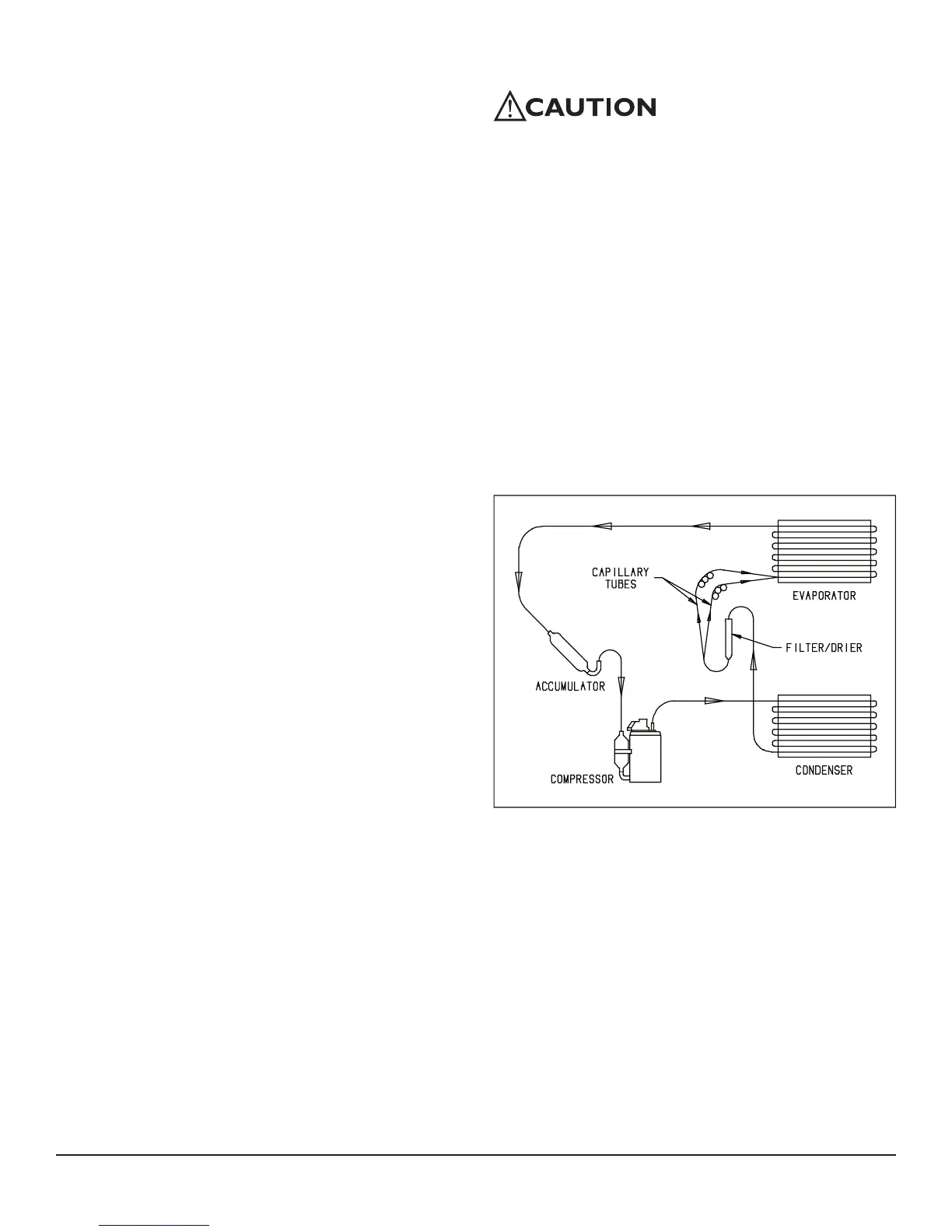
The Phoenix 200 MAX uses a refrigeration system similar
to an air conditioner’s to remove heat and moisture from
incoming air, and to add heat to the air that is discharged
(see Fig. 2).
Hot, high pressure refrigerant gas is routed from the
compressor to the condenser coil (see Figure 2). The
refrigerant is cooled and condensed by giving up its heat
to the air that is about to be discharged from the unit. The
refrigerant liquid then passes through a lter/drier and
capillary tubing which cause the refrigerant pressure and
temperature to drop. It next enters the evaporator coil where
it absorbs heat from the incoming air and evaporates.
The evaporator operates in a ooded condition, which means
that all the evaporator tubes contain liquid refrigerant during
normal operation. A ooded evaporator should maintain
constant pressure and temperature across the entire coil,
from inlet to outlet.
Figure 2: Refrigeration system of Phoenix


 To Next Page