1
Appendix Apéndice
DFX2000
APPLICATION APLICACIÓN
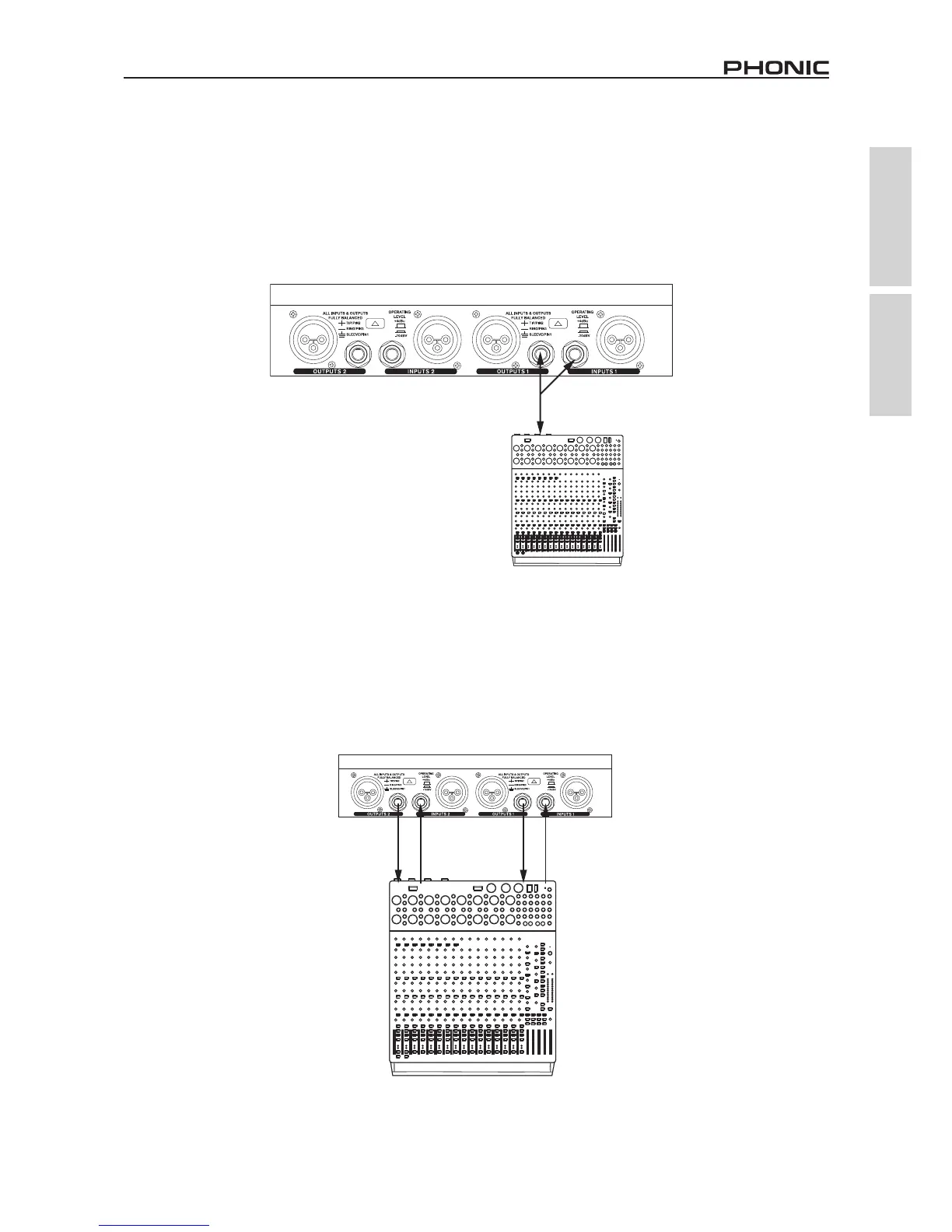
Insert Application
Insert a Y cord (tip=send, ring=return, sleeve=ground) into your mixer's insert point, and connect the corresponding jacks on the other
end into the RISC2024P's input and output jacks. The output mode of the RISC2024P should be set to "Internal."
Insertar Aplicación
Inserte el cable Y (tip=envío, ring=retorno, sleeve=tierra) en el punto de inserción de su mezcladora, y conecte los jacks
correspondientes en el otro extremo en los jacks de entrada y salida de RISC2024P. El modo de salida de RISC2024P debería estar
puesto en “Interno.”
Auxiliary Device
Use the RISC2024P as an auxiliary device by connecting your mixer’s AUX or EFX outputs to the RISC’s inputs, and the RISC’s output
jacks to your mixer’s AUX return jacks. Set the device’s output mode to “External” when using this conguration.
Dispositivo Auxiliar
Utilice el RISC2024P como un dsipositivo auxiliar conectando las salidas de AUX o EFX de su mezcladora a las entradas de RISC, y
los jacks de salida de RISC a jacks de retorno AUX de su mezcladora. Setée el modo de salida de dispositivo a “Externo” cuando se
usa esta conguración.


 To Next Page