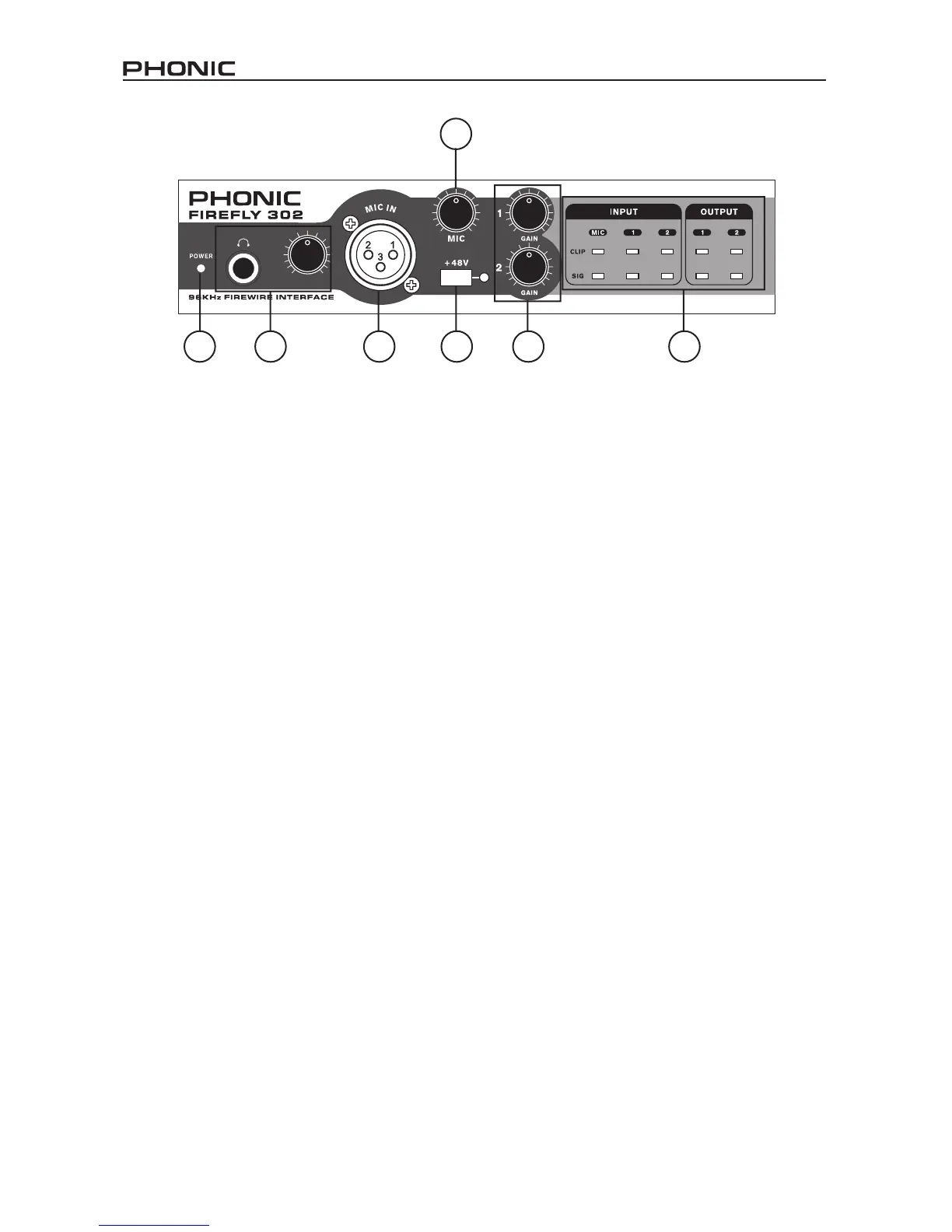
Front Panel Description
1. Power LED Indicator
When you connect the DC power converter
and change the power switch to the DC IN
(or BUS, if using the 6-pin FireWire con-
nector) position, the unit will be powered
and the front power LED will be illuminated
giving you an indication that your FireFly is
on and running.
2. Headphone Output Jack and Control
All the audio signals that are mixed on
computer can be monitored with the Head-
phone output. You can also control this
level with the corresponding level control.
3. XLR Microphone Connector
This is a balanced microphone XLR 3-pin
connector, which you can use to connect
dynamic or condenser microphones.
Phantom power may be applied to these
connectors to allow all condenser or ribbon
microphones to be connected.
4. Mic Gain
Turn this knob clockwise to increase the
Microphone input’s gain. You have 44dB
of possible gain with this knob, so please
take care when applying gain to ensure Mic
Clip LED does not light up.
5. Gain 1 and 2
This knob controls the input gain for the
RCA and 1/4” plug input jacks located
on the rear panel. Turn then clockwise to
increase the signal level gain or turn them
counterclockwise to lower the input levels.
Gain 1 controls the Analog In RCA 1 and
1/4” TRS 1 input jacks, and Gain 2 controls
the Analog In RCA 2 and 1/4” TRS 2 input
jacks. Each gain control is independent so
you can easily match your input levels.
6. +48V Phantom Power
Pushing this button will activate +48V of
phantom power on the microphone input,
allowing users to connect condenser
microphones, ribbon microphones, or
devices that need +48V power to work
properly. If you are not sure if your mic
requires phantom power, please refer to
the microphone’s owner’s manual.
7. Sig / Clip Indicators
These LED indicators give users an idea of
when their analog and mic inputs and out-
puts are receiving a signal (sig) and when
that signal reaches high peaks just prior
to the signal being dynamically clipped,
which may cause undesirable effects to
your audio integrity (clip).
1
2 3
4
6 5
7


 To Next Page