14
4.0 CONTROLS
4.1 FRONT PANEL
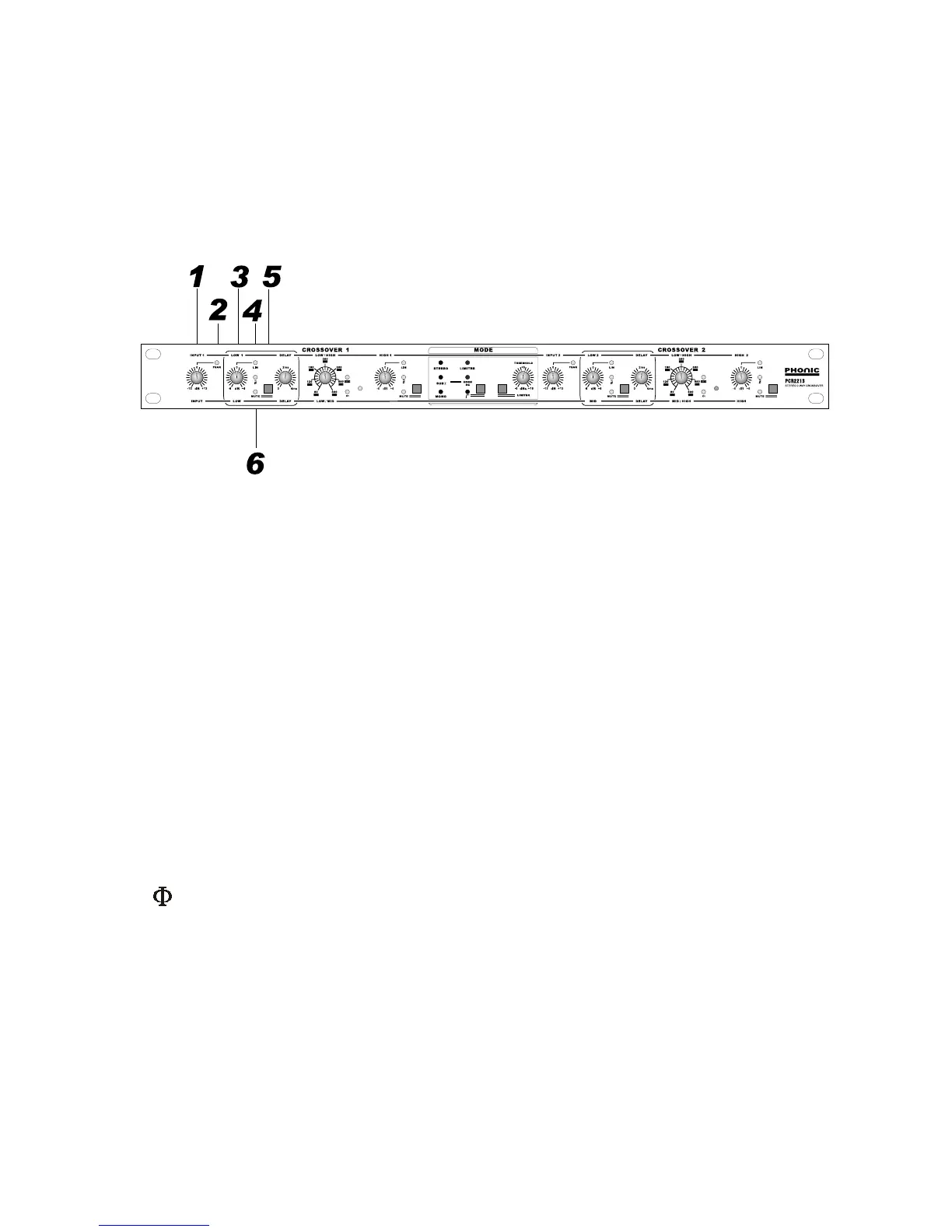
The front panel is printed with dual color, the yellow line above the knobs represents the function in stereo 2-
way mode. The white line below the knobs represents the function in mono 3-way mode.
The center part with white background represents general functions effective to both channels.
11
11
1. INPUT level control:
Two INPUT level controls (+/-12 dB) match the sensitivity of the PCR2213's inputs to any source. When in
mono 3-way mode, only the channel 1 input level control is effective as printed at the bottom of the knobs.
22
22
2. PEAK
Each input has an associated PEAK LED to indicate peaking signal. Bring down the level control supposing
the peak led stays on. Keep it at very rare flashing at all possible.
33
33
3. LOW level control:
These 2 knobs control the output level (+/-6 dB) of LOW portion for the user to set proper level in association
with HIGH level controls [10]. When in mono 3-way mode, the channel 1 LOW is the LF, and the channel 2
LOW is the MF as printed at the bottom of the knobs.
44
44
4. LIM
This led indicate the output limiter is triggered.
55
55
5.
This led indicate the associate phase invert button [20] on the rear panel is pressed.
66
66
6. MUTE:
There are 4 muting push switches next to the 4 outputs to mute the associate output. This is very convenient
during system alignment. Always start the alignment by muting all the outputs, and un-mute the HF first. In
case of wrong wiring the LF signal to HF amplifiers and drivers, this practice lets you notice the mistake without
blow out all your valuable horn drivers.
All these 4 switches incorporate a LED to indicate engagement.


 To Next Page