15
77
77
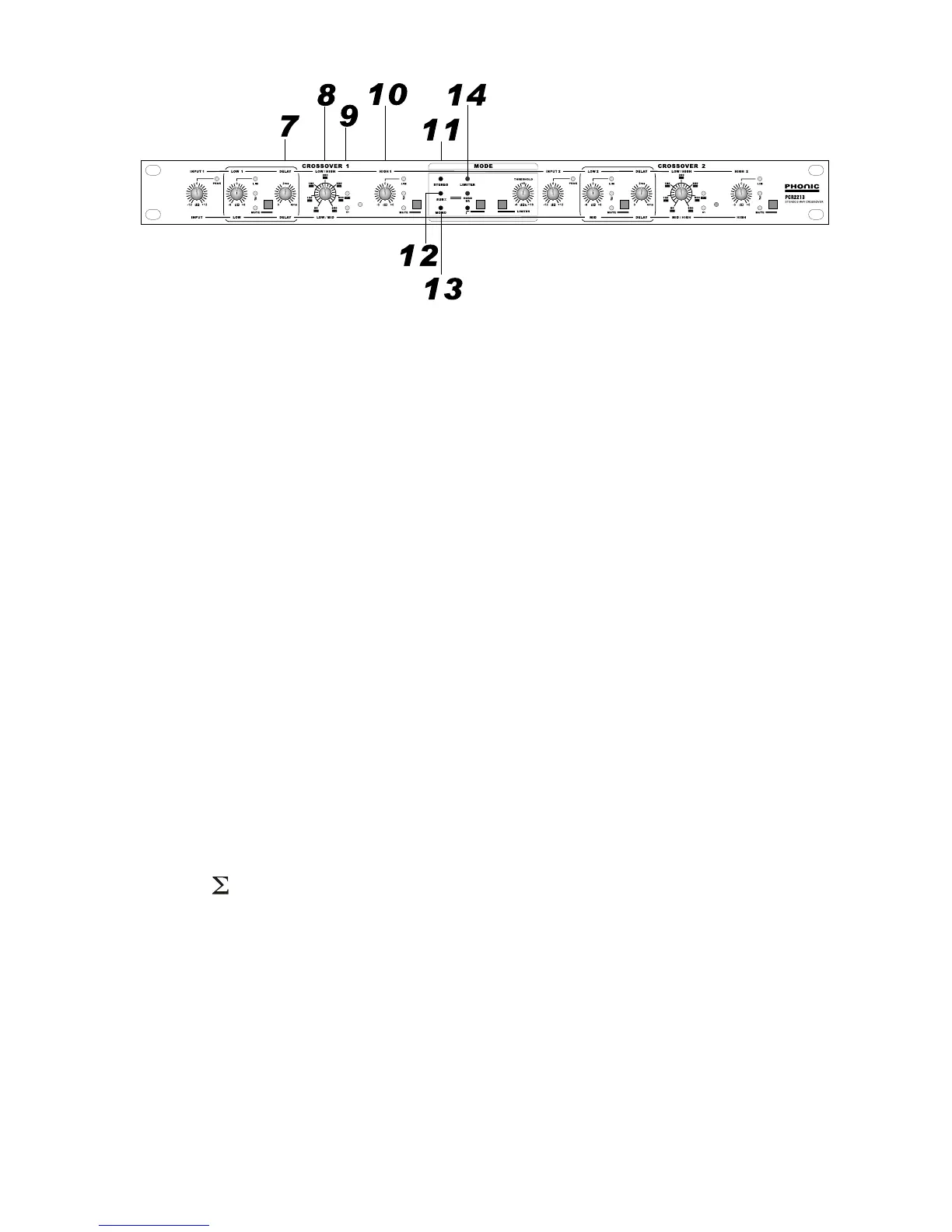
7. DELAY control
These 2 knobs adjust the signal delay of LF portion. The delay time is between 0~4msec, equal to 120cm to
compensate the offset between HF horn and LF driver.
88
88
8. CROSSOVER 1, CROSSOVER 2
These are the precision crossover frequency control knobs to set the crossover points. The crossover fre-
quency not only depends on this pot but also the range push switch [9] next to the pot. There are 2 range, x1
and x10. The x1 range is printed with white number, and the x10 range is printed with black number on white
box.
When in mono 3-way mode, the crossover 1 set the crossover frequency of low/mid, and the crossover 2 set
the crossover frequency of mid/high as printed at the bottom of the knobs.
99
99
9. RANGE
The crossover frequency range is cut into 2 for more precision control. 80 to 800Hz is the x1 range, and 800Hz
to 8KHz is the x10 range. 2 LED are incorporated to show the selected range.
1010
1010
10. HIGH
These 2 knobs control the output level (+/-6 dB) of HIGH portion for the user to set proper level in association
with LOW level controls [3]. When in mono 3-way mode, the channel 1 HIGH is not used, and the channel 2
HIGH is the HF as printed at the bottom of the knob.
1111
1111
11. STEREO
This led indicates the unit is in stereo mode. The mode is set by [24] in the rear panel.
1212
1212
12. SUB
This led indicates the summing of the low portions of both channels. This mode is set by [23] in the rear panel.
This mode will be disengaged in mono mode automatically.
1313
1313
13. MONO
This led indicate the unit is in mono mode. The mode is set by [24] in the rear panel.
1414
1414
14. LIMITER ON
This led indicates the limiters of the 4 outputs are on which is activated by button[17].


 To Next Page