PHONIC CORPORATIONPage 6
CHANNEL STRIP DESCRIPTION
CHANNEL STRIP DESCRIPTION
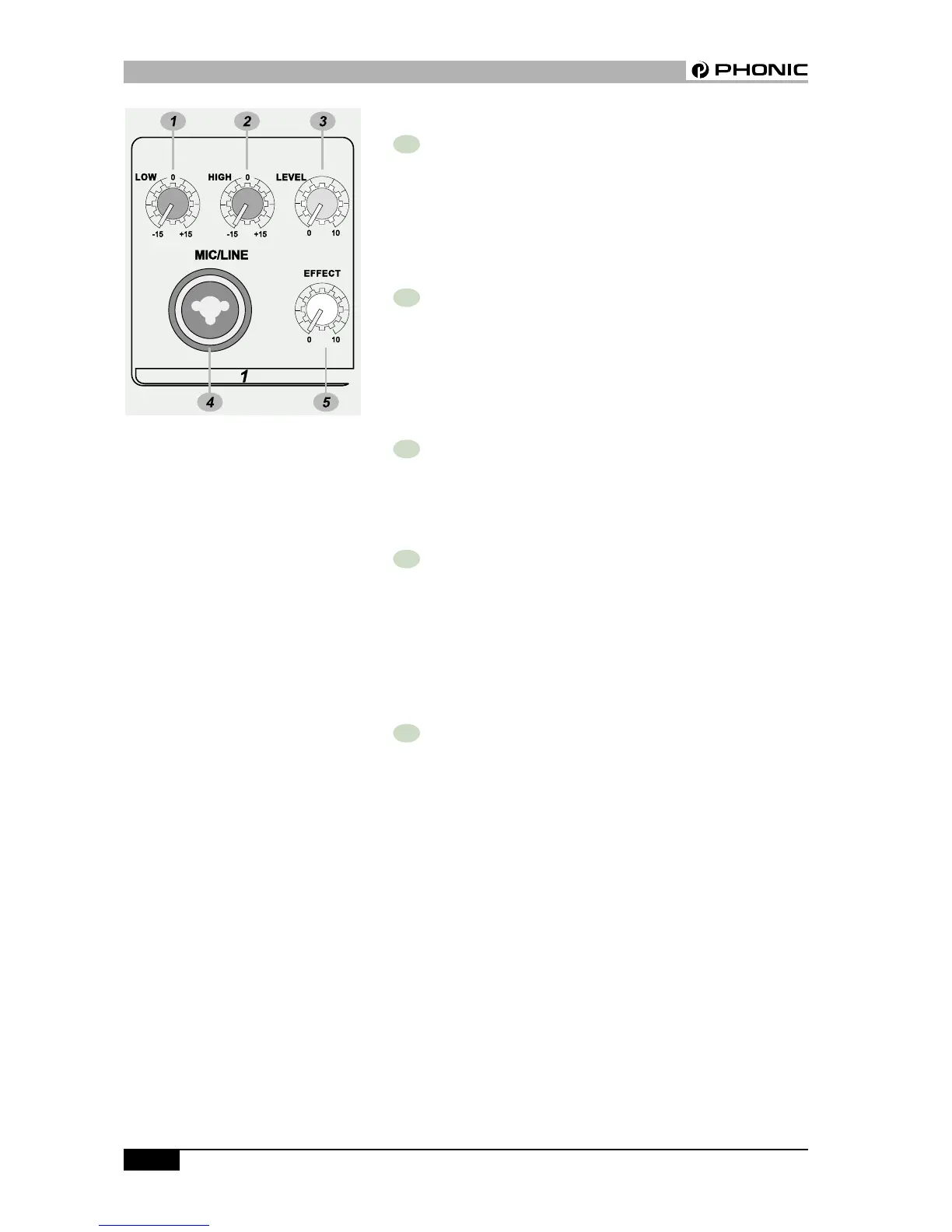
1 LOW EQ
The control has shelving response giving 15dB of boost or cut at
80Hz. Add warmth to vocals or extra punch to guitars, drums and
synths by turning to the right. Turn to the left to reduce stage
rumble, hum or to improve a mushy sound.
2 HIGH EQ
Turn to the right to boost high frequencies, adding crispness to
percussion from drum machines, cymbals and synths. Turn to the
left to cut these frequencies, reducing sibilance or hiss. The control
has a shelving response giving 15dB of boost or cut at 12kHz.
3 LEVEL CONTROL
The Level Control determines the proportion of the channel signal
in the mix, and provides a clear visual indication of channel level.
4 MIC/LINE INPUT
The MIC/LINE is via a combo connector, which allows the connections of
XLR or 1/4” type phone jack. Please use a low impedance microphone
and a properly wired cable for best results. When the 1/4” phone
jack is plugged into the combo connector, the connection can be
either a microphone or line level signal.
5 EFFECT
This knob decides the signal level which will be sent to the built-in
digital delay effect control.
POWERPOD408 / POWERRACK408 USER’S MANUAL



 To Next Page