EasyManua.ls Logo

Pioneer CT-W630R - User Manual

Pioneer CT-W630R
16 pages
Print Icon
To Next Page IconTo Next Page
Loading...
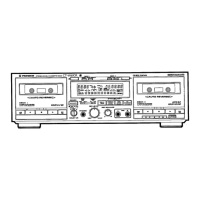
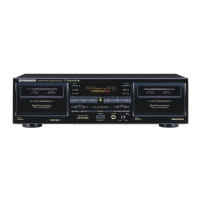
Instructions
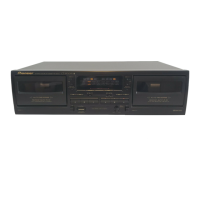
STEREO
DOUBLE
CASSETTE
DECK
CT-Wo630R
CIV
550K
@
The
above
illustration
shows
U.S.
model
of
CT-W630R.
Thank
you
for
buying
this
Pioneer
product.
Please
read
through
these
operating
instructions
so
you
will
know
how
to
operate
your
unit
properly.
After
you
have
finished
reading
the
instructions,
keep
the
manual
in
a
safe
place
for
future
reference.
In
some
countries
or
regions,
the
shape
of
the
power
plug
and
power
outlet
may
sometimes
differ
from
that
shown
in
the
drawings.
However,
the
method
of
connecting
and
operating
the
unit
is
the
same.
WARNING
:ro
prevent
FIRE
OR
SHOCK
HAZ-
ARD,
DO
NOT
EXPOSE
THIS
APPLIANCE
TO
RAIN
OR
MOISTURE.
IMPORTANT
NOTICE
{For
U.S.
and
Canadian
models]
The
serial
number
for
this
equipment
is
located
on
the
rear
panel.
Please
write
this
serial
number
on
your
enclosed
war-
ranty
card
and
keep
it
in
a
secure
area.
This
is
for
your
security.
LINE
VOLTAGE
SELECTOR
SWITCH
Only
multi-voltage
models
are
provided
with
this
switch.
U.S.,
Canadian,
European,
U.K.,
and
Australian
models
are
not
provided
with
this
switch.
Main
voltages
in
Saudi
Arabia
are
127V
and
220V
only.
Never
use
this
model
with
a
110V
setting
in
Saudi
Arabia.
The
line
voltage
selector
switch
is
on
the
rear
panel.
Before
your
model
is
shipped
from
the
factory,
this
switch
is
set
to
the
power
requirements
of
the
destination,
Check
that
it
is
set
properly
before
plugging
the
power
cord
into
the
AC
outlet.
If
the
voltage
is
not
properly
set
or
if
you
move
to
an
area
where
the
voltage
requirements
differ,
adjust
the
selector
switch
as
follows.
1.
Disconnect
the
power
cord.
2.
Use
a
medium-size
screwdriver.
3.
Insert
the
screwdriver
into
the
groove
on
the
voltage
selector,
and
adjust
so
that
the
tip
of
the
arrow
points
to
the
voltage
value
of
your
area.
Medium-size
screwdriver
“This
product
complies
with
the
Radio
Interference
require-
ments
of
the
EC
(European
Community}
Directive
87/308/EEC.”
Q
PIONEER’
The
future
of
sound
and
vision.
Question and Answer IconNeed help?

Do you have a question about the Pioneer CT-W630R and is the answer not in the manual?

Summary

IMPORTANT NOTICE

Serial Number Location

Location of the serial number for security purposes on U.S. and Canadian models.

LINE VOLTAGE SELECTOR SWITCH

Voltage Selection Procedure

Steps to adjust the line voltage selector switch for proper operation.

SAFETY INSTRUCTIONS

General Safety Precautions

Important guidelines for safe operation, installation, and handling of the appliance.

UK Mains Lead Colour Coding

Explains wire colour coding for UK mains leads.

INSTALLATION

General Installation Guidelines

Advice on placement, ventilation, and avoiding interference during installation.

Dew Condensation Handling

How to prevent and manage condensation when moving the unit between temperatures.

Power Cord Handling Caution

Precautions for safely handling and using the power cord.

INFORMATION TO USER [FOR U.S. MODEL]

FCC Compliance and Interference

Explains FCC rules, compliance, and how to resolve radio/TV interference.

CONNECTIONS

General Connection Precautions

Advice on reading instructions, power sequence, and secure plug insertion.

Pioneer System Remote Control Connection

How to connect for system remote control operation.

CD Deck Synchro Connection

Connecting for synchro recording from a CD player.

Audio Input;Output Cord Connection

Proper connection of audio input/output cords using color-coded plugs.

HOW TO HANDLE CASSETTE TAPES

Cassette Inspection Before Use

Checks for tape condition, slack, and stoppers before loading.

Erasure Prevention Tab Usage

How to use or restore accidental erasure prevention tabs.

Automatic Tape Selector Function

How the unit detects tape type using sensor holes.

Tips for Cassette Tape Usage

Advice on leader tape, tape storage, and using C-120 tapes.

FRONT PANEL FACILITIES

Power, Volume, and Recording Controls

Details power switch, headphone jack, record level/balance, and recording mute.

Tape Transport Mode Controls

Explains controls for playback, stop, fast forward/reverse, and reverse mode selection.

Copy and Synchronization Controls

Covers synchro copy, relay/skip, and CD synchro buttons.

Specialty Jacks and Indicators

Describes microphone jacks, system remote jacks, and various operating display indicators.

TAPE TRANSPORT MODE INDICATORS

Common Deck Operation Indicators

Shows indicators for stop, playback, fast forward/reverse, and music search modes.

Deck II Specific Operation Indicators

Displays indicators for playback pause, record, recording pause, and mute on Deck II.

Reverse Mode Selector Explained

Details the functions of the one-way, two-way, and repeat reverse modes.

PLAYBACK MODES

Single Deck Playback

How to perform playback using a single deck.

Blank Skip Functionality

How to skip unrecorded portions during playback.

Deck I Remote Operation

Operating Deck I with a remote control not designed for double decks.

Relay Playback Explained

How to perform continuous playback using both decks.

MUSIC SEARCH AND PLAYBACK FEATURES

Music Search Operation

How to skip forward/backward to desired selections using the music search function.

Dolby NR System Explained

How Dolby Noise Reduction systems reduce tape hiss.

Dolby HX PRO Headroom Extension

Explanation of the Dolby HX PRO system for improved recording.

RECORDING OPERATIONS

Basic Recording Procedure

Steps for inserting tape, setting controls, and adjusting recording levels.

Recording Mute and Erasing Contents

How to create tape blanks and erase recorded content.

Microphone Recording (CT-W630 R only)

How to connect and use microphones for recording.

Tape Copying Procedures

Instructions for copying tapes from Deck I to Deck II at normal or high speed.

TIMER RECORDING AND PLAYBACK

Unattended Recording Setup

How to set up timer recording from external sources.

Wake-Up Playback Setup

How to set up timer playback for wake-up purposes.

CD-DECK SYNCHRO RECORDING

CD Synchro Recording Connection

How to connect the unit and CD player for synchro recording.

Performing CD Synchro Recording

Step-by-step guide to initiating and managing CD synchro recording.

CD Player Compatibility and Features

Information on compatible CD players and program recording features.

TROUBLESHOOTING GUIDE

Power and Cassette Door Issues

Solutions for problems related to power and cassette door operation.

Playback and Sound Quality Problems

Troubleshooting steps for playback errors and poor sound quality.

ADDITIONAL TROUBLESHOOTING AND MAINTENANCE

Recording and Remote Control Issues

Solutions for recording indicator problems and remote control system failures.

Head, Pinch Roller, and Capstan Cleaning

How to clean critical tape path components for optimal performance.

Head Demagnetization and Panel Cleaning

Procedures for demagnetizing heads and cleaning the front panel.

SPECIFICATIONS

Technical Performance Specifications

Details on system, heads, motors, frequency response, SNR, and distortion.

Unit Dimensions and Power Requirements

Physical dimensions, power consumption, and voltage requirements.

Key Subfunctions and Accessories

Lists the main features and included accessories.

Pioneer CT-W630R Specifications

General IconGeneral
BrandPioneer
ModelCT-W630R
CategoryCassette Player
LanguageEnglish

Related product manuals