EasyManua.ls Logo

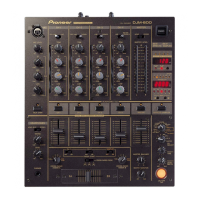
Pioneer DJM-1000 - User Manual

Pioneer DJM-1000
20 pages
Print Icon
To Next Page IconTo Next Page
Loading...
Operating Instructions
DJ MIXER
DJM-1000

Other manuals for Pioneer DJM-1000

Questions and Answers

  • L
    Lindsay StewartSep 3, 2025
    Why are the link indicators flashing three times on my Pioneer DJM-1000 Music Mixer?
    • B
      Bobby JohnsonSep 3, 2025
      If each link indicator flashes three times on your Pioneer Music Mixer, the link connectors of a single DJM-1000 are connected together, or the link connectors from two DJM-1000s are connected together. Check connections.
  • N
    Nathan GregorySep 18, 2025
    What does it mean when the link indicator flashes twice on my Pioneer DJM-1000 Music Mixer?
    • J
      Jeffrey WestSep 18, 2025
      If each link indicator flashes twice on your Pioneer Music Mixer, unsupported components are connected at the link input/output connectors. Check the connections at the link input/output connectors.
  • T
    torreswilliamSep 16, 2025
    Why do the link indicators flash three times on my Pioneer DJM-1000 Music Mixer?
    • R
      Robert LeeSep 16, 2025
      If each link indicator flashes three times on your Pioneer Music Mixer, the link connectors of a single DJM-1000 are connected together, or the link connectors from two DJM-1000s are connected together. Check connections.
  • E
    estradarossSep 14, 2025
    How to resolve distorted sound from an external effector on my Pioneer DJM-1000 Music Mixer?
    • C
      christina36Sep 14, 2025
      If the sound from an external effector is distorted when using your Pioneer Music Mixer, the input level from the external effector might be too high. Lower the external effector’s output level, or adjust the return level using the RETURN dial (LEVEL).
  • M
    Michael SalazarSep 12, 2025
    Why doesn't my external effector operate with the Pioneer DJM-1000 Music Mixer?
    • A
      Anthony BerrySep 12, 2025
      If an external effector isn’t operating with your Pioneer Music Mixer: * The SEND/RETURN button might be turned OFF. Turn the SEND/RETURN button ON. * The effector might not be connected to the RETURN connector or EFX connector located in the rear panel. Connect the effector to either the SEND/ RETURN connector or the EFX 1 or EFX 2 connectors in the rear panel. * The SEND channel selector switch setting might be mistaken. Select the source to which you want to apply effects with the SEND channel selector switch.
  • L
    larrymillerSep 12, 2025
    Why is the sound distorted on my Pioneer DJM-1000 Music Mixer, and how can I fix it?
    • J
      joshua79Sep 12, 2025
      If the sound from your Pioneer Music Mixer is distorted: * The master output level might be too high. Adjust the MASTER ATT. dial on the rear panel. * The input level might be too high. Adjust the TRIM dial so that the input level approaches 0 dB on the CHANNEL LEVEL indicators.
  • J
    Jonathan GutierrezSep 9, 2025
    How to fix a Pioneer DJM-1000 when the power does not turn on?
    • D
      Derrick WiseSep 9, 2025
      If your Pioneer Music Mixer doesn't turn on, the power cord may not be connected. Connect the power cord to a power outlet.
  • J
    jcraigSep 7, 2025
    What to do if there is little or no sound from my Pioneer Music Mixer?
    • C
      Christopher BlakeSep 7, 2025
      If you experience little or no sound with your Pioneer Music Mixer, there might be a few reasons: * The input selector switch might be in the wrong position. Ensure you select the correct device currently playing using the input selector switch. * A connection cable might not be properly connected or could be disconnected. Make sure all cables are securely connected. * A connector or plug might be dirty. Clean the connectors and plugs, then reconnect them. * The MASTER ATT. dial on the rear panel could be set too low. Adjust the MASTER ATT. dial on the rear panel.
  • F
    flynnkatelynSep 5, 2025
    What does it mean when each link indicator flashes twice on my Pioneer DJM-1000 Music Mixer?
    • B
      Barbara PetersSep 5, 2025
      If each link indicator flashes twice on your Pioneer Music Mixer, unsupported components are connected at the link input/output connectors. Check the connections at the link input/output connectors.
  • D
    Dawn McdanielAug 20, 2025
    What to do if my Pioneer DJM-1000 Music Mixer has little or no sound?
    • D
      Donna LewisAug 20, 2025
      If you're experiencing little to no sound with your Pioneer Music Mixer, there are several possible causes: * The input selector switch may be in the wrong position. Select the correct device that is currently playing using the input selector switch. * A connection cable may not be properly connected or may have become disconnected. Ensure all cables are properly connected. * The connector or plug may be dirty. Clean the connector or plug and reconnect it. * The MASTER ATT. dial on the rear panel might be set too low. Adjust the MASTER ATT. dial on the rear panel.

Summary

Important Safety Instructions

General Warnings and Precautions

Covers fire, electric shock, serial number notice, and lead warnings.

Electrical Safety and Servicing

Information on power cords, lightning protection, servicing, damage, and compliance.

Connection Panel Overview

Connecting Effectors, Outputs, and MIDI

Connecting External Effectors

Using SEND/RETURN and EFX connectors for integrating external effects.

Connecting Audio Peripherals and Links

Digital Link Connections

Details on VISUAL, EFX, and CDJ link connections for synchronized operation.

Operation Panel Controls and Functions

Main Microphone and Channel Input Controls

Controls for main microphone, channel input selectors, TRIM, and EQ.

Output and Monitoring Controls

Advanced Functions and Link Controls

Fader Start;Stop for CDJs

Using buttons to control CD player playback start/stop via channel or cross fader.

Core Operations and Fader Adjustments

Basic Operation Procedures

Initial setup, channel adjustments, microphone, booth, and headphone operations.

Fader Curve Customization

Adjusting the response curve of channel and cross faders for desired feel.

Fader Start Functionality

Cross Fader Start Play & Back Cue

Using the cross fader to start CD player playback and cue tracks.

Channel Fader Start Play & Back Cue

Using channel faders to start CD player playback and cue tracks.

Connecting and Using External Effectors

Digital Link Functionality Explained

EFX Link for Effectors

Connecting EFX-1000 for fader effect and BPM sync using digital link.

BPM Link for CD Players

Connecting DJ CD players for BPM synchronization and fader start.

Troubleshooting Common Issues

Power, Sound, and Crossfading

Solutions for power issues, low/distorted sound, and crossfading problems.

Technical Specifications

Pioneer DJM-1000 Specifications

Power IconPower
power supply voltageAC 120V, 60Hz
power consumption63W
Operating Environment IconOperating Environment
operating temperature+41 °F to +95°F
operating humidity5% to 85% (no condensation)
Audio Specifications IconAudio Specifications
sampling rate96kHz
A/D, D/A converter24 bits
frequency response20Hz - 20kHz
Weight and Dimensions IconWeight and Dimensions
weight26 lb 11 oz
width19 in
depth14-5/16 in
height7-3/8 in

Related product manuals