EasyManua.ls Logo

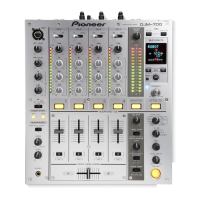
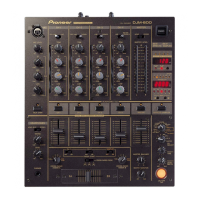
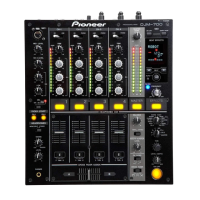
Pioneer DJM-700 - User Manual

Pioneer DJM-700
28 pages
Print Icon
To Next Page IconTo Next Page
Loading...
Operating Instructions
DJ MIXER
DJM-700-S
DJM-700-K
00_cover_ANKI_EN.fm 1 ページ 2010年6月2日 水曜日 午後9時1分

Other manuals for Pioneer DJM-700

Questions and Answers

  • M
    Maria EdwardsAug 16, 2025
    What to do if my Pioneer Music Mixer has no sound or low volume?
    • J
      Joyce NicholsAug 17, 2025
      If you're experiencing no sound or low volume with your Pioneer Music Mixer, there are several possible causes and solutions: * Ensure the input selector is correctly set to the playback component. * Verify that all connection cables are properly connected and not loose. Connect them correctly if needed. * Clean any dirty jacks or plugs before connecting. * Check the rear panel master output attenuator switch (MASTER ATT) and adjust it if it's set to –6 dB or another incorrect setting.
  • S
    Sharon ButlerAug 19, 2025
    Why is the sound distorted on my Pioneer DJM-700?
    • E
      Erin HernandezAug 19, 2025
      Sound distortion on your Pioneer Music Mixer can occur if the master output level is too high. Try adjusting the master output level (MASTER LEVEL) dial or the rear panel master output attenuator (MASTER ATT) switch. Also, check if the input level is too high; if so, adjust the TRIM dial until the input level approaches 0 dB on the channel level indicator.
  • B
    Brandon ReidAug 22, 2025
    What to do if my Pioneer DJM-700 cross fader doesn’t work?
    • R
      Ralph GlennAug 22, 2025
      If the cross fader on your Pioneer Music Mixer isn't working, the CROSS FADER ASSIGN switch setting ([A], [THRU], [B]) may be incorrect. Ensure you correctly set the CROSS FADER ASSIGN switch for the desired channel.
  • M
    Michele HaneyAug 25, 2025
    Why is my Pioneer DJM-700 not powering on?
    • K
      Kaylee MorrisonAug 26, 2025
      If your Pioneer Music Mixer isn't powering on, the power cord might not be properly connected. Ensure that the power cord is securely connected to a power outlet.
  • M
    monique86Aug 27, 2025
    Why can’t I perform fader start with CD player on my Pioneer Music Mixer?
    • H
      hawkinscaitlynAug 27, 2025
      If you're unable to perform a fader start with a CD player on your Pioneer Music Mixer: * Ensure the FADER START button is set to ON. * Verify that the rear panel CONTROL jack is connected to the CD player using a control cable. * Make sure both the CONTROL jacks and analog input connectors are connected.
  • O
    onealjeffreyAug 30, 2025
    What to do if effects don't work on my Pioneer Music Mixer?
    • T
      Timothy VincentAug 30, 2025
      If the effects aren't working on your Pioneer Music Mixer, make sure that the effect channel selector is correctly set for the channel on which you wish to apply effects. Also, check that the effect parameter 2 adjust dial (LEVEL/DEPTH) is not set to [MIN]; adjust it as needed.
  • A
    awilsonSep 2, 2025
    How to fix no digital output on Pioneer DJM-700?
    • A
      Austin JarvisSep 2, 2025
      If you're getting no digital output from your Pioneer Music Mixer, the digital output sampling frequency (fs) might not match the specifications of the connected component. Set the rear panel sampling frequency selector to match the specifications of the connected component.
  • A
    Ana BlackSep 4, 2025
    What to do if external effector doesn’t work with my Pioneer Music Mixer?
    • J
      Jared GonzalezSep 5, 2025
      If an external effector isn't working with your Pioneer Music Mixer: * Ensure the effect selector is set to [SND/RTN]. * Verify that the effector is connected to the rear panel SEND/RETURN connectors. * Check that the effect channel selector is correctly set to select the audio source to which you wish to apply the effects.
  • D
    Dylan BowmanSep 7, 2025
    Why is the sound from external effector distorted on my Pioneer Music Mixer?
    • A
      Amy HarmonSep 8, 2025
      If the sound from an external effector is distorted on your Pioneer Music Mixer, the input level from the external effector might be set too high. Try lowering the output level of the external effector.
  • E
    Eugene RomeroSep 10, 2025
    Why can’t BPM be measured or is incorrect on my Pioneer DJM-700 Music Mixer?
    • R
      Richard CarrollSep 12, 2025
      If the BPM can't be measured or the measured BPM value is incorrect on your Pioneer Music Mixer: * Adjust the TRIM dial so that the input level approaches 0 dB in the channel level indicator if the input level is too high or too low. * Adjust other channels as well so that the input levels approach 0 dB in the channel level indicator, as BPM may not be correctly measurable with some tracks. * Strike the TAP button to set BPM manually.

Summary

Important Safety Instructions

General Safety Warnings

Covers essential safety warnings regarding electrical shock, fire hazards, and proper product usage.

Operating Environment and Safety Precautions

Installation Environment Guidelines

Provides guidelines for optimal installation environment, including temperature, humidity, and ventilation.

Power Supply and Voltage Requirements

Details power supply voltage requirements and safe procedures for connecting/disconnecting power.

Product Features and Handling

Confirm Accessories and Handling Precautions

Instructions for confirming accessories and precautions for safe handling and cleaning of the unit.

Key Product Features

Highlights key features including sound quality, manual filter, beat effects, digital output, and MIDI capabilities.

Connections Overview

Connection Panel Layout

Detailed description and identification of all input and output connectors on the connection panel.

Connecting Audio Sources

Connecting DJ CD Players and Turntables

Guides on connecting DJ CD players and analog turntables to the mixer's inputs.

Connecting Other Line Level Devices

Instructions for connecting other line-level audio output devices like cassette decks.

Output and External Connections

Master, Booth, and Recording Outputs

Details on master outputs (XLR/RCA), booth monitor output, and recording output connectors.

Digital Output and External Effector Connections

Information on digital output and connecting external effectors via SEND/RETURN jacks.

Microphone, Headphones, and MIDI Connections

Microphone and Headphones Input;Output

Guidance on connecting microphones and headphones to the mixer.

MIDI Connector Information

Reference information regarding MIDI connectors and their functions.

Power Cord Connection Procedure

Procedure for connecting the power cord as the final step after all other connections.

Operation Panel: Controls and Functions

Microphone Input Controls

Detailed explanation of microphone input controls, including level, EQ, and function indicators.

Channel Input Selectors and Trim;EQ

Description of channel input selectors and controls for adjusting input level and channel equalization.

Operation Panel: Faders and Monitoring

Channel Level Indicators and Cue Buttons

Explanation of channel level indicators and the function of headphone cue selection buttons.

Fader Functions and Curves

Details on fader start function, channel/cross fader assignment, and curve response settings.

Master, Booth, Headphones Controls

Controls for master output, balance, booth monitor, and headphone output adjustments.

Display, MIDI, and Filter Controls

Headphones Jack and Beat Select Buttons

Information on the headphones jack and the use of beat select buttons for effects.

MIDI and BPM Controls

Controls for MIDI functions and BPM measurement, including AUTO and TAP modes.

Filter, Effect Controls and Display

Controls for filters, effect parameters, and an overview of the display sections.

Beat Effect Display Details

Beat Display Section Functionality

Details on the beat display section, explaining its indicators and how they relate to BPM and effect parameters.

Basic Mixer Operations

Initial Setup and Input Selection

Steps for initial setup, including setting the power switch and selecting input sources for each channel.

Level, Tone, and Fader Adjustments

Instructions for adjusting input level, channel tone (EQ), and channel fader volume.

Monitoring and Master Control

Operations for cross fader, master volume, microphone monitoring, booth output, and headphone monitoring.

Fader Curve and Start Functions

Fader Curve Selection

How to select and customize channel and cross fader response curves.

Fader Start Function Overview

Explanation of the fader start function for controlling CD player playback via faders.

Fader Start Playback Scenarios

Details on initiating CD playback and back cue using cross fader and channel fader.

Cross Fader Start Playback

Cross Fader Start Operation Steps

Step-by-step guide on using the cross fader to control CD player playback and back cue.

Beat Effect Functions

Beat Effect Types: DELAY, ECHO, TRANS

Detailed explanation of DELAY, ECHO, and TRANS beat effects, including their operation and examples.

Beat Effect Types: FILTER, FLANGER, PHASER

Detailed explanation of FILTER, FLANGER, and PHASER beat effects, including their operation and examples.

Beat Effect Functions (Continued)

Beat Effect Types: REVERB, ROBOT, CRUSH

Details on REVERB, ROBOT, and CRUSH beat effects, including their application and sound characteristics.

Beat Effect Types: ROLL and SEND;RETURN

Explanation of ROLL, REVERSE ROLL, UP ROLL, DOWN ROLL effects, and the SEND/RETURN function.

Producing Beat Effects

BPM Measurement and Manual Input

How to measure BPM automatically or manually using the TAP button.

Effect Selection and Beat Synchronization

Steps for selecting effects and synchronizing them with the music rhythm using beat select buttons.

Effect Parameter Adjustment

Using the TIME and LEVEL/DEPTH dials to adjust effect parameters and their impact.

Filter Operation Modes

Manual Filter Operation

Detailed guide on operating the manual filter for tone shifting and frequency modification.

Effect Frequency Filter Operation

Instructions for using the effect frequency filter to apply beat effects to specific frequency bands.

Effect Parameter Details

Beat Effect Parameter Table

Comprehensive table detailing parameters for each beat effect, including setting ranges and dial functions.

MIDI Settings and Synchronization

MIDI Protocol and External Synchronization

Introduction to MIDI protocol and steps for synchronizing the mixer with external sequencers.

MIDI Channel Configuration

Procedure for setting and storing the MIDI channel for communication.

MIDI Message Mapping

Channel 1-4 and Cross Fader MIDI Data

Mapping of MIDI messages for mixer channels 1-4 and cross fader operations.

Master, Booth, and Filter MIDI Data

Mapping of MIDI messages for master, booth monitor, and filter controls.

MIDI Message Mapping (Continued)

Effect, Microphone, and Headphone MIDI Data

Mapping of MIDI messages for effect functions, microphone inputs, and headphone controls.

Fader Start and MIDI Start;Stop MIDI Data

MIDI message mapping for fader start functions and overall MIDI start/stop control.

MIDI Program Change and Snapshot

Program Change Assignments for Effects

Table showing program change assignments for effect selection and channel mapping.

Snapshot and MIDI On;Off Functions

Explanation of the snapshot function for saving parameters and controlling MIDI signal generation.

Troubleshooting Common Issues

Power, Sound, and Output Troubleshooting

Solutions for common problems related to power, sound volume, digital output, and audio distortion.

Fader, Effect, and MIDI Troubleshooting

Troubleshooting steps for issues with faders, effects, external effectors, and MIDI synchronization.

BPM Measurement Troubleshooting

Guidance on resolving issues with BPM measurement and accuracy.

Technical Specifications

General and Audio Specifications

Detailed specifications covering power, operating conditions, weight, dimensions, and audio performance.

Connector Systems and Accessories

Lists input/output connector systems and included accessories.

Block Diagram

Audio Signal Flow Diagram

Visual representation of the mixer's internal audio signal flow and processing.

Pioneer DJM-700 Specifications

Power IconPower
power requirementsAC 120V, 60Hz
power consumption34W
Audio Performance IconAudio Performance
frequency response20Hz - 20kHz
signal-to-noise ratio104dB (LINE)
total harmonic distortion0.005% or less
Connectivity IconConnectivity
input terminal - CD/LINE5 (RCA)
input terminal - PHONO3 (RCA)
input terminal - MIC2 (XLR x1, 1/4” PHONE x1)
output terminal - MASTER OUT2 (RCA x1, XLR x1)
output terminal - BOOTH OUT1 (RCA)
output terminal - HEADPHONE MONITOR OUT1 (TOP PANEL 1/4” PHONE x1)
output terminal - REC OUT1 (RCA)
output terminal - DIGITAL OUT1 (COAXIAL)
other terminals - SEND1 (1/4” PHONE)
other terminals - RETURN1 (1/4” PHONE)
other terminals - MIDI OUT1 (5P DIN)
other terminals - CONTROL OUT2 (3.5 MINI JACK)
Audio Processing IconAudio Processing
a/d, d/a converter24-bit
sampling rate96kHz
head room19dB
Weight and Dimensions IconWeight and Dimensions
weight14.5 lbs
width12.6 inches
depth14.9 inches
height4.25 inches

Related product manuals