EasyManua.ls Logo

Pioneer PL-X430 - Page 6

Pioneer PL-X430
28 pages
Print Icon
To Next Page IconTo Next Page
To Previous Page IconTo Previous Page
Loading...
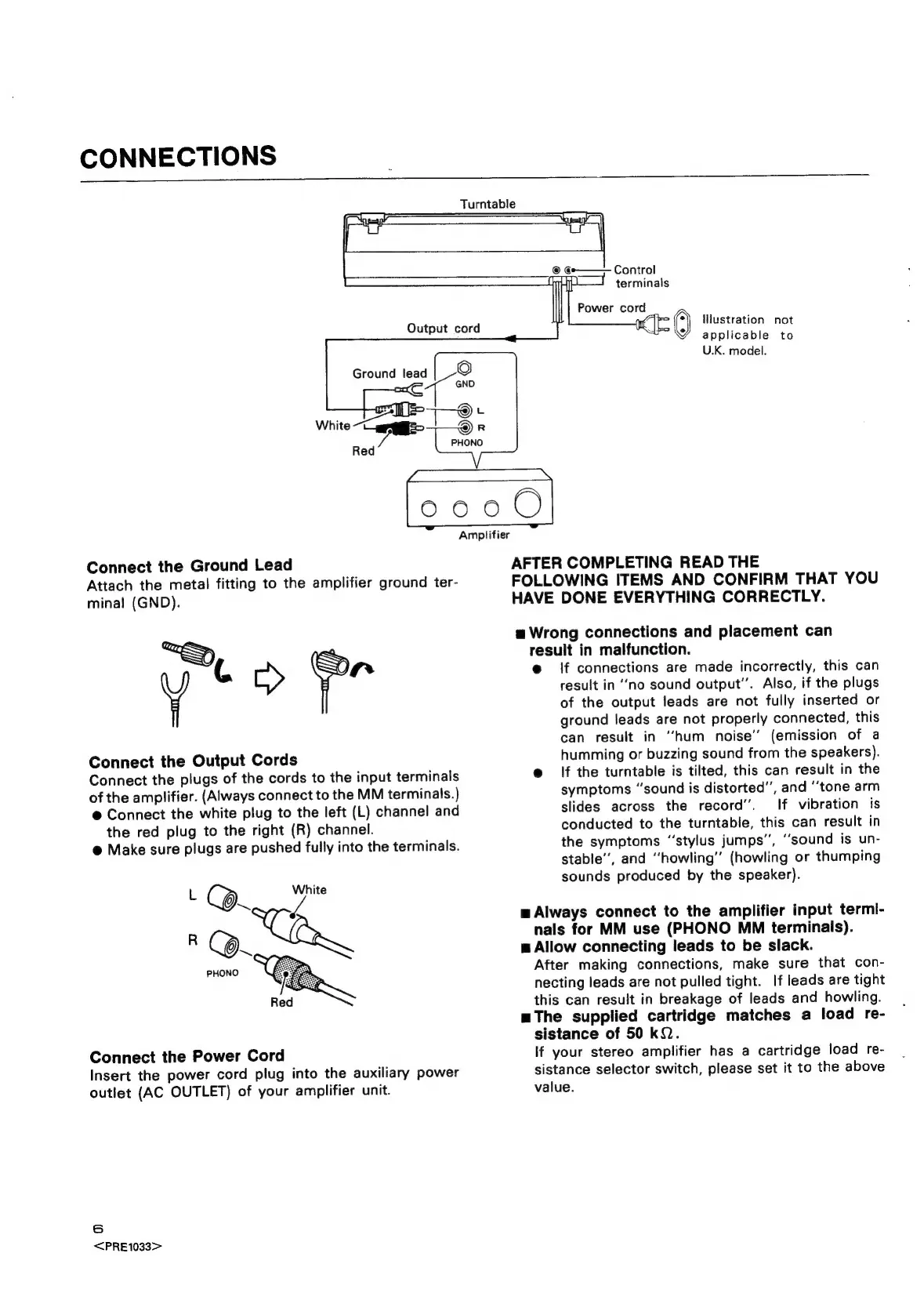
CONNECTIONS
Turntable
Ground
lead
Output
cord
<n
lustration
not
applicable
to
U.K.
model.
0000
Connect
the
Ground
Lead
Attach
the
metal
fitting
to
the
amplifier
ground
ter-
minal
(GND).
ia
a
Connect
the
Output
Cords
Connect
the
plugs
of
the
cords
to
the
input
terminals
of
the
amplifier.
(Always
connect
to
the
MM
terminals.)
@
Connect
the
white
plug
to
the
left
(L)
channel
and
the
red
plug
to
the
right
(R)
channel.
@
Make
sure
plugs
are
pushed
fully
into
the
terminals.
White
Connect
the
Power
Cord
Insert
the
power
cord
plug
into
the
auxiliary
power
outlet
(AC
OUTLET)
of
your
amplifier
unit.
6
<PRE1033>
AFTER
COMPLETING
READ
THE
FOLLOWING
ITEMS
AND
CONFIRM
THAT
YOU
HAVE
DONE
EVERYTHING
CORRECTLY.
a
Wrong
connections
and
placement
can
result
in
malfunction.
e@
if
connections
are
made
incorrectly,
this
can
result
in
‘no
sound
output”.
Also,
if
the
plugs
of
the
output
leads
are
not
fully
inserted
or
ground
leads
are
not
properly
connected,
this
can
result
in
“hum
noise’
(emission
of
a
humming
or
buzzing
sound
from
the
speakers).
@
If
the
turntable
is
tilted,
this
can
result
in
the
symptoms
“sound
is
distorted”,
and
“tone
arm
slides
across
the
record”.
If
vibration
is
conducted
to
the
turntable,
this
can
result
in
the
symptoms
“stylus
jumps”,
‘sound
is
un-
stable’,
and
“howling’’
(howling
or
thumping
sounds
produced
by
the
speaker).
w
Always
connect
to
the
amplifier
input
termi-
nals
for
MM
use
(PHONO
MM
terminals).
m
Allow
connecting
leads
to
be
slack.
After
making
connections,
make
sure
that
con-
necting
leads
are
not
pulled
tight.
If
leads
are
tight
this
can
result
in
breakage
of
leads
and
howling.
mThe
supplied
cartridge
matches
a
load
re-
sistance
of
50
kQ.
If
your
stereo
amplifier
has
a
cartridge
load
re-
sistance
selector
switch,
please
set
it
to
the
above
value.

Related product manuals