EasyManua.ls Logo

Pioneer PL-X430 - Page 7

Pioneer PL-X430
28 pages
Print Icon
To Next Page IconTo Next Page
To Previous Page IconTo Previous Page
Loading...
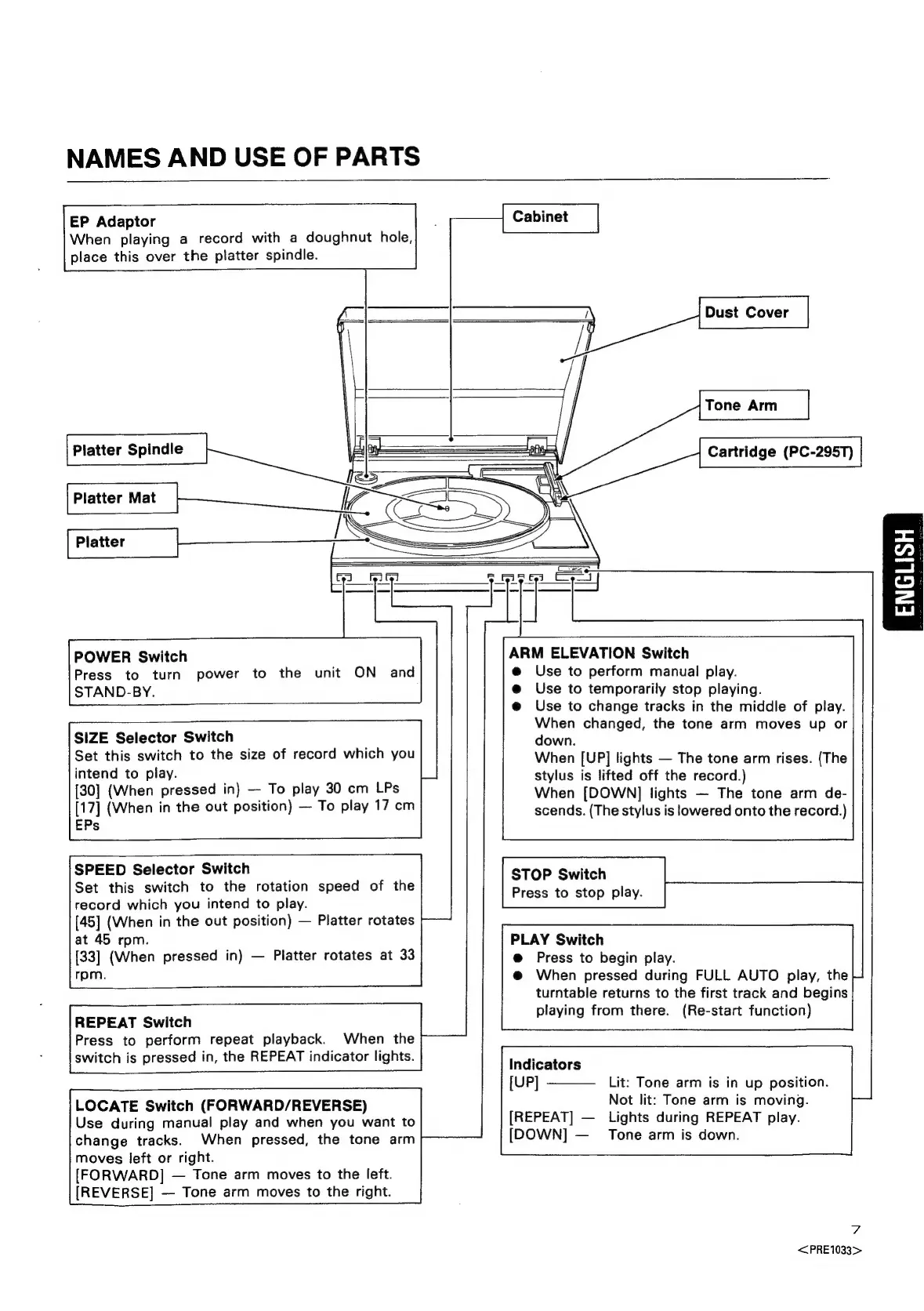
NAMES
AND
USE
OF
PARTS
EP
Adaptor
When
playing
a
record
with
a
doughnut
hole,
place
this
over
the
platter
spindle.
47
=
Platter
Spindle
i
poo
Cartridge
(PC-295T)
SN
—l
©
i
a
Z
Platter
Mat
ye
.
SS
Platter
Sea,
a
Cel
Felfei
ARM
ELEVATION
Switch
@
Use
to
perform
manual
play.
@
Use
to
temporarily
stop
playing.
@
Use
to
change
tracks
in
the
middle
of
play.
When
changed,
the
tone
arm
moves
up
or
down.
When
[UP]
lights
The
tone
arm
rises.
(The
stylus
is
lifted
off
the
record.)
When
[DOWN]
lights
The
tone
arm
de-
scends.
(The
stylus
is
lowered
onto
the
record.)
STOP
Switch
Press
to
stop
play.
PLAY
Switch
@
Press
to
begin
play.
@
When
pressed
during
FULL
AUTO
play,
the
turntable
returns
to
the
first
track
and
begins
playing
from
there.
(Re-start
function)
POWER
Switch
Press
to
turn
power
to
the
unit
ON
and
STAND-BY.
SIZE
Selector
Switch
Set
this
switch
to
the
size
of
record
which
you
intend
to
play.
[30]
(When
pressed
in)
To
play
30
cm
LPs
[17]
(When
in
the
out
position)
To
play
17
cm
EPs
SPEED
Selector
Switch
Set
this
switch
to
the
rotation
speed
of
the
record
which
you
intend
to
play.
[45]
(When
in
the
out
position)
Platter
rotates
at
45
rpm.
[33]
(When
pressed
in)
Platter
rotates
at
33
rpm.
REPEAT
Switch
Press
to
perform
repeat
playback.
When
the
switch
is
pressed
in,
the
REPEAT
indicator
lights.
Indicators
[UP]
Lit:
Tone
arm
is
in
up
position.
Not
lit:
Tone
arm
is
moving.
[REPEAT]
Lights
during
REPEAT
play.
[DOWN]
—_
Tone
arm
is
down.
LOCATE
Switch
(FORWARD/REVERSE)
Use
during
manual
play
and
when
you
want
to
change
tracks.
When
pressed,
the
tone
arm
moves
left
or
right.
[FORWARD]
Tone
arm
moves
to
the
left.
[REVERSE]
Tone
arm
moves
to
the
right.
7
<PRE1033>

Related product manuals